OBD2 tools on OBD2shop.co.uk https://blog.dnevnik.hr/obd2shop
petak, 05.12.2025.
OBDSTAR DC706 Guide: Reading & Writing Data for ZOTYE 6DCT360 TCM
This guide demonstrates the procedure for reading and writing Transmission Control Module (TCM) data on the ZOTYE 6DCT360 using the OBDSTAR DC706 ECU Tool (also compatible with Keymaster G3).
Required Tools & Equipment:
OBDSTAR DC706 / Keymaster G3
High-power DC Regulated Power Supply
Main Cable
ECU Clone Jumper
MP001 Programmer
ZOTYE 6DCT360 TCM Unit

Step-by-Step Procedure:
1. Preparation & Software
Ensure your OBDSTAR DC706 device is updated with the latest software version.
Launch the ECU Flasher application and select the Passenger Car > TCM category.
Use the search function (top right) to quickly locate the ZOTYE 6DCT360 model.


2. Guided Instructions & Connection
Tap the Guide section. Carefully review the Warm Reminder, Menu Description, Operation Guide, Connection Methods, and Special Notes.
Tap Pinout and select BENCH mode. Verify that the displayed module matches your TCM's appearance.
Tap Connector Pinout and connect your cables to the TCM accordingly, following the diagram.


3. Reading & Writing Data
After completing the physical connections, tap Start.
The tool will now establish communication with the ECU.
First, create a data backup (READ): Always back up the original data first. You can customize the backup file name. The storage location is shown on the left side of the screen.
Write data (WRITE): Proceed to write the required data file into the module. The file management system allows you to filter files by name, modification time, or size.
Verification: If the data file has not been modified, verification is typically not required.
Completion: Once the process is finished, the operation is complete.


For a visual walkthrough, follow along with our video guide:
https://youtu.be/CoQ7MjJfdtM
www.obd2shop.co.uk
Oznake: obdstar dc706
petak, 24.10.2025.
Read/Write Data and Program VIN for JINBEI TR40.3 ECM Using DC706
This post provides a practical demonstration of performing data read/write and VIN programming operations on the JINBEI TR40.3 Engine Control Module (ECM) using the OBDSTAR DC706 ECU tool.
Required Tools & Equipment:
DC706 or KEYMASTER G3 Tool
High-power DC Regulated Power Supply
Main Cable
ECU Clone Jumper
MP001 Programmer
JINBEI TR40.3 ECM

Step-by-Step Guide:
1. Software Preparation:
Ensure your diagnostic software is updated to the latest version before starting.
2. Navigate to the ECM Flasher:
Tap on [ECU Flasher], then select [ECM], followed by [ECM V32.40].
Pro Tip: Use the search function in the upper-right corner of the menu page to locate the correct option quickly.
3. Review the Guide:
Tap the [Guide] button. Carefully read all provided information, including the warm reminder, menu descriptions, operation guide, special notes, and connection methods.


4. Pinout & Hardware Connection:
Click on [Pinout] and select the appropriate adapter. For this demonstration, we are using the MP001 Multifunctional Programmer.
Verify the module's physical appearance matches the [ECU Image] displayed.
Tap [PCB Pinout]. Then, open the ECM cover and solder a Boot wire as illustrated in the guide.
Tap [Connector Pinout]. Refer to the wiring diagram to ensure that all cables are correctly connected to the ECM.


5. Read/Backup Original Data:
Click [Start]. After a successful connection, the first crucial step is to back up the original flash data.
You can customize the backup file name. The saving path and a log of all operations will be displayed on the left side of the screen.


6. Enhanced File Management:
The file management system has been upgraded. You can now filter saved files by name, modification date, or file size.
Example: Quickly locate your most recent backup by filtering files based on the modification time.
7. VIN Programming:
Use the [Write VIN] function to program the desired Vehicle Identification Number into the ECM.


Operation Completed.
Video Tutorial:
For a visual walkthrough, please refer to our video guide:
https://youtu.be/X7ghH1og7as
www.obd2shop.co.uk
Oznake: obdstar dc706
petak, 19.09.2025.
Using OBDSTAR DC706 to do BAIC Delphi MT80 IMMO OFF via Bench
This guide provides step-by-step instructions on how to perform an immobilizer (IMMO) off procedure on the BAIC Delphi MT80 Engine Control Module (ECM) using the OBDSTAR DC706 tool via the bench method.
Tools Required
OBDSTAR DC706 (X300 Classic G3)
High-power DC regulated power supply
Main cable
ECU clone jumper
MP001 programmer
BAIC Delphi MT80 ECM

Preparation
1. Ensure your DC706 device is updated to the latest software version.
2. Power on the tool and navigate to the main menu.
Step-by-Step Procedure
1. Enter ECM Flasher Menu
Tap [ECU Flasher] ’ [ECM] ’ [ECM V32.30].
Use the search function in the upper right corner to quickly locate the corresponding option if needed.


2. Select Guide Mode
Tap [Guide] and carefully review:
Warm reminders
Menu descriptions
Operation guide
Connection methods
Special notes


3. Select Adapter
Choose the appropriate adapter. For this procedure, select the MP001 multifunctional programmer.
4. Confirm ECU and Pinout
Confirm the ECU appearance matches the image shown on the device.
Tap [Connector Pinout] to view the wiring diagram.
Refer to the diagram and make all necessary connections.


5. Backup Original Data
Once connected successfully, back up the original flash data.
Ensure you have a stable internet connection, as this step requires server communication.
You may customize the backup file name. The save path and operation records will be displayed on the left side of the screen.


6. Perform IMMO OFF
Tap [IMMO OFF] to disable the immobilizer system.
Wait for the operation to complete.


Completion
The IMMO OFF procedure is now complete. You may now disconnect the equipment and reassemble the vehicle.
For more information or to purchase tools, visit: www.obd2shop.co.uk.
Video guides:
https://youtu.be/clVcnQOKDOE
Oznake: obdstar dc706
nedjelja, 27.04.2025.
Hyundai ME17.9.21.1 ECU Idle Speed Repair by OBDSTAR DC706
This guide will walk you through how to use the OBDSTAR DC706 ECU Tool to perform data reading/writing and idle speed repair on a Hyundai Bosch ME17.9.21.1 ECU.
Tools Required:
OBDSTAR DC706 (X300 Classic G3 is also supported)
High-power DC regulated power supply
Main cable
ECU Clone Jumper
MP001 Programmer
Hyundai ME17.9.21.1 ECU

Step-by-Step Instructions:
1. Preparation
Before proceeding, ensure that the software is upgraded to the latest version.
Launch the [ECU Flasher] software and select Passenger Car [ECM].

2. Model Search
Use the search box in the upper right corner to quickly locate the corresponding ECU model.


3. Review the Guide
Open the [Guide] section and carefully read through:
Warm reminders
Function descriptions
Operation instructions
Connection methods


4. Connector Pinout
Open the [Connector Pinout] section and connect the hardware according to the provided diagrams.


5. Start the Process
After completing the physical connection, tap [Start].

6. ECU Connection and Data Backup
Establish a connection to the ECU.
Perform a full data backup immediately.
File names can be customized for easy identification.


7. Data Writing
Write the previously backed-up data back into the ECU module.


8. Idle Speed Repair
Tap on [Idle Speed Repair].
Once the operation is completed, reinstall the ECU module into the vehicle.
After repair, the normal idle speed will be stabilized between 800–850 RPM.


By following these steps carefully, you can ensure that the Hyundai ME17.9.21.1 ECU is properly repaired and operating at optimal idle speed.
Video guides:
https://youtu.be/kKqeZ8dWIw8
www.obd2shop.co.uk
Oznake: obdstar dc706
četvrtak, 03.04.2025.
Writing VIN on Buick Delphi MT60 ECM Using OBDSTAR DC706
To write the VIN on a Buick Delphi MT60 ECM using the OBDSTAR DC706 ECU tool, follow these structured steps:
Required Tools:
OBDSTAR DC706 (or X300 Classic G3)
High-power DC regulated power supply
Main cable
ECU clone jumper
MP001 programmer
Delphi MT60 ECM

Preparation:
Ensure the software is updated to the latest version before starting.
Steps to Write VIN:
1. Access ECU Flasher
Tap [ECU Flasher] > [ECM] > [ECM V31.70].
Use the search function in the upper-right corner to locate the module quickly.
2. Review Guide & Connection Methods
Tap [Guide] and carefully read the operation instructions.
Review the procedures for both the BOOT and BENCH modes.


3. Select and Verify Connection Mode
Open [Pinout], select [BENCH], and confirm the module's appearance matches your ECU.
Open [Connector Pinout] and follow the connection diagram.


4. Establish Connection
Connect the module accordingly.
Tap [Start] to begin.
Note: If cloning the ECU, use the BOOT mode instead.
5. Backup Original Data
After a successful connection, back up the original ECU data.
Customize the file name as needed.


6. Write the VIN
Tap [Write VIN].
Enter the new VIN.
Confirm the update. Writing completed!


Conclusion:
By following these steps, you can efficiently modify the VIN on the Delphi MT60 ECM using OBDSTAR DC706. Always ensure data backup before making changes.
Video guides:
https://youtu.be/NHIIupUw5GI
www.obd2shop.co.uk
Oznake: obdstar dc706
ponedjeljak, 31.03.2025.
OBDSTAR DC706 Volvo HCM R/W Data, Coding, Change Left Side
This article will demonstrate how to use OBDSTAR DC706 to read and write data, read coding, and modify left or right-side settings on the Volvo HCM module. It also supports OBDSTAR X300 Classic G3.
Required Tools:
DC706 ECU Tool
High-power DC regulated power supply
Main cable
ECU clone jumper
120© resistor
MP001 Programmer
Volvo HCM module

Procedure
Before proceeding, you need to upgrade the software to the latest version.
ECU Flasher >> BODY/CHASSIS/OTHER >> Latest version >> VOLVO HCM(OLD) CONTINENTAL RIGHT R7F7010244 >> Pinout >> BENCH, MP001, OK
Check if the module's appearance is consistent.
Click "Guide" and carefully read the warm reminder, function description, operation introduction, and connection method.
Connect the device according to the wiring diagram.


After connecting, click "Start".
BENCH >> MP001 >> OK
This function is available when connecting to the service. Please ensure the Internet connection is normal.
Click "Connect >> OK".
Here, we can read and write coding, read and write INT flash(R7F7010244), and change the left side.


www.obd2shop.co.uk
Oznake: obdstar dc706
ponedjeljak, 22.01.2024.
OBDSTAR DC706 Clone Benz Continental SIM271DE ECM on Bench
This is a guide on how to clone Mercedes-Benz CONTINENTAL SIM271DE ECM with OBDSTAR DC706 ECU Tool by bench. Besides, DC706 also supports to read and write SIEMENS/CONTINENTAL SIM271KE, SIEMENS/VDO MSM, BOSCH EDC15C6 KLINE and EDC17C60 ECM.
Tools Required
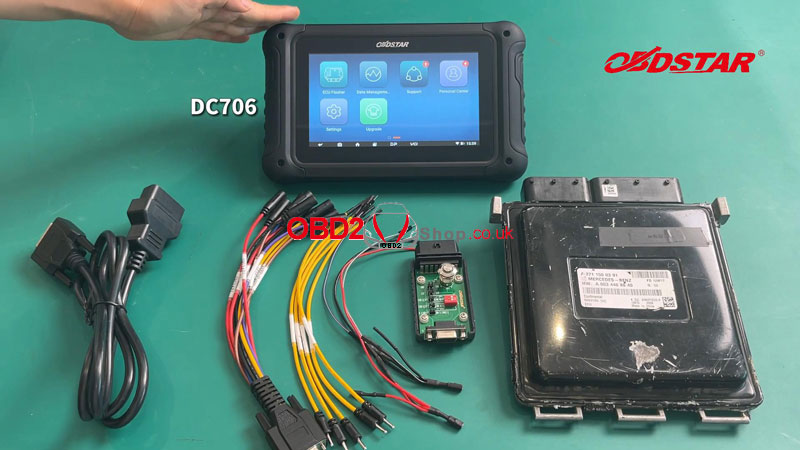
OBDSTAR DC706
Main cable
P004 ECU Clone Jumper + Adapter
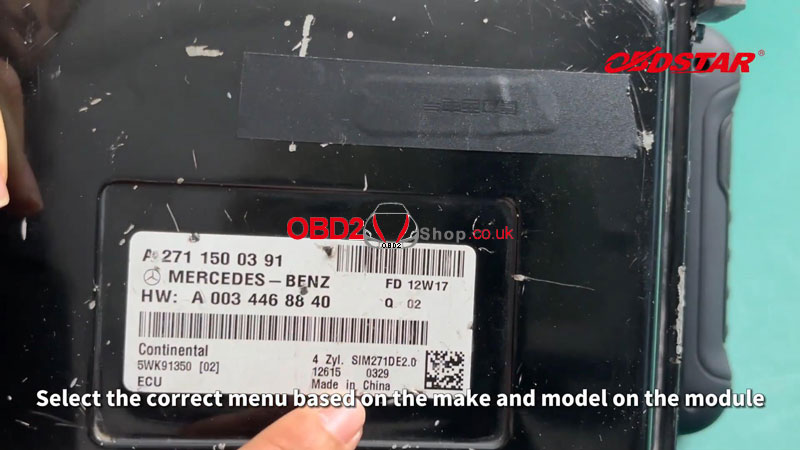
BENZ SIM271DE ECM
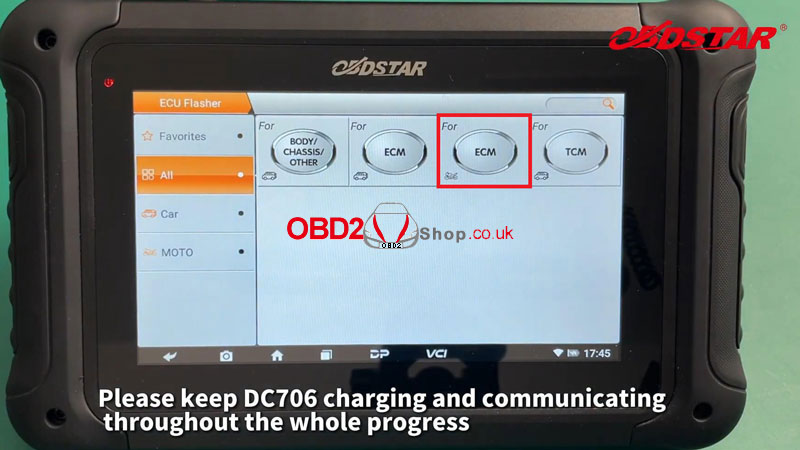
Make sure DC706 is in charge and communicates during the whole process.
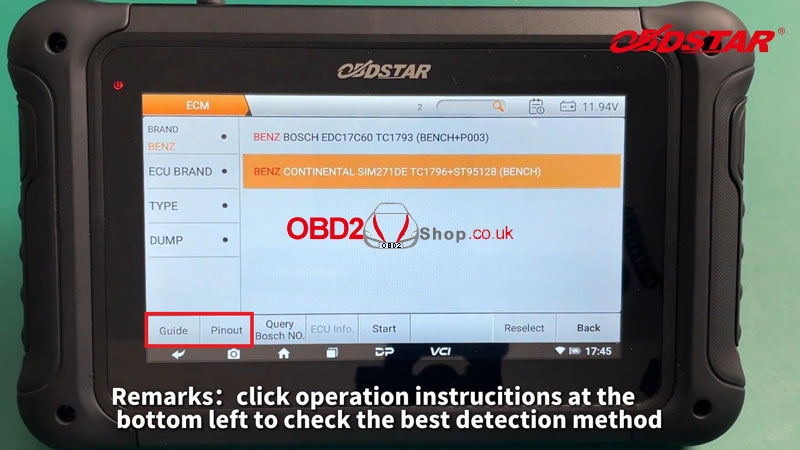
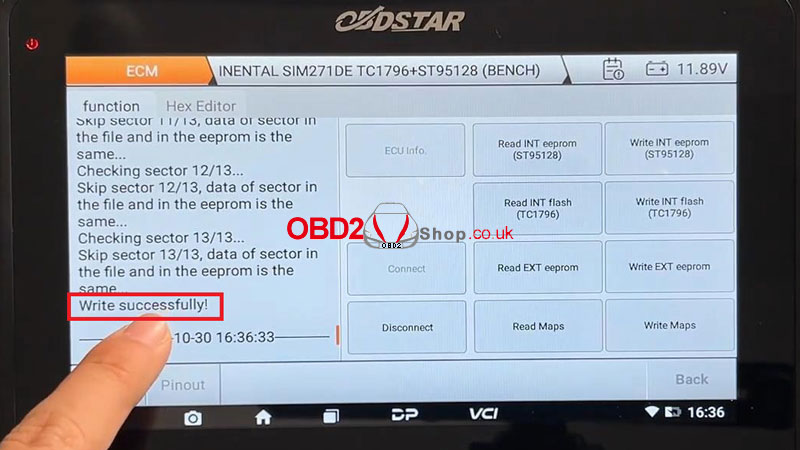
ECU Flasher >> ECM >> Latest version >> Brand >> BENZ >> BENZ CONTINENTAL SIM271DE TC1796+ST95128(BENCH)
Follow the "Guide&Pinout" to connect modules.
Here you can check the best detection method and wiring diagram.
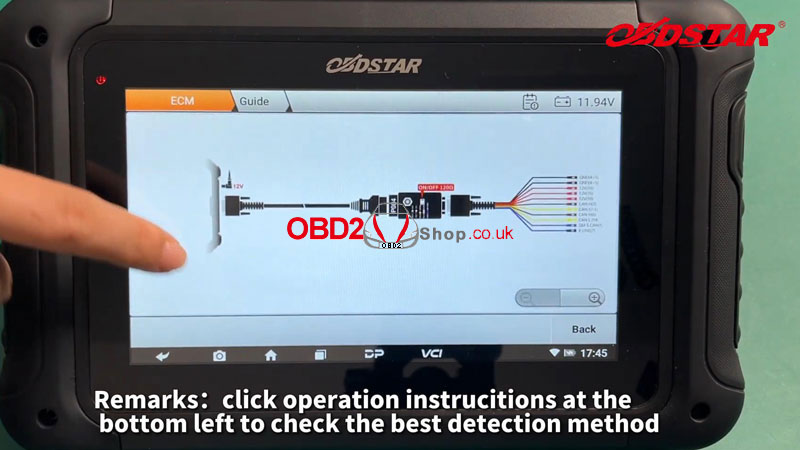
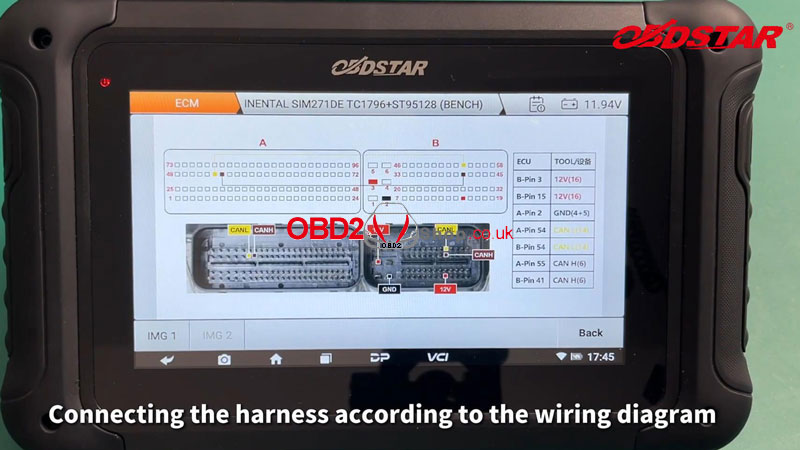
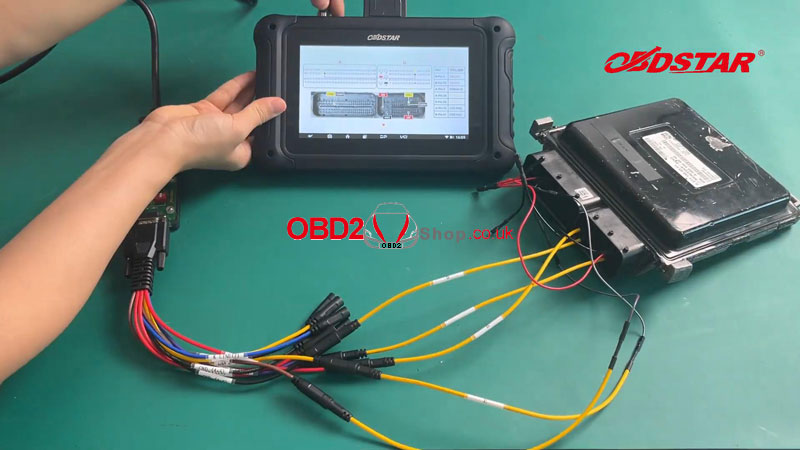
After a successful connection, turn on the P004 ignition.
Click "Start >> OK >> Connect".
Switch the ignition off.
Switch the ignition on.
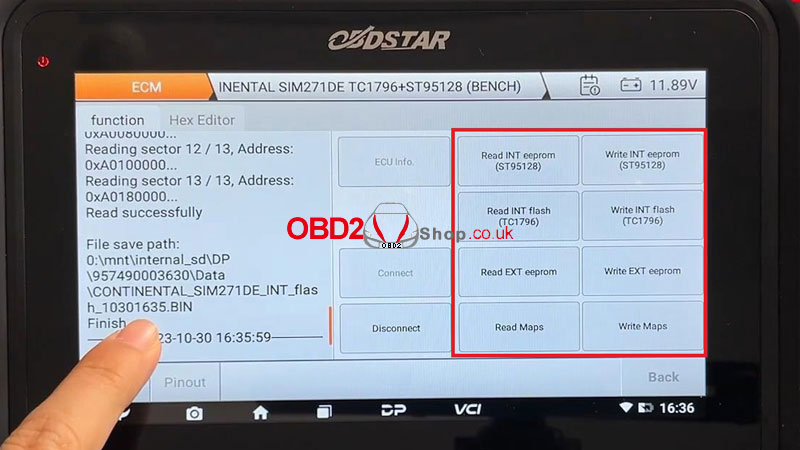
Now we can start to read and write INT EEPROM(ST95128), INT FLASH(TC1796), EXT EEPROM, and Maps.
*On the left side of the screen, we can see the saved path of data files.
When completing all operations, don't forget to disconnect.
www.obd2shop.co.uk
Oznake: obdstar dc706
četvrtak, 07.12.2023.
OBDSTAR DC706 ECM/TCM/BODY ECU Flasher Upgrade[2023.11]
OBDSTAR DC706 ECU Tool has released a major upgrade on ECM, TCM & Body ECU Flasher in November. Keep your OBDSTAR device updated to date to catch new features all the time.
OBDSTAR DC706 ECM Flasher Upgrade V30.32
Details Added
Add Read ISN Code function for below models:
BMW BOSCH MEVD17.2 TC1797(BENCH)
BMW BOSCH EDC17C06 TC1766(BENCH)
MINI BOSCH EDC17C06 TC1766(BENCH)
Add Read/Write INT flash functions for below models:
ASHOK LEYLAND DELPHI DCM2.5 XC2XXX(OBD/BENCH)
MAHINDRA DELPHI DCM2.5 XC2XXX(OBD/BENCH)
TATA DELPHI DCM2.5 XC2XXX(OBD/BENCH)
Add Read/Write EXT eeprom, EXT flash, INT flash functions for below models:
ALFA ROMEO BOSCH EDC16C8 MPC556+AM29BL802C(BENCH)
FIAT BOSCH EDC16C8 MPC556+AM29BL802C (BENCH)
IVECO BOSCH EDC16C8 MPC556+AM29BL802C (BENCH)
LANCIA BOSCH EDC16C8 MPC556+AM29BL802C (BENCH)
MAHINDRA BOSCH EDC16C8 MPC556+AM29BL802C(BENCH)
OPEL MAGNETI MARELLI MULTIJET MJD 602 1.3 CAN Z13DTH MPC563+
M58BW016DB+95320(BENCH)
OPEL MAGNETI MARELLI MULTIJET MJD 602 1.3 CAN Z13DTH SPANSION MPC563
+S29CL016J+95320(BENCH)
Add Read/Write EXT eeprom,EXT flash functions for below models:
ALFA ROMEO BOSCH EDC16C39 MPC561(2)+M58BW016D(F)B(BENCH)
AUDI BOSCH MED9.1 MPC561(2)+M58BW016D(F)B(BENCH)
AUDI BOSCH MED9.5.10 MPC561(2)+M58BW016D(F)B(BENCH)
BENZ BOSCH EDC15C6 KLINE 29F800BT+95P08(BENCH/BOOT)
BMW BOSCH EDC16CP35 MPC561(2)+M58BW016D(F)B(BENCH)
BUICK BOSCH EDC16C39 MPC561(2)+M58BW016D(F)B(BENCH)
BUICK BOSCH ME9.6.1 MPC561(2)(BENCH)
BUICK BOSCH MED9.6.1 MPC561(2)(BENCH)
CADILLAC BOSCH ME9.6.1 MPC561(2)(BENCH)
CADILLAC BOSCH MED9.6.1 MPC561(2)(BENCH)
CHEVROLET BOSCH EDC16C39 MPC561(2)+M58BW016D(F)B(BENCH)
CHEVROLET BOSCH ME9.6.1 MPC561(2)(BENCH)
CHEVROLET BOSCH MED9.6.1 MPC561(2)(BENCH)
CITROEN BOSCH EDC16C39 MPC561(2)+M58BW016D(F)B(BENCH)
DAEWOO BOSCH EDC16C39 MPC561(2)+M58BW016D(F)B(BENCH)
FERRARI BOSCH MED9.6.1 MPC561(2)(BENCH)
FIAT BOSCH EDC16C39 MPC561(2)+M58BW016D(F)B(BENCH)
FORD BOSCH ME9.0 MPC561(2)+M58BW016D(F)B(BENCH)
FORD SIEMENS SID802 AM29F400BB+93C56(BENCH)
FORD SIEMENS SID804 AM29F400BB+93C56(BENCH)
FORD SIEMENS SIM210 AM29F400BB+93C86(BENCH)
FORD SIEMENS SIM22 AM29F400BB+93C86(BENCH)
FORD SIEMENS SIM24 AM29F400BB+93C86(BENCH)
FORD SIEMENS SIM28 AM29F400BB+93C86(BENCH)
FORD SIEMENS SIM29 AM29F400BB+93C86(BENCH)
GMC BOSCH ME9.6.1 MPC561(2)(BENCH)
GMC BOSCH MED9.6.1 MPC561(2)(BENCH)
GREAT WALL BOSCH EDC16C39 MPC561(2)+M58BW016D(F)B(BENCH)
HOLDEN BOSCH EDC16C39 MPC561(2)+M58BW016D(F)B(BENCH)
HOLDEN BOSCH ME9.6.1 MPC561(2)(BENCH)
HOLDEN BOSCH MED9.1 MPC561(2)+M58BW016D(F)B(BENCH)
HOLDEN BOSCH MED9.6.1 MPC561(2)(BENCH)
HYUNDAI BOSCH EDC16C39 MPC561(2)+M58BW016D(F)B(BENCH)
INFINITI BOSCH EDC16C39 MPC561(2)+M58BW016D(F)B(BENCH)
KIA BOSCH EDC16C39 MPC561(2)+M58BW016D(F)B(BENCH)
LANCIA BOSCH EDC16C39 MPC561(2)+M58BW016D(F)B(BENCH)
LANDROVER SIEMENS MS43/KV6 SAK-C167(AM29F400BB+93C86)(BENCH)
MAHINDRA BOSCH EDC16C39 MPC561(2)+M58BW016D(F)B(BENCH)
OPEL BOSCH EDC16C39 MPC561(2)+M58BW016D(F)B(BENCH)
OPEL BOSCH ME9.6.1 MPC561(2)(BENCH)
OPEL BOSCH MED9.1 MPC561(2)+M58BW016D(F)B(BENCH)
OPEL BOSCH MED9.6.1 MPC561(2)(BENCH)
PEUGEOT BOSCH EDC16C39 MPC561(2)+M58BW016D(F)B(BENCH)
PONTIAC BOSCH ME9.6.1 MPC561(2)(BENCH)
PONTIAC BOSCH MED9.6.1 MPC561(2)(BENCH)
PORSCHE BOSCH MED9.1 MPC561(2)+M58BW016D(F)B(BENCH)
SAAB BOSCH EDC16C39 MPC561(2)+M58BW016D(F)B(BENCH)
SAAB BOSCH ME9.6.1 MPC561(2)(BENCH)
SATURN BOSCH EDC16C39 MPC561(2)+M58BW016D(F)B(BENCH)
SATURN BOSCH ME9.6.1 MPC561(2)(BENCH)
SATURN BOSCH MED9.1 MPC561(2)+M58BW016D(F)B(BENCH)
SATURN BOSCH MED9.6.1 MPC561(2)(BENCH)
SEAT BOSCH MED9.1 MPC561(2)+M58BW016D(F)B(BENCH)
SEAT BOSCH MED9.5.10 MPC561(2)+M58BW016D(F)B(BENCH)
SKODA BOSCH MED9.1 MPC561(2)+M58BW016D(F)B(BENCH)
SKODA BOSCH MED9.5.10 MPC561(2)+M58BW016D(F)B(BENCH)
SUBARU BOSCH EDC16C39 MPC561(2)+M58BW016D(F)B(BENCH)
SUZUKI BOSCH EDC16C39 MPC561(2)+M58BW016D(F)B(BENCH)
VAUXHALL BOSCH EDC16C39 MPC561(2)+M58BW016D(F)B(BENCH)
VOLKSWAGEN BOSCH MED9.1 MPC561(2)+M58BW016D(F)B(BENCH)
VOLKSWAGEN BOSCH MED9.5.10 MPC561(2)+M58BW016D(F)B(BENCH)
VOLKSWAGEN SIEMENS SIMOS 3.3A 29F400BB+93C76(BENCH)
VOLKSWAGEN SIEMENS SIMOS 3.4A 29F400BB+93C76(BENCH)
VOLVO BOSCH ME9.0 MPC561(2)+M58BW016D(F)B(BENCH)
Add Read/Write EXT eeprom, EXT flash, History Image and Reset ECU functions for below models:
CITROEN SIEMENS SID 803A KLINE AM29BDD160GB+95320(BENCH)
PEUGEOT SIEMENS SID 803A KLINE AM29BDD160GB+95320(BENCH)
Add Read/Write EXT eeprom, EXT flash, History Image functions for below models:
CITROEN SIEMENS SID 805 CAN AM29F400BB+93C56(BENCH)
CITROEN SIEMENS SID 806 CAN AM29F400BB+93C56(BENCH)
PEUGEOT SIEMENS SID 805 CAN AM29F400BB+93C56(BENCH)
PEUGEOT SIEMENS SID 806 CAN AM29F400BB+93C56(BENCH)
Add Read/Write INT eeprom, INT flash functions for below models:
BMW BOSCH EDC17C06 TC1766(BENCH)
FORD CONTINENTAL SID208 TC1797(BENCH)
FORD CONTINENTAL SID209 TC1797(BENCH)
HYUNDAI BOSCH ME17.9.1 TC1796(BENCH)
HYUNDAI KEFICO CPGDSH2.20.X TC1782 R5F72544R(BENCH)
HYUNDAI KEFICO CPGDSH2.24.X TC1782 R5F72544R(BENCH)
HYUNDAI KEFICO CPGDSH2.26.X TC1782 R5F72544R(BENCH)
KIA BOSCH ME17.9.1 TC1796(BENCH)
KIA KEFICO CPGDSH2.20.X TC1782 R5F72544R(BENCH)
KIA KEFICO CPGDSH2.24.X TC1782 R5F72544R(BENCH)
KIA KEFICO CPGDSH2.26.X TC1782 R5F72544R(BENCH)
LANDROVER CONTINENTAL SID208 TC1797(BENCH)
MAHINDRA BOSCH MD1CS018 SPC5898(BENCH)
MAZDA CONTINENTAL SID208 TC1797(BENCH)
MINI BOSCH EDC17C06 TC1766(BENCH)
SSANGYONG KEFICO CPGDSH2.20.X TC1782 R5F72544R(BENCH)
Add Read/Write EXT flash functions for below models:
KIA SIEMENS SIM2K-47(MT)SAK-C167(29F400BB)(BENCH)
KIA SIEMENS SIM2K-47(AT)SAK-C167(29F400BB)(BENCH)
HYUNDAI SIEMENS SIM2K-47(MT)SAK-C167(29F400BB)(BENCH)
HYUNDAI SIEMENS SIM2K-47(AT)SAK-C167(29F400BB)(BENCH)
Add Read/Write EXT eeprom and IMMO OFF functions for below models:
RENAULT SIEMENS SIRIUS 32 AM29F200BB(BENCH)
RENAULT SIEMENS SIRIUS 34 AM29F400BB(BENCH)

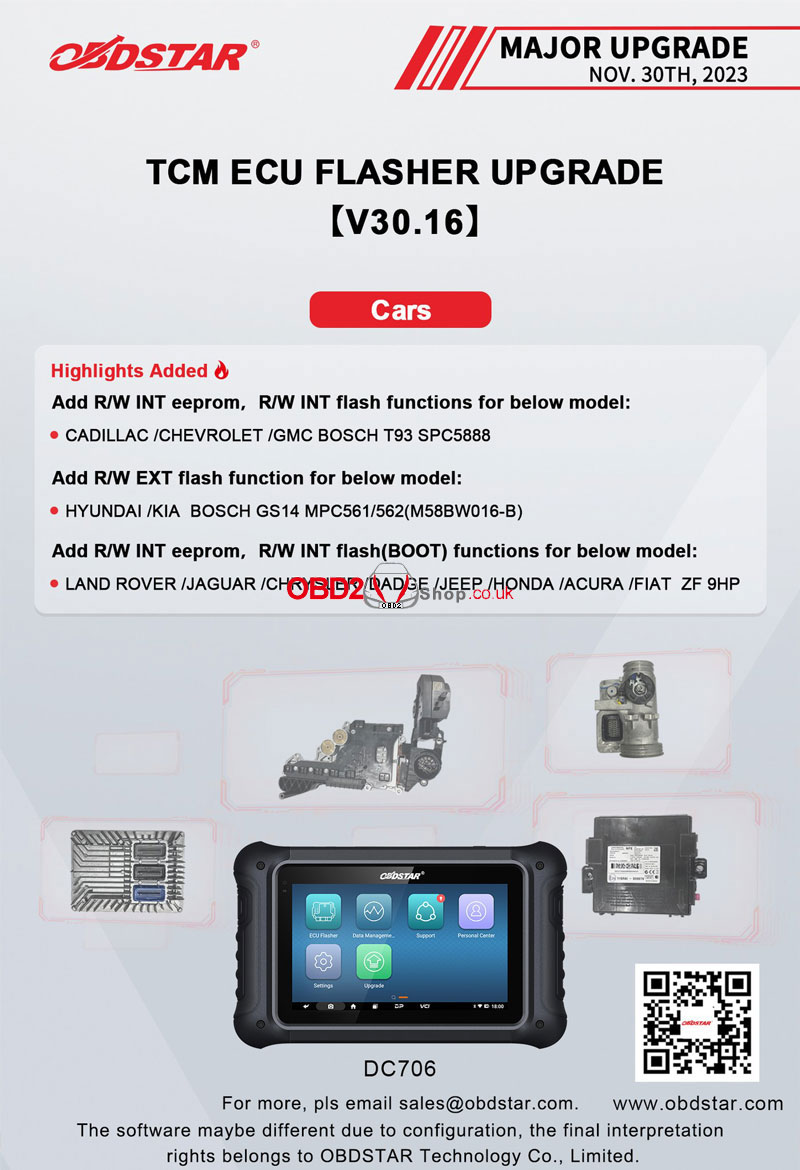
OBDSTAR DC706 TCM ECU Flasher Upgrade V30.16
Highlights Added
Add R/W INT eeprom, R/W INT flash functions for below model:
CADILLAC /CHEVROLET/GMC BOSCH T93 SPC5888
Add R/W EXT flash function for below model:
HYUNDAI/KIA BOSCH GS14 MPC561/562(M58BW016-B)
Add R/W INT eeprom, R/W INT flash(BOOT) functions for below model:
LAND ROVER/JAGUAR /CHRYSLER /DADGE /JEEP /HONDA /ACURA /FIAT ZF 9HP
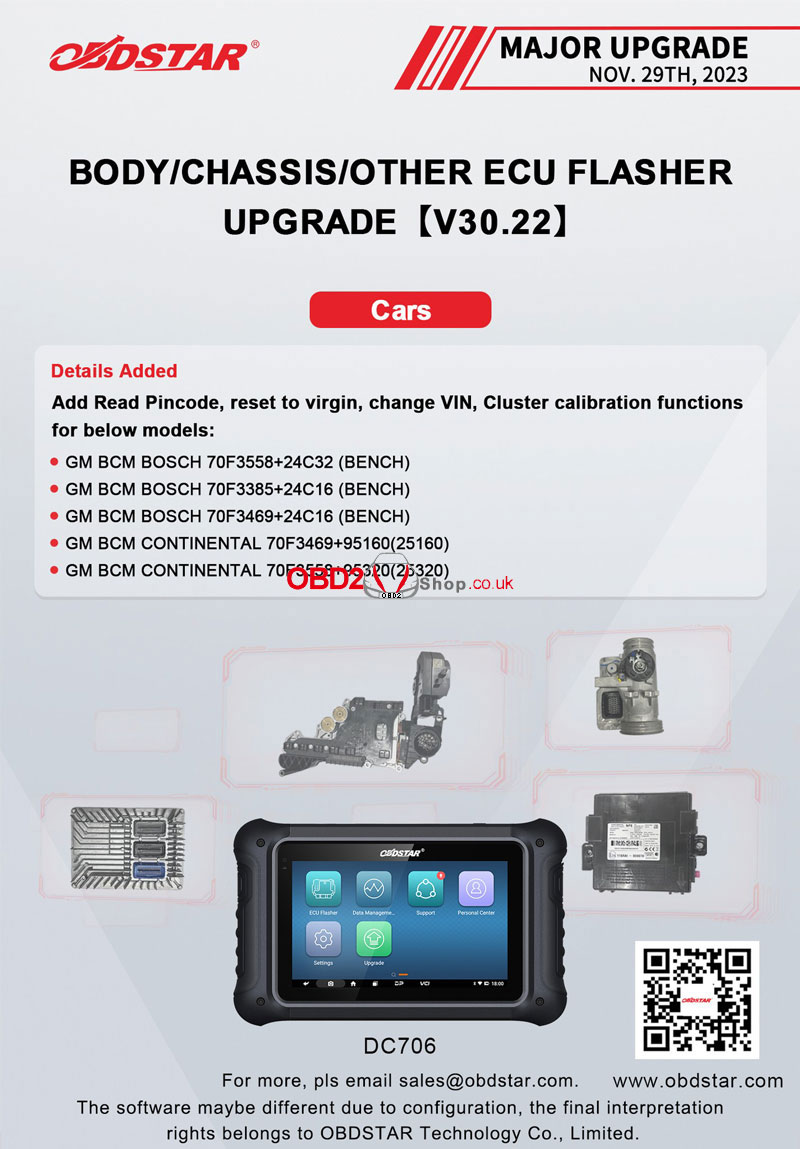
OBDSTAR DC706 BODY/Chassis/Other ECU Flasher Upgrade V30.22
Details Added
Add Read Pincode, reset to virgin, change VIN, Cluster calibration functions for below models:
GM BCM BOSCH 70F3558+24C32(BENCH)
GM BCM BOSCH 70F3385+24C16(BENCH)
GM BCM BOSCH 70F3469+24C16(BENCH)
GM BCM CONTINENTAL 70F3469+95160(25160)
GM BCM CONTINENTAL 70F3558+95320(25320)
www.obd2shop.co.uk
Oznake: obdstar dc706
utorak, 17.10.2023.
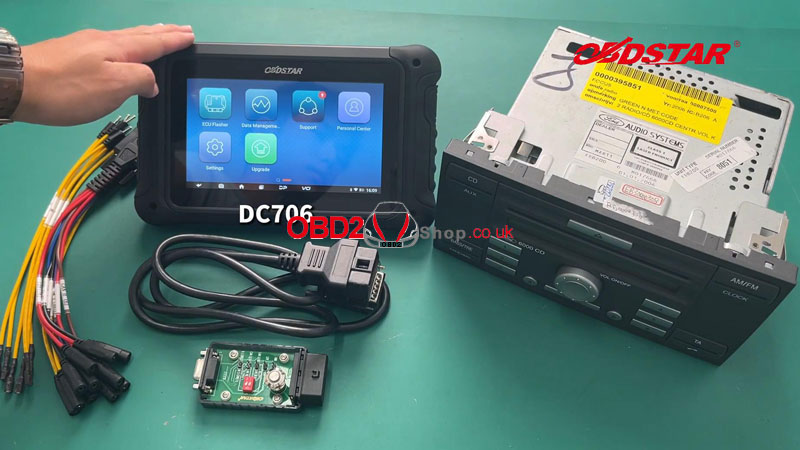
OBDSTAR DC706 Read & Write Ford 6000CD Radio Code
This is a tutorial on how to read and write Ford 6000CD radio code with OBDSTAR DC706 by bench. It can also support to clone EEPROM. Read this article to learn step by step.
Accessories
DC706 ECU Tool
P004 ECU Clone Adapter + Jumper
Main cable
Ford 6000CD
Please keep DC706 charging and communicating during the whole process.
Operation
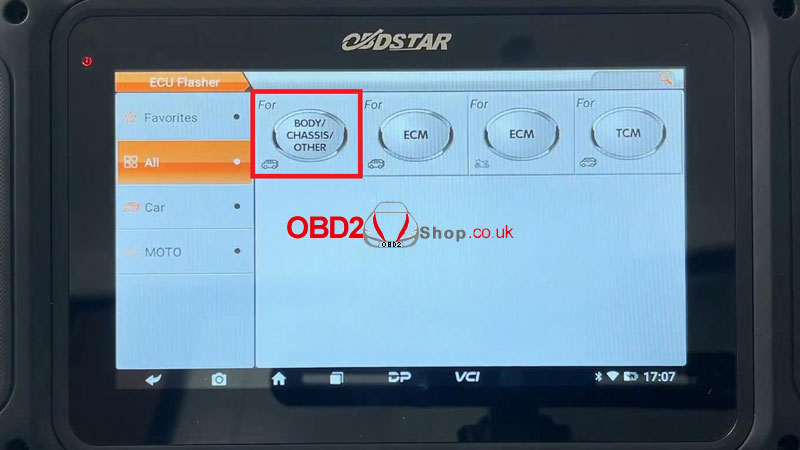
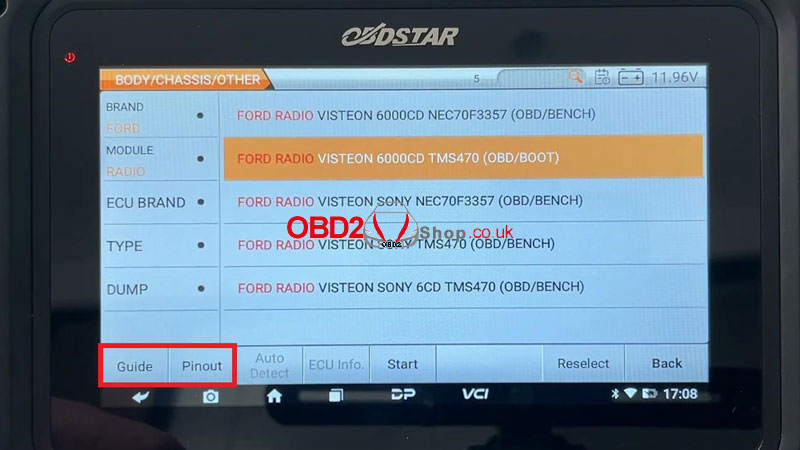
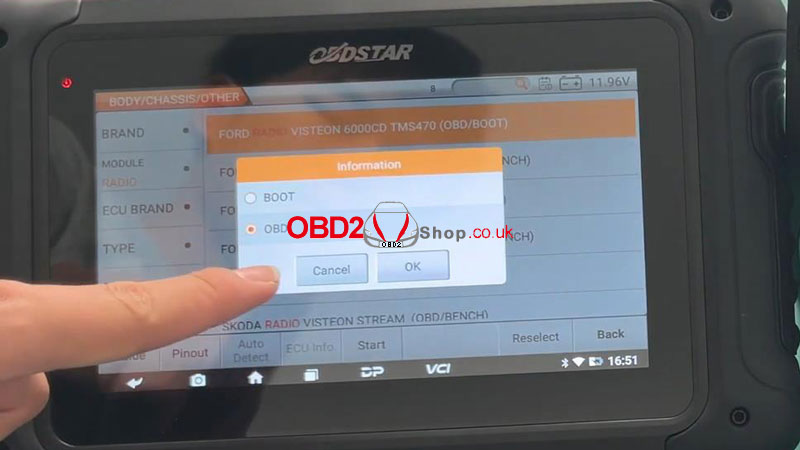
ECU Flasher >> BODY/ CHASSIS/ OTHER >> Latest version >> BRAND >> FORD >> FORD RADIO VISTEON 6000CD TMS470(OBD/BOOT)
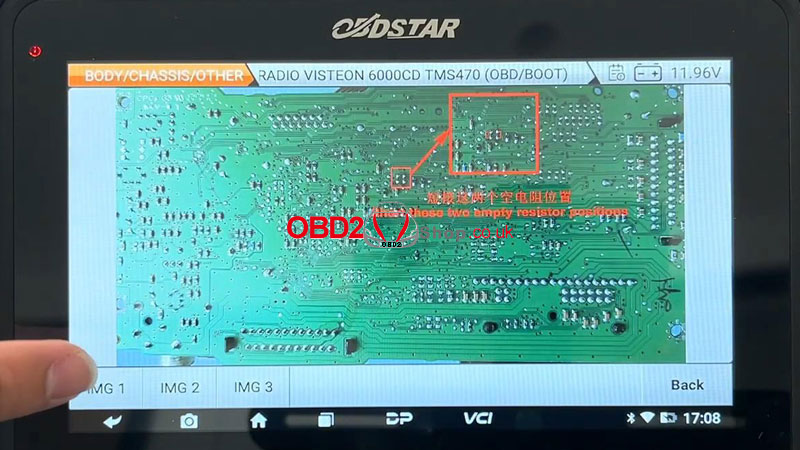
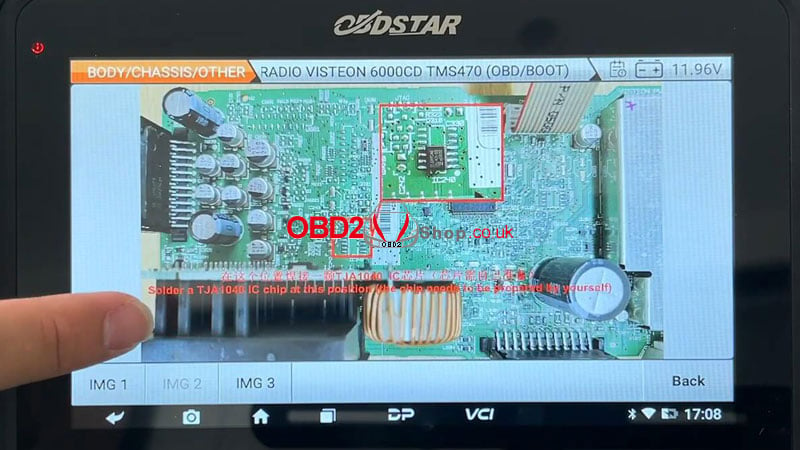
Press "Guide/Pinout" to check the best detection method.
Connect the harness according to the wiring diagram.
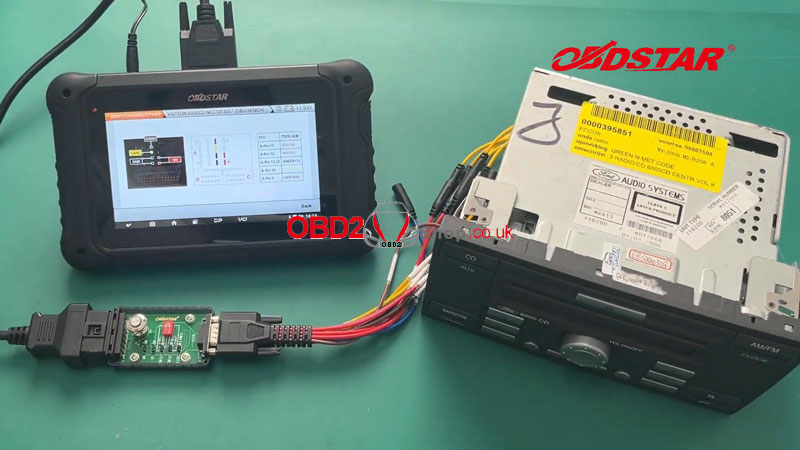
After a successful connection, press
Start >> OBD >> OK
This function is available by connecting the server, please ensure the Internet connection is normal.
Switch on P004 ignition.
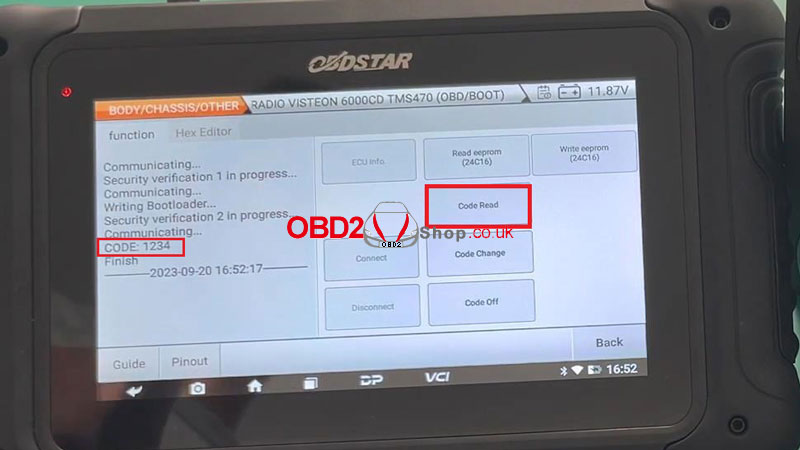
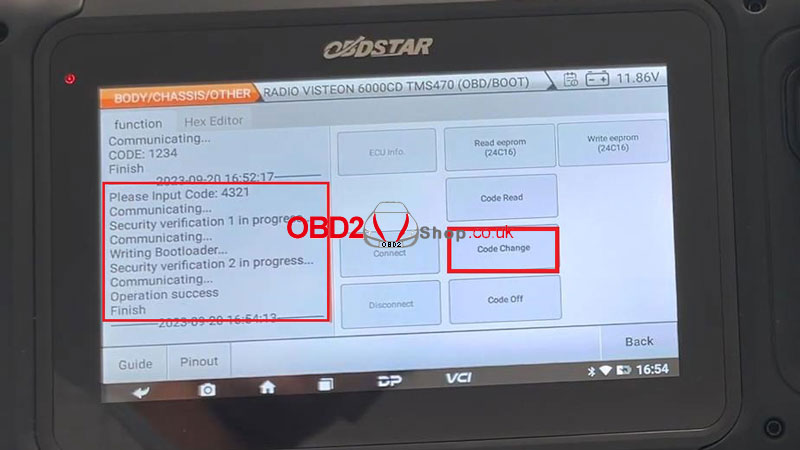
Press "Code Read".
Writing bootloader...
Pincode read successfully:1234
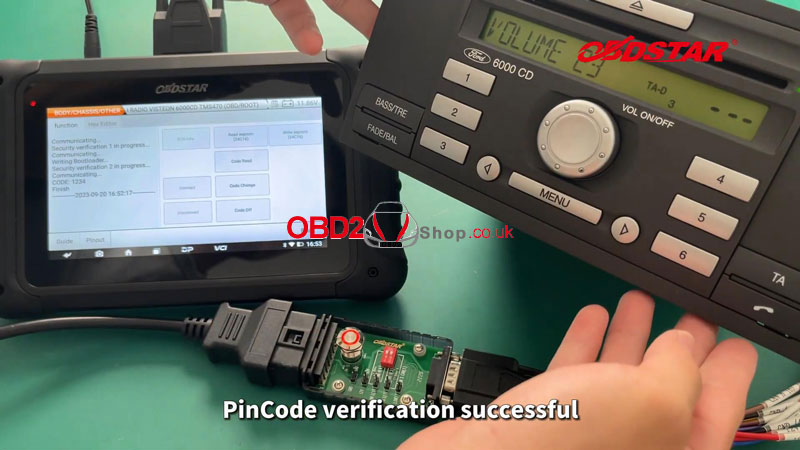
Reboot and enter the pincode on Ford 6000CD radio for verification.
Pincode verification is successful.
Press "Code Change" to change the pin code: 4321
Operation success.
Reboot and verify the changed pincode on the 6000CD radio.
Pincode changed successfully.
Press "Code off".
Security verification in progress...
Operation success.
Next, we can also read/write EEPROM (24C16) for radio ECU cloning.
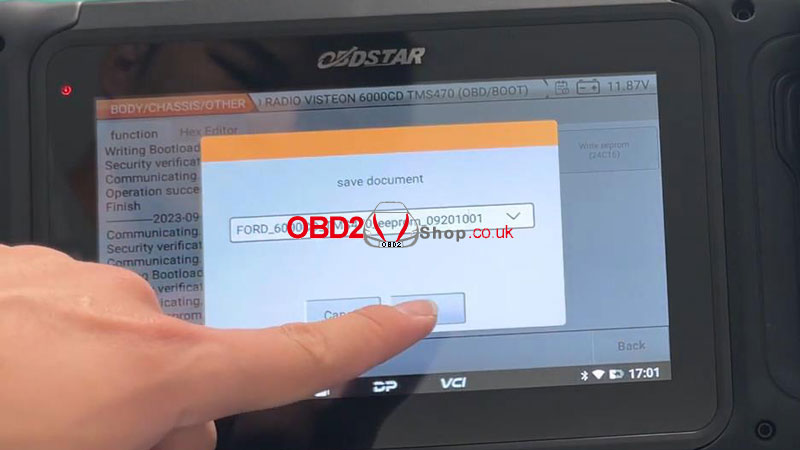
Save EEPROM's success.
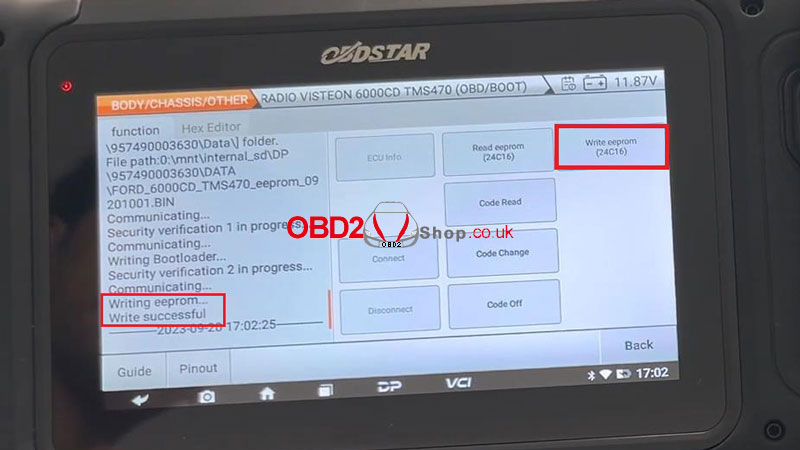
WriteEEPROM(24C16) >> Load external data
Writing EEPROM...
Writing success.
The read-and-write EEPROM operation is completed.
www.obd2shop.co.uk
Oznake: obdstar dc706
ponedjeljak, 11.09.2023.
OBDSTAR DC706 Clone BMW MSV90 ECM on Bench
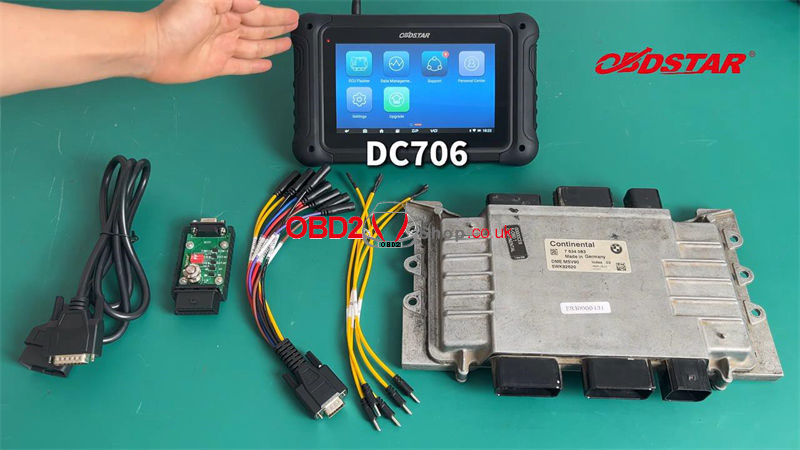
This is a quick guide on how to use the OBDSTAR DC706 ECU Tool to clone BMW MSV90 ECM on bench. Besides, it also supports clone MEVD17.2.6 EXX, MEVD17.2.6 FXX, MSD80, MSD85, and MSD54 ECM.
Tools Required
OBDSTAR DC706
Main cable
P004 Adapter + P004 ECU Clone Jumper
BMW MSV90 ECM
Please keep DC706 charging & communicating throughout the whole process.
Operation Process
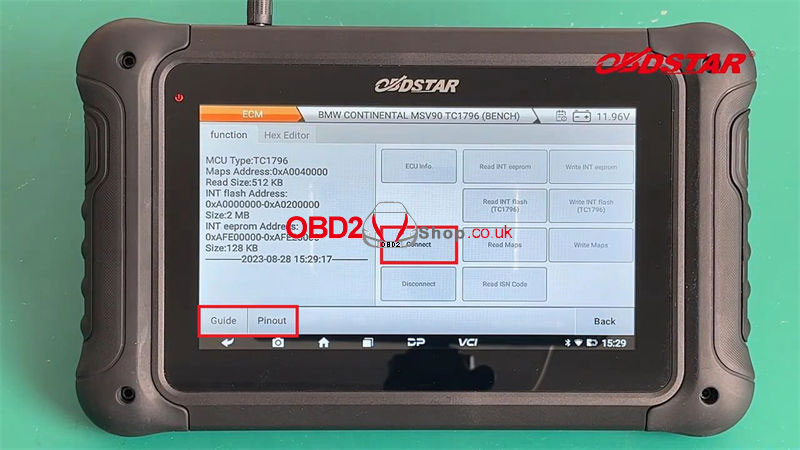
ECU Flasher >> ECM >> Latest version >> BMW >> BMW Continental MSV90 TC1796(BENCH) >> Start
This function is available by connecting the server, please ensure the Internet connection is normal.
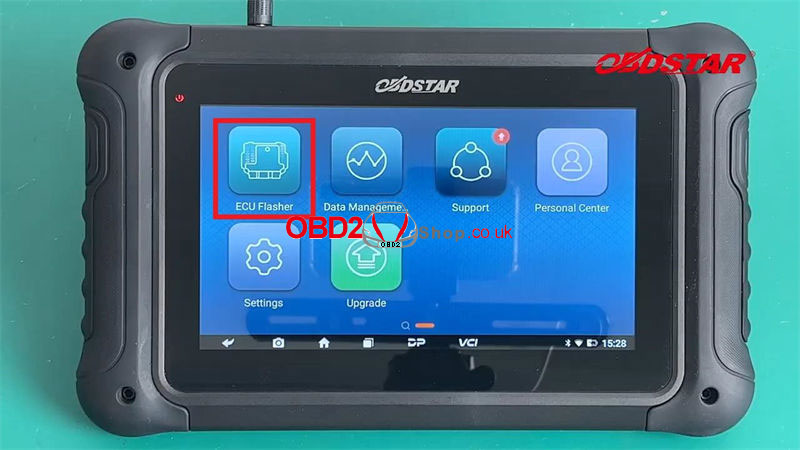
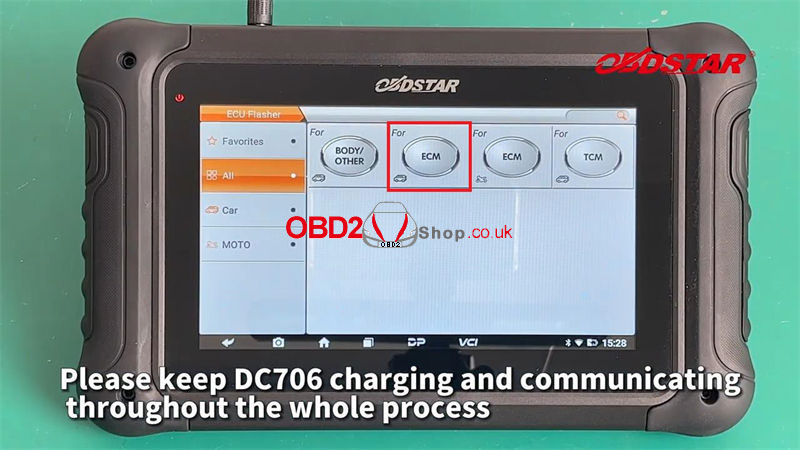
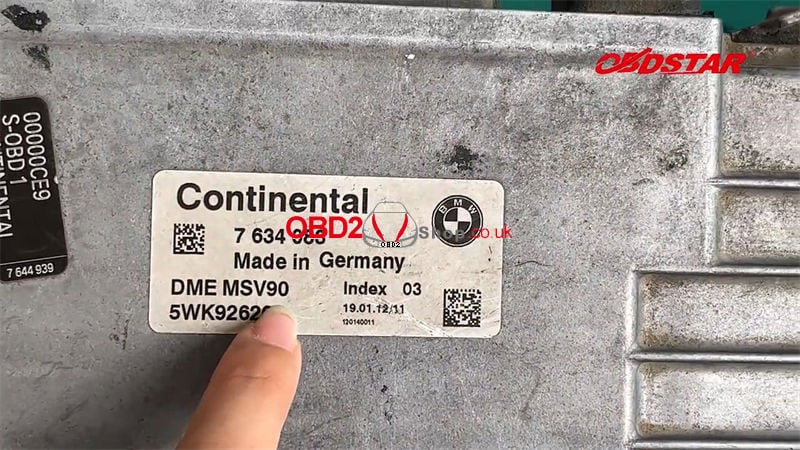
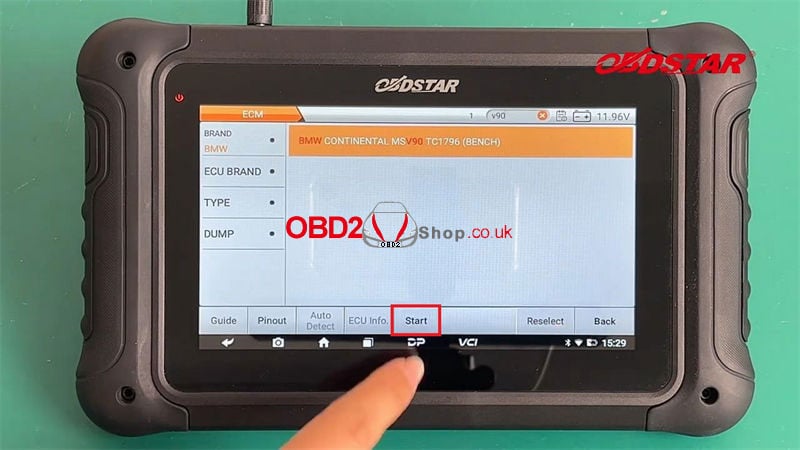
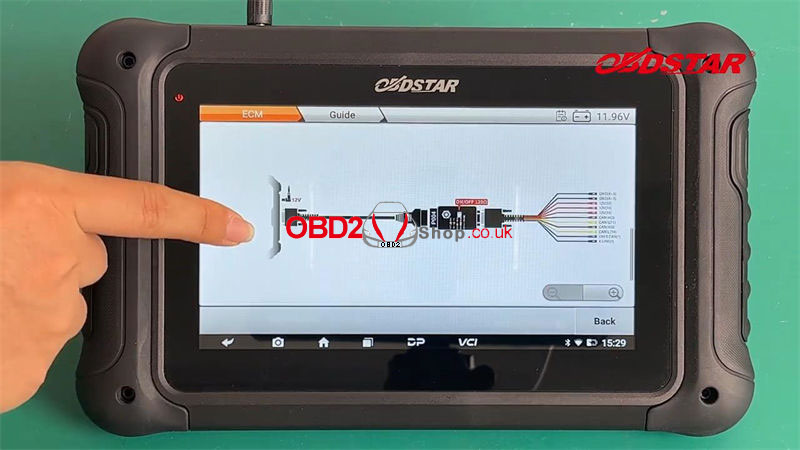
Remarks: Click operation instructions at the bottom left to check the best detection method.
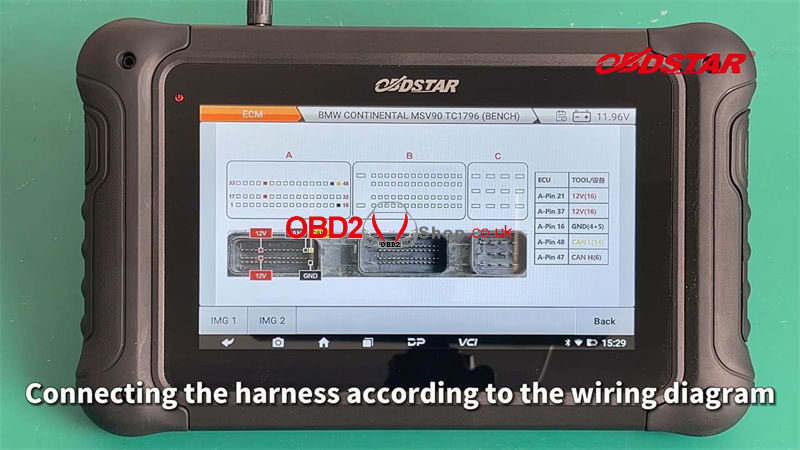
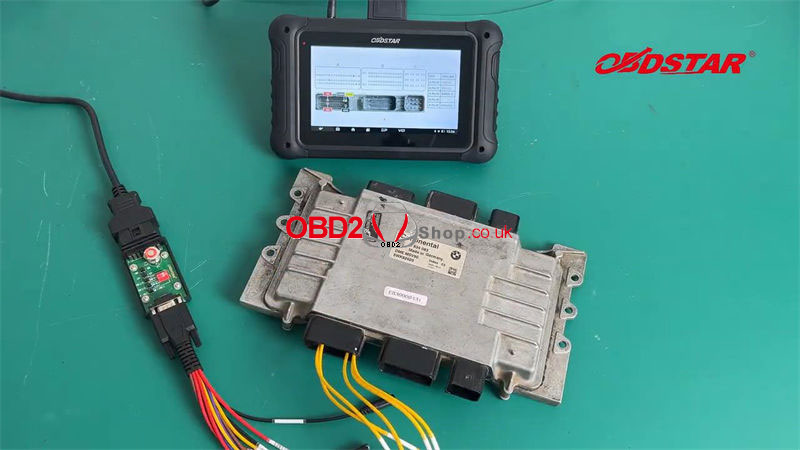
Connecting the harness according to the wiring diagram.
Follow the interface prompts:
Switch the ignition off.
Switch the ignition on.
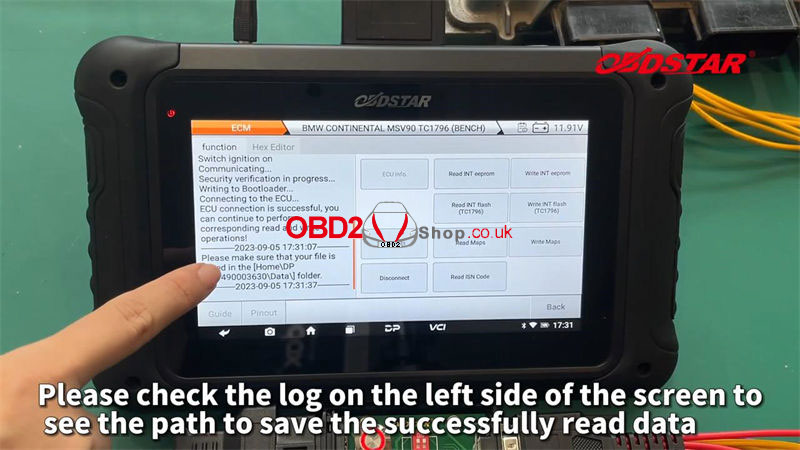
Read INT eeprom, INT flash(TC1796), Maps, and ISN code.
Please check the log on the left side screen to see the saved path of reading data.
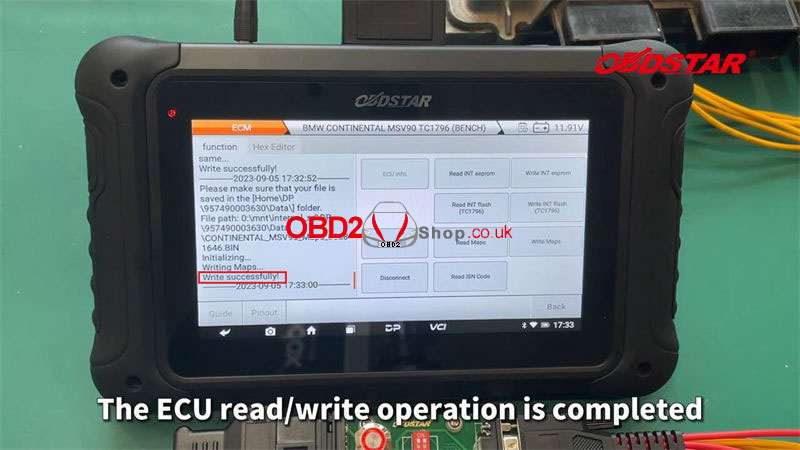
After successfully saving, write INT eeprom, INT flash(TC1796), and Maps.
The ECU clone operation is completed.
Remember to disconnect before exiting.
www.obd2shop.co.uk
Oznake: obdstar dc706
srijeda, 15.02.2023.
How to Clone Tricore ECU with FoxFlash/KT200 Tool?
FoxFlash & KT200 Programmer can support cloning ECU function as OBDSTAR DC706. This is an introduction on how to clone Tricore ECU with new KT200 software step by step. The procedure may apply to FoxFlash software as well.
Step1. Read ECU data via "BOOT MODE TRICORE" or "BENCH TRICORE" option. Including Micro FLASH, EEPROM data from original ECU & new ECU.
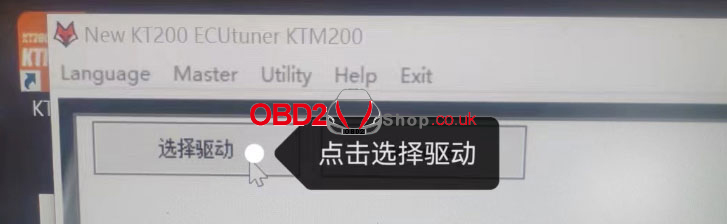
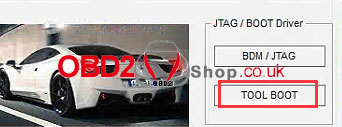
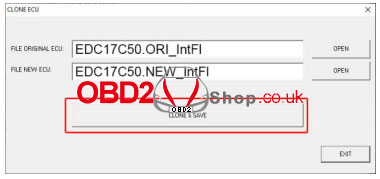
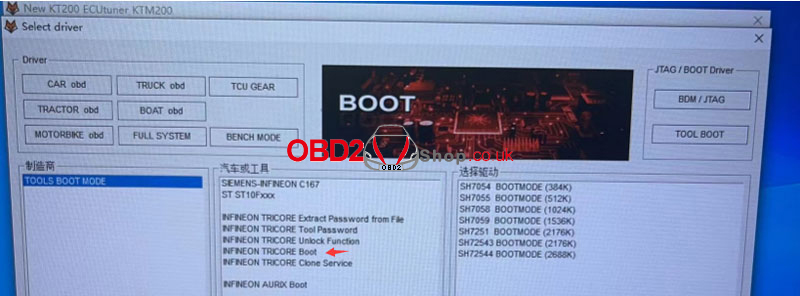
Step2. Select Menu >> Select Drive >> TOOL BOOT >> TOOLS BOOT MODE - INFINEON TRICORE Clone Service >> ECU Model
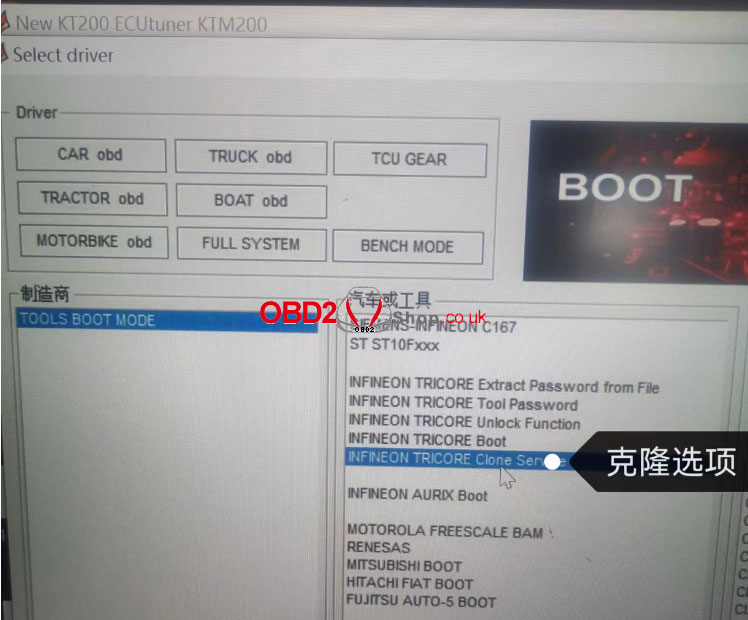
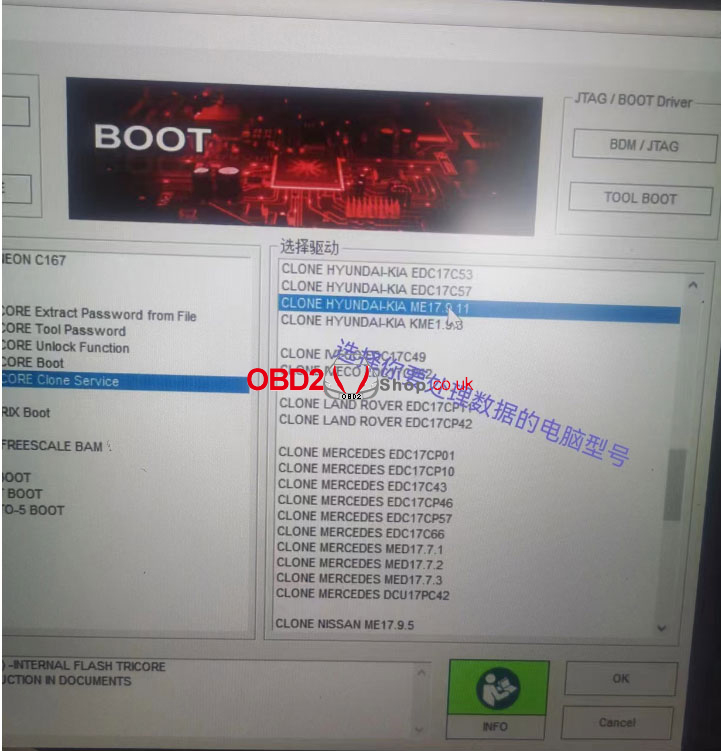
Step3. Fill 1st option with original ECU Micro file, fill 2nd option with new ECU Micro file.
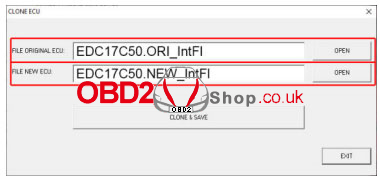
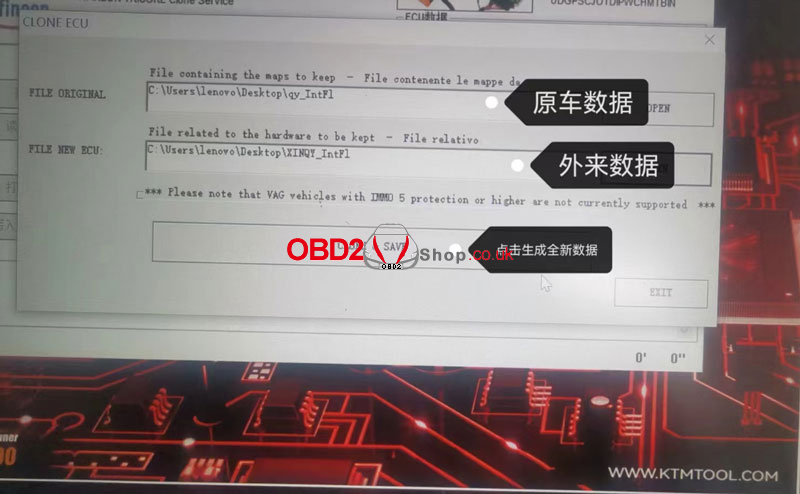
Step4. Click "CLONE & SAVE" to save new ECU file.
Step5. Select BOOT MODE >> INFINION TRICORE Boot >> ECU Model >> Load new ECU file >> Write to new ECU
* BENCH TRICORE may cause incomplete writing of ECU data(Boot is recommended)
Attention
1. Please write the original EEPROM to new ECU with no changes;
2. Please write Micro FLASH & EEPROM data separately, CANNOT read & write together;
3. If the Micro FLASH data cannot be written, it needs to be processed manually with winols. Or asking help for a professional engineer.
4. Nonsupport VW 5th generation IMMO system.
Technical Support
www.obd2shop.co.uk
Oznake: foxflash ecu programmer, kt200 ecu progarmmer, obdstar dc706

| < | veljača, 2026 | |||||
| P | U | S | Č | P | S | N |
| 1 | ||||||
| 2 | 3 | 4 | 5 | 6 | 7 | 8 |
| 9 | 10 | 11 | 12 | 13 | 14 | 15 |
| 16 | 17 | 18 | 19 | 20 | 21 | 22 |
| 23 | 24 | 25 | 26 | 27 | 28 | |
Svibanj 2026 (1)
Veljača 2026 (4)
Siječanj 2026 (19)
Prosinac 2025 (22)
Studeni 2025 (21)
Listopad 2025 (20)
Rujan 2025 (21)
Kolovoz 2025 (8)
Srpanj 2025 (13)
Lipanj 2025 (9)
Svibanj 2025 (12)
Travanj 2025 (10)
Ožujak 2025 (12)
Veljača 2025 (14)
Siječanj 2025 (8)
Prosinac 2024 (6)
Studeni 2024 (6)
Listopad 2024 (4)
Rujan 2024 (7)
Kolovoz 2024 (14)
Srpanj 2024 (12)
Lipanj 2024 (10)
Svibanj 2024 (13)
Travanj 2024 (12)
Ožujak 2024 (11)
Veljača 2024 (2)
Siječanj 2024 (10)
Prosinac 2023 (8)
Studeni 2023 (6)
Listopad 2023 (7)
Rujan 2023 (9)
Kolovoz 2023 (6)
Srpanj 2023 (10)
Lipanj 2023 (4)
Veljača 2023 (8)
Siječanj 2023 (14)
Prosinac 2022 (13)
Studeni 2022 (14)
Listopad 2022 (18)
Rujan 2022 (9)
Kolovoz 2022 (16)
Srpanj 2022 (11)
Lipanj 2022 (14)
Svibanj 2022 (13)
Travanj 2022 (12)
Ožujak 2022 (12)
Veljača 2022 (13)
Siječanj 2022 (10)
Dnevnik.hr
Gol.hr
Zadovoljna.hr
Novaplus.hr
NovaTV.hr
DomaTV.hr
Mojamini.tv