OBD2 tools on OBD2shop.co.uk https://blog.dnevnik.hr/obd2shop
srijeda, 29.01.2025.
How to Cut Key by Picture with 2M2 TANK 2 Pro CNC?
This is a tutorial on how to cut keys by picture with a 2M2 TANK 2 Pro CNC Key Cutting Machine. Here's taking the Mitsubishi key as an example.
Connect the 2M2 TANK to app via Bluetooth.
Cut by bitting >> Search GM18R
Follow the guide instructions to install the key blade.
It's important to pay more attention to the details, the key has to be flat.

Click "Continue" when it's ready.
Camera >> Album >> Select the key picture
We have to enlarge the key picture, and let the key width align with the edge of the frame.
Pay attention to the read-line position.
This key has a shoulder, please enlarge it more with the "+" button.
Lock the picture after aligning.
Move every point to the edge of the key.
If all are finished, please click OK.


The key bittings appeared, click "Cut >> Continue".
The Key Cutting Machine will automatically start to cut.
It'll take almost 40s to cut this key...
Key cutting was successfully done.

www.obd2shop.co.uk
Oznake: 2m2 tank 2 pro cnc
utorak, 28.01.2025.
How to Register OBDSTAR Iscan Pro Series Marine Scanner
OBDSTAR iScan Pro Series Marine Scanner is a powerful device that provides accurate diagnostics and troubleshooting for marine engines and systems. In this article, we will guide you through registering your OBDSTAR iScan Pro Series Marine Scanner, helping you get started with confidence and ease.
Registration Procedure:
Tap the [Personal Center] icon in the DP menu, then the login interface will be shown.
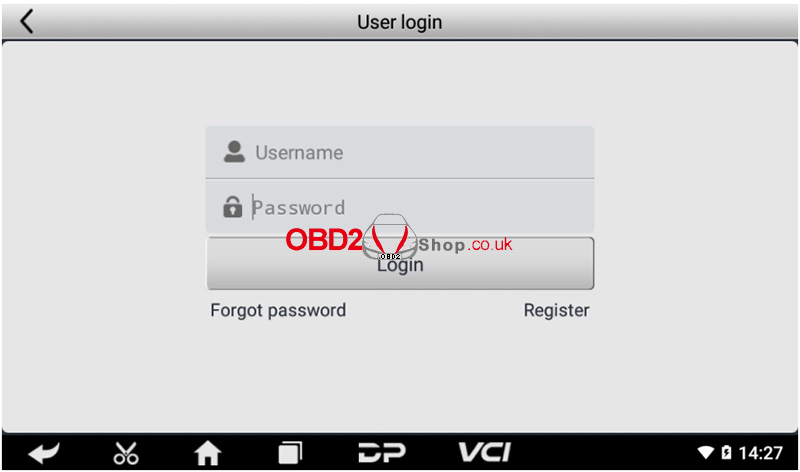
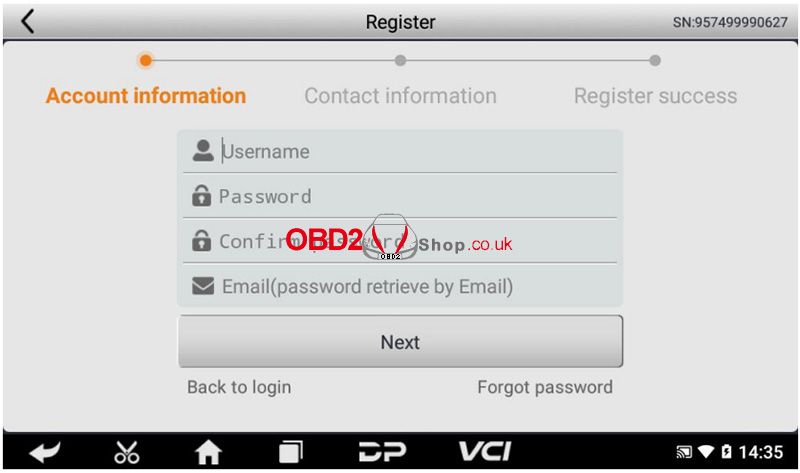
Select the [Register] button in the lower right corner and proceed to the user registration interface.
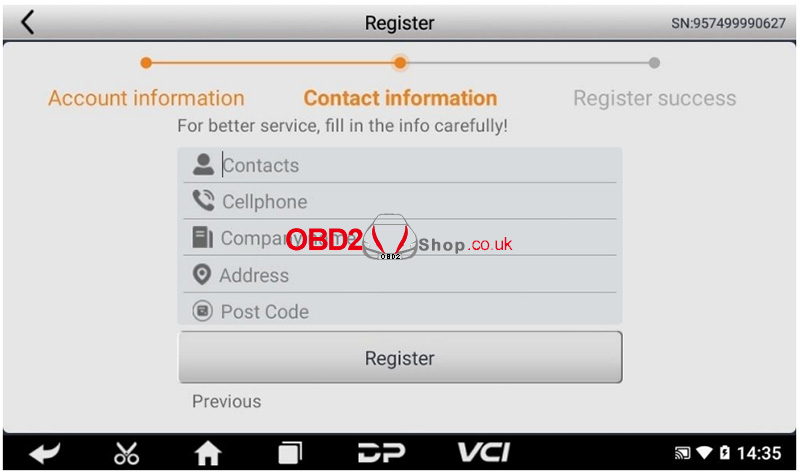
Fill in the information in each field. After that, you will be prompted with "Registered successfully!"
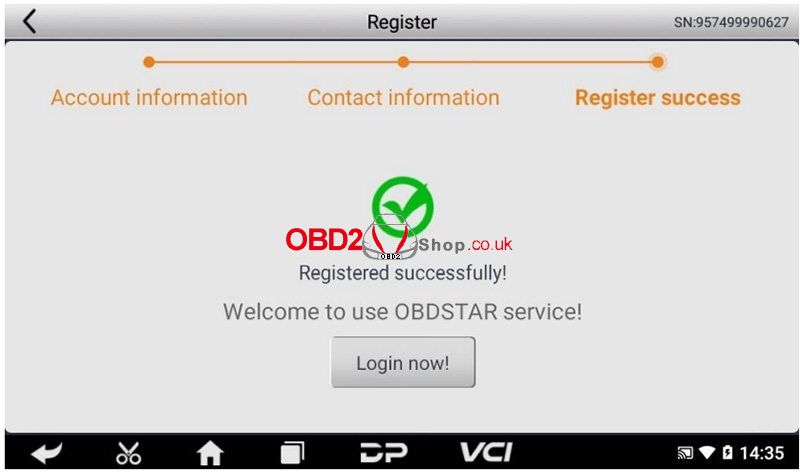
Tap [Login now!]
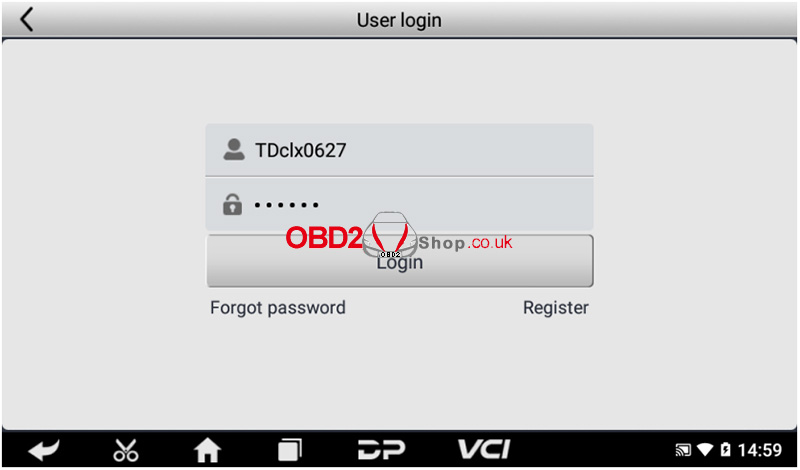
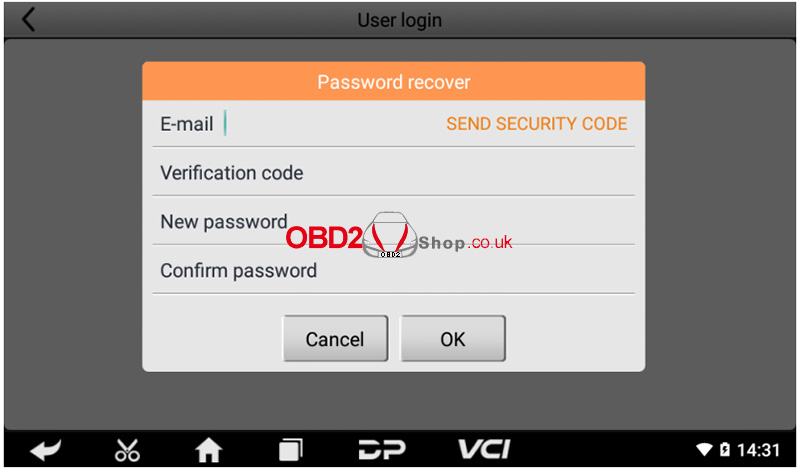
If you forget your password, you can select [Forgot password], then fill in the necessary information in the Password Recovery pop-up window, and you will be able to log in with your new password.
The above is the registration process for the OBDSTAR Iscan Pro Series Marine Scanner. I hope it is helpful to you. For more information and services, please visit www.obd2shop.co.uk.
Oznake: obdstar scanner
ponedjeljak, 20.01.2025.
Yanhua Mini ACDP Module 36: JLR 3rd Gen 8HP Gearbox Clone
This is a tutorial on how to do JLR 3rd Generation 8HP Gearbox Clone with Yanhua MiniACDP-2 + Module 36 on bench.
Power on the MiniACDP-2.
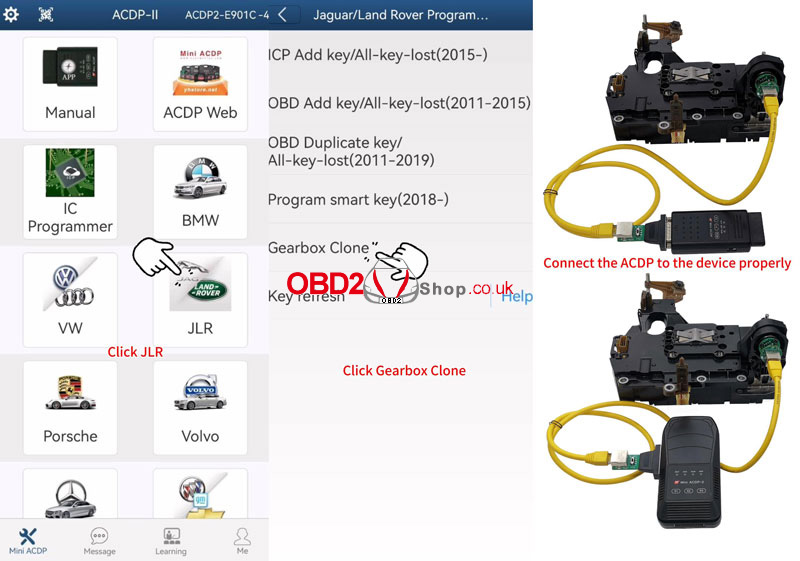
MiniACDP>> JLR >> Gearbox Clone >> 8HP_GEN3(ZF TC275)
Connect ACDP to the device properly according to the diagram.
Click "Identify" after a successful connection.
Please use the ACDP standard power adapter(voltage+ 12V, current >= 2.5A)
Please connect ACDP with the gearbox.
Verify system info, click OK.
Identify chip info finish.
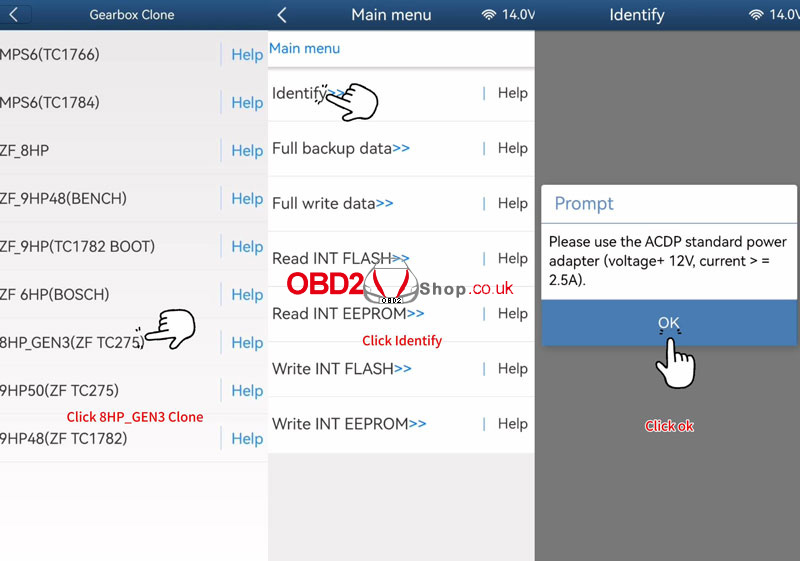
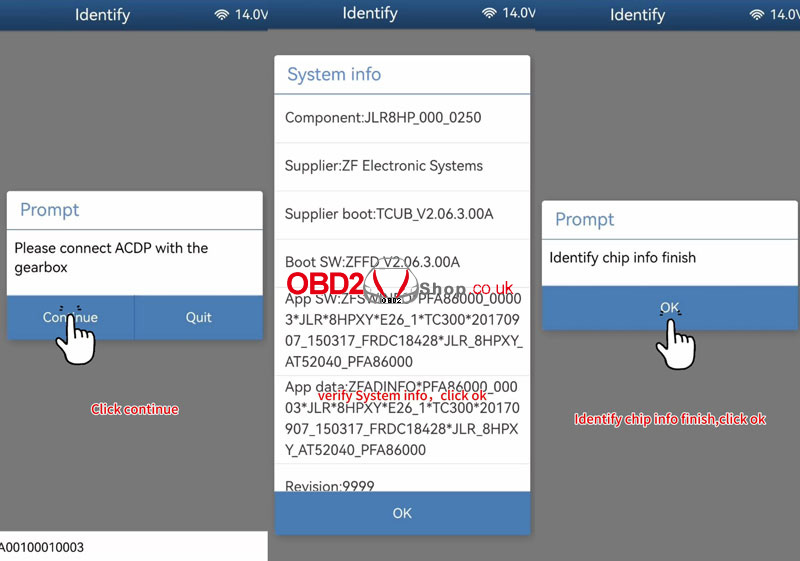
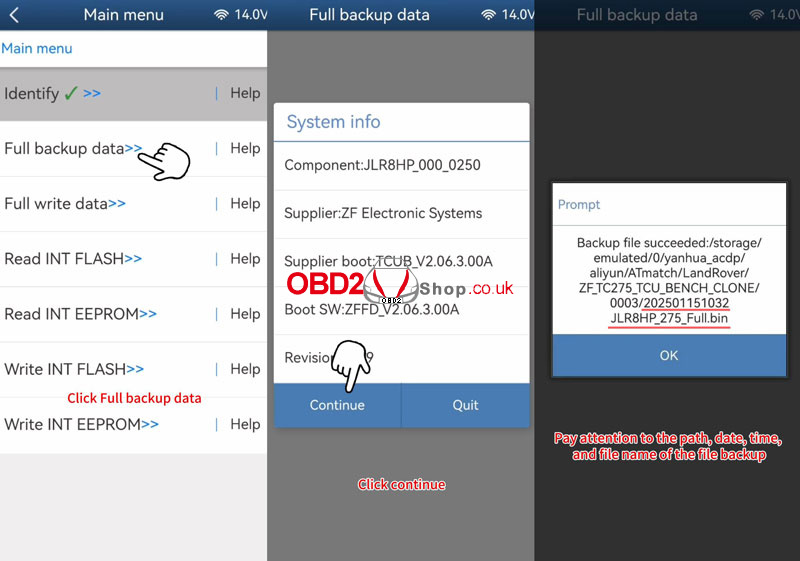
Full backup data >> OK >> Continue >> Continue
Reading chip data, please wait...
Please save chip data.
The backup file succeeded.
*Pay attention to the path, date, time, and file name of the file backup.
Backup chip data finish.
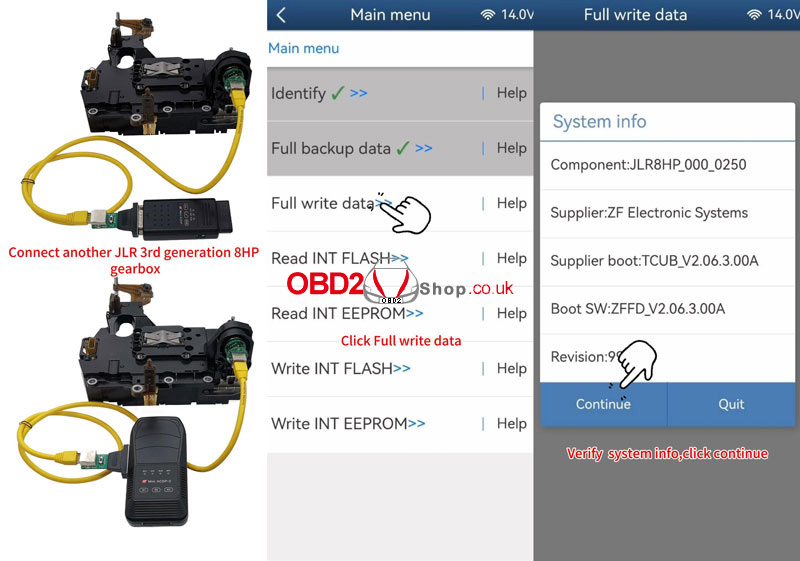
Connect another JLR 3rd generation 8HP gearbox.
Prepare to write the original vehicle data.
Full write data >> OK >> OK
Verify system info, click Continue.
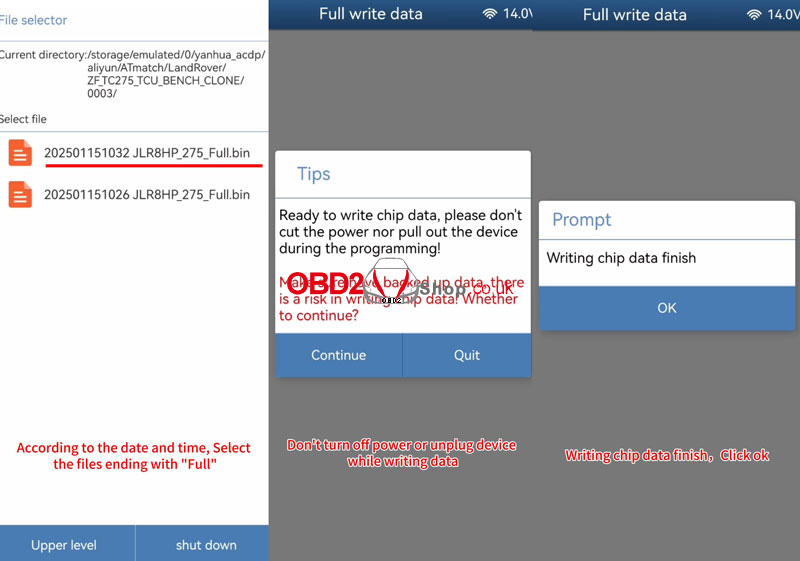
Please select chip data: select the files ending with "Full".
Ready to write chip data, please don't cut the power nor pull out the device during the programming!
Make sure to have backed-up data, there is a risk in writing chip data!
Click Continue.
Writing chip data, please wait...
Writing chip data finish.
www.obd2shop.co.uk
Oznake: yanhua acdp module 36
petak, 17.01.2025.
2019 Volvo S90 Key Programming with Lonsdor K518 PRO
This post will show you how to program a smart key for the 2019 Volvo S90 with the Lonsdor K518 PRO.
Select [IMMO] >> [Volvo] >> [S90] >> [2017-2021] >> [Program smart key].
There are two ways to add a new key, now choose the manually enter a 10-digit CEM security code.
Click "OK".
Now we enter the 10-digit security code. (This part of the security code can be calculated by a third party.)
OK, the 10-digit security code is entered.
Please confirm whether the input is correct and click OK.


We need to turn on the ignition to prevent programming failure after the vehicle is off.
Click OK.
The count of the programmed key is 1.
Please insert the new key into the induction coil.
Now place the new key in the position of the induction coil and click OK.
OK, the count of programmed keys is 2, and if the program is successful, whether to program the next key?
We just need to program one key, so click cancel.
The program is complete, exit.


After exiting, we test the remote control.
The remote control of the two keys is working.
Now let's see if it starts properly.
Hit the brake and push the button.
Ok, the startup was successful.
This car is a hybrid car, so there is no engine sound when you step on the accelerator.
We can rotate the steering wheel, the steering wheel can rotate, which means it's starting properly.
Using K518PRO to program the new key for the 2019 Volvo S90 with the third-party inquiry password is successful.


For more details, you can refer to the video here:
https://youtu.be/L3Rw4Cxm-PU
www.obd2shop.co.uk
Oznake: lonsdor k518 pro
ponedjeljak, 13.01.2025.
Yanhua ACDP Module 36 BMW 3rd Generation 8HP Gearbox Clone
This is a tutorial on how to do a BMW 3rd generation 8HP gearbox clone with Yanhua Mini ACDP 2 + Module 36 by bench.
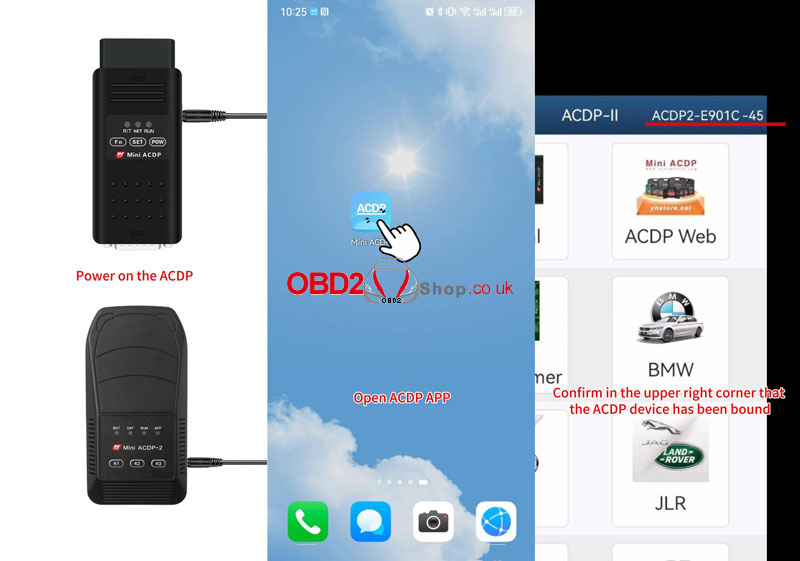
Power on the device, and open the Mini ACDP app.
Confirm the device has been bound.
BMW >> EGS >> 8HP_GEN3 Clone(ZF TC275/TC277)
Connect ACDP to the device properly according to the diagram in "Help".
Click "Identify".
Please use the ACDP standard power adapter(voltage+ 12v, current >= 2.5A).
Please connect ACDP with the gearbox.
Verify system info, click OK.
Identify chip info finish.
Full backup data >> OK >> Continue >> Continue
Reading chip data, please wait...
Please save chip data.
The backup file succeeded.
Connect another BMW 3rd generation 8HP gearbox, and prepare to write the original vehicle data.
Full write data >> OK >> Continue
Verify system info, click Continue.
Please select chip data
(According to the date and time, choose the files ending with "Full".)
Don't turn off the power or unplug the device while writing data.
Writing chip data, please wait...
Writing chip data finish.


www.obd2shop.co.uk
Oznake: yanhua mini acdp 2
petak, 10.01.2025.
OBDSTAR MOTOMASTER vs. MS80 Motorcycle Tool Comparison
OBDSTAR has a newly released OBDSTAR MOTOMASTER Motocycle Scanner. How is it different from the OBDSTAR MS80? Here, we are comparing them from hardware specifications.
MOTOMASTER vs MS80
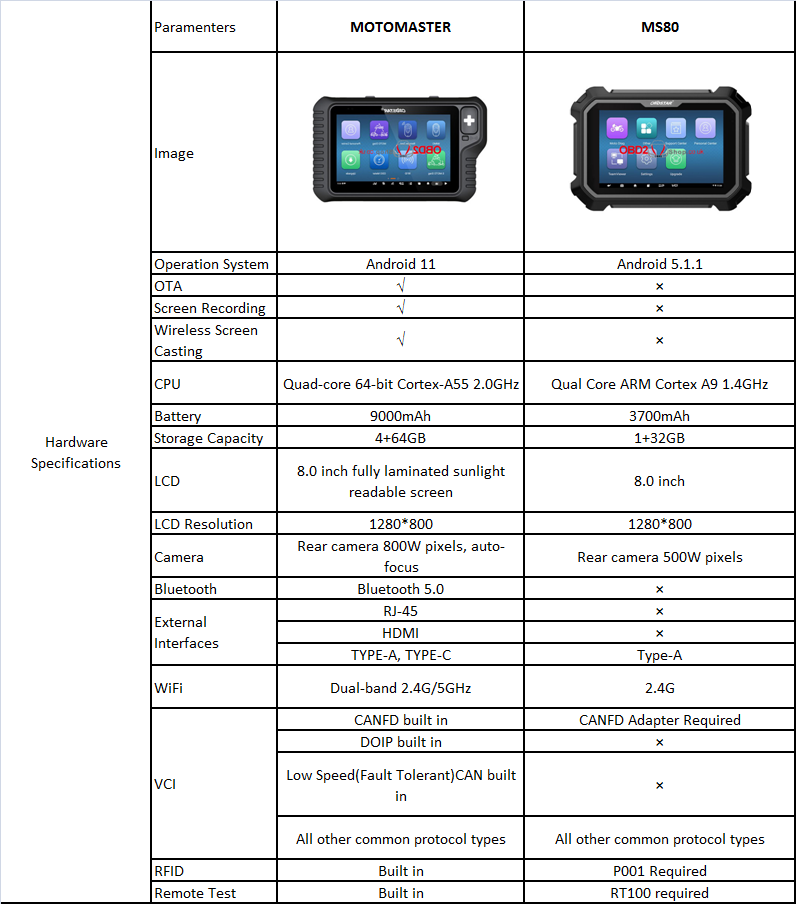
1. Operating System
MOTOMASTER: Android 11
MS80: Android 5.1.1
2. OTA, Screen Recording & Wireless Screen Casting
MOTOMASTER: Supports all three (OTA, screen recording, wireless screencasting).
MS80: Does not support any of these.
3. CPU
MOTOMASTER: Quad-core 64-bit Cortex-A55 (2.0GHz, newer architecture).
MS80: Quad-core ARM Cortex A9 (1.4GHz, older architecture).
4. Battery
MOTOMASTER: 9000mAh (larger capacity).
MS80: 3700mAh (smaller capacity).
5. Storage Capacity
MOTOMASTER: 4GB RAM + 64GB storage.
MS80: 1GB RAM + 32GB storage.
6. Display
MOTOMASTER: 8.0-inch fully laminated, sunlight-readable screen.
MS80: 8.0-inch standard screen.
7. Camera
MOTOMASTER: Rear 800W pixels, autofocus.
MS80: Rear 500W pixels, no autofocus.
8. Bluetooth
MOTOMASTER: Bluetooth 5.0.
MS80: No Bluetooth support.
9. External Interfaces
MOTOMASTER: RJ-45, HDMI, TYPE-A, TYPE-C.
MS80: Only TYPE-A.
10. WiFi
MOTOMASTER: Dual-band (2.4GHz/5GHz).
MS80: Single-band (2.4GHz).
11. Vehicle Communication Interface (VCI)
MOTOMASTER: Built-in CANFD, DOIP, Low-Speed CAN, and other protocols.
MS80: Requires external adapters for CANFD and other protocols.
12. RFID
MOTOMASTER: Built-in RFID.
MS80: Requires external hardware (P001).
13. Remote Test
MOTOMASTER: Built-in support.
MS80: Requires external hardware (RT100).
Summary
MOTOMASTER offers a significantly better operating system, hardware, connectivity, and functionality compared to the MS80, which lacks many features and relies on external adapters for extended capabilities.
www.obd2shop.co.uk
Oznake: obdstar ms80
četvrtak, 02.01.2025.
Xtruck Y006 Manual: CAN-bus Node search
The CAN-bus Node search function of Xtruck Y006 can help find the lost node through the OBD interface which can find the device on the CAN bus. In this post, we will show you how to operate this function.
Step 1. One end of the main test line is connected to the device, and the other end is connected to the vehicle detection port OBD.
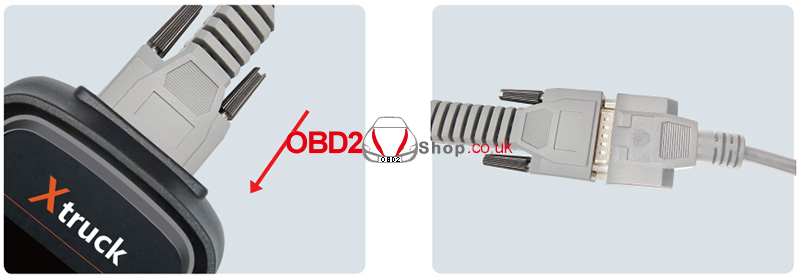
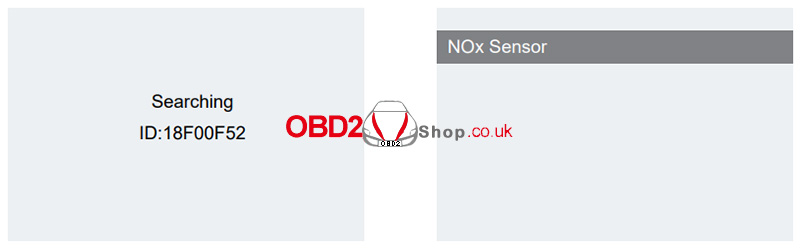
Step 2. If the wiring harness is connected correctly, click the device CAN node to search automatically.
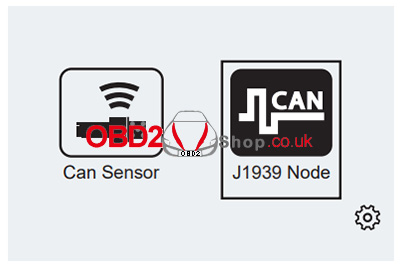
Ď Wait for a few seconds, and the device will automatically search for the vehicle's fault-free CAN module.
www.obd2shop.co.uk
Oznake: Xtruck Y006
srijeda, 01.01.2025.
How to use OBDSTAR V2 Converter for ECU Diagnosis?
Many friends are asking what this OBDSTAR V2 Converter is used for. Here we'll introduce how to use it today.
The OBDSTAR special adapter is mainly used with third-party equipment. This adapter connects the TCM dedicated connector to a test platform so that we can perform diagnostics or tests on the ECU.
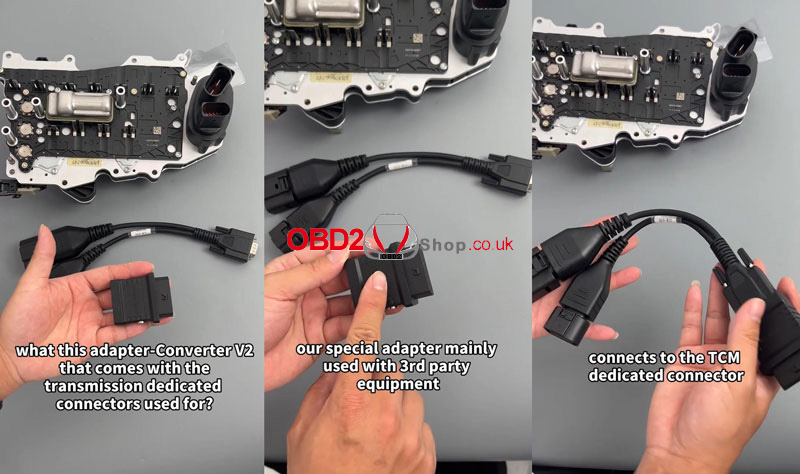
We're gonna show how to diagnose with a V2 adapter.
The OBDSTAR V2 Adapter supports an external independent power supply. We can make a connection like this:
1) Connect the entire Bluetooth head here.
2) Supply 12 volts.
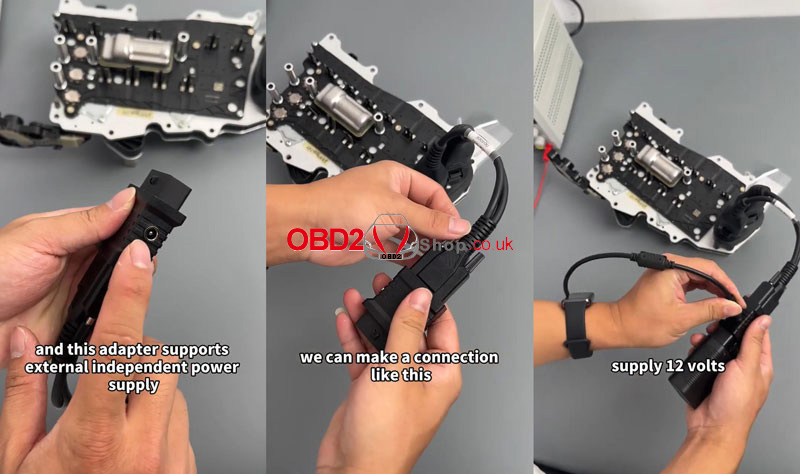
Then, we can diagnose this ECU module through a dedicated test platform. After transferring, the adapter makes this connector into the test platform.
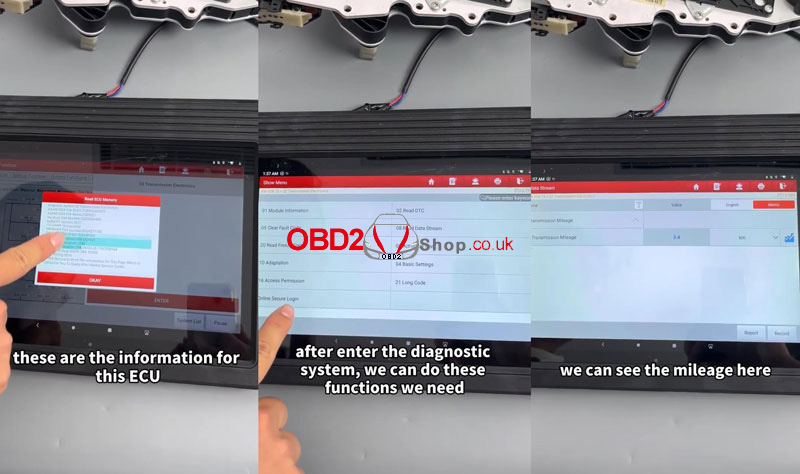
Now we enter the diagnostic system, we can see the ECU information. It's a DQ400E transmission ECU. After entering the diagnostic system, we can continue to do more functions like checking mileage as needed.
www.obd2shop.co.uk
Oznake: obdsrtar v2 converter

| < | siječanj, 2025 | > | ||||
| P | U | S | Č | P | S | N |
| 1 | 2 | 3 | 4 | 5 | ||
| 6 | 7 | 8 | 9 | 10 | 11 | 12 |
| 13 | 14 | 15 | 16 | 17 | 18 | 19 |
| 20 | 21 | 22 | 23 | 24 | 25 | 26 |
| 27 | 28 | 29 | 30 | 31 | ||
Svibanj 2026 (1)
Veljača 2026 (2)
Siječanj 2026 (19)
Prosinac 2025 (22)
Studeni 2025 (21)
Listopad 2025 (20)
Rujan 2025 (21)
Kolovoz 2025 (8)
Srpanj 2025 (13)
Lipanj 2025 (9)
Svibanj 2025 (12)
Travanj 2025 (10)
Ožujak 2025 (12)
Veljača 2025 (14)
Siječanj 2025 (8)
Prosinac 2024 (6)
Studeni 2024 (6)
Listopad 2024 (4)
Rujan 2024 (7)
Kolovoz 2024 (14)
Srpanj 2024 (12)
Lipanj 2024 (10)
Svibanj 2024 (13)
Travanj 2024 (12)
Ožujak 2024 (11)
Veljača 2024 (2)
Siječanj 2024 (10)
Prosinac 2023 (8)
Studeni 2023 (6)
Listopad 2023 (7)
Rujan 2023 (9)
Kolovoz 2023 (6)
Srpanj 2023 (10)
Lipanj 2023 (4)
Veljača 2023 (8)
Siječanj 2023 (14)
Prosinac 2022 (13)
Studeni 2022 (14)
Listopad 2022 (18)
Rujan 2022 (9)
Kolovoz 2022 (16)
Srpanj 2022 (11)
Lipanj 2022 (14)
Svibanj 2022 (13)
Travanj 2022 (12)
Ožujak 2022 (12)
Veljača 2022 (13)
Siječanj 2022 (10)
Dnevnik.hr
Gol.hr
Zadovoljna.hr
Novaplus.hr
NovaTV.hr
DomaTV.hr
Mojamini.tv