OBD2 tools on OBD2shop.co.uk https://blog.dnevnik.hr/obd2shop
četvrtak, 28.11.2024.
How to install Yanhua R7F701401/21-5D Interface board
This post will show you how to install the Yanhua R7F701401/21-5D Interface board.
Here are the steps:
1. Find the interface board installation area on the instrument according to the visual positioning mark on the interface board.
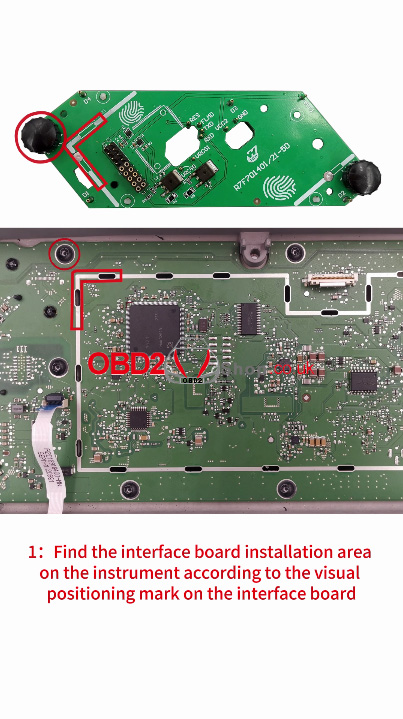
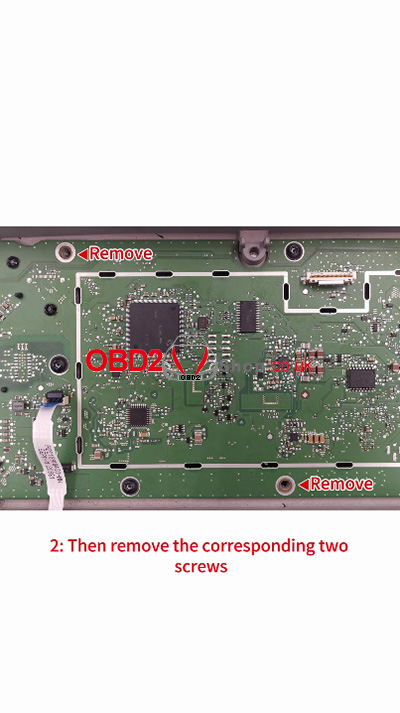
2. Then remove the corresponding two screws, and locate the D1-D4 positioning holes correctly on the instrument panel.
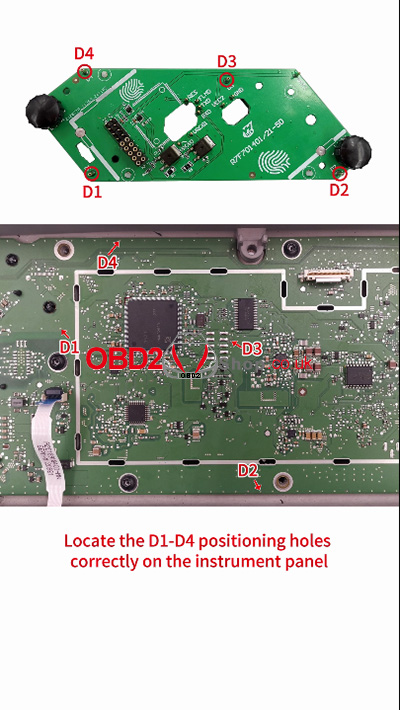
3. Align the interface board with the screw fastener holes and D1, D2 positioning points.
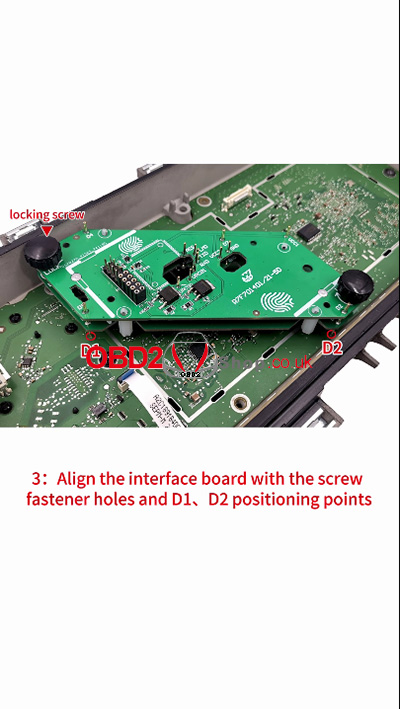
4. Press down on the interface board, tighten the locking screw, and the installation is finished.
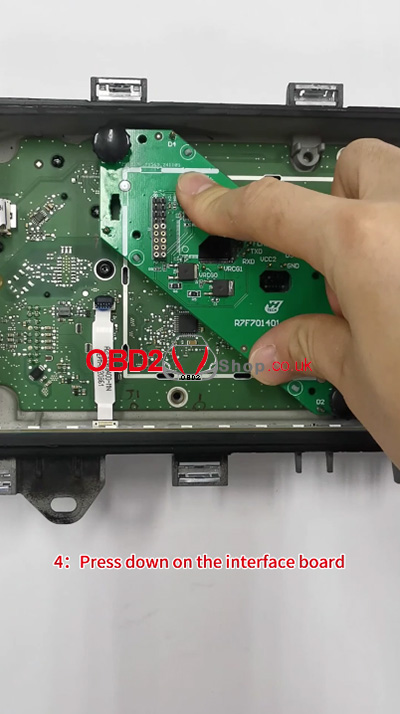
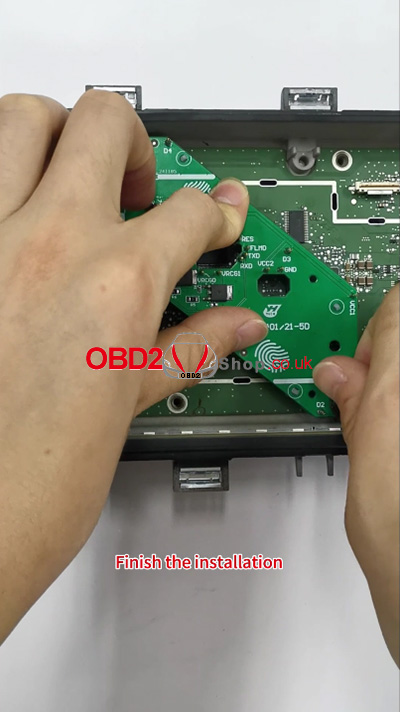
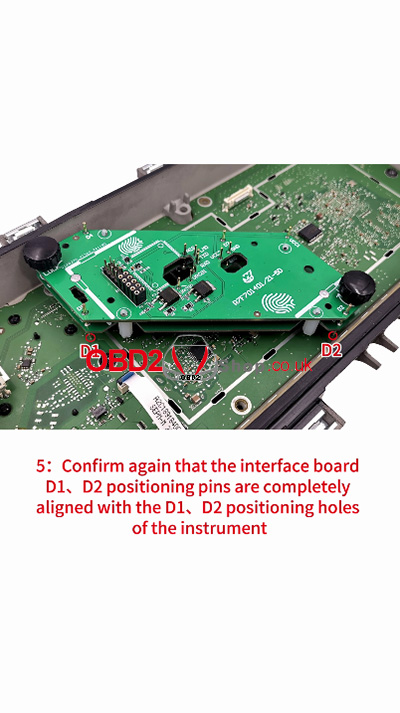
5. Confirm again that the interface board D1, D2 positioning pins are completely aligned with the D1, D2 positioning holes of the instrument.
For more technical service support, please visit www.obd2shop.co.uk.
Oznake: yanhua acdp board
(Solved) Yanhua ACDP Software App Can Not be Started
Problem Description: I downloaded ACDP 2 software from Yanhua's official website, but after opening it, I got the message "This application cannot be started." What should I do to use this app normally?
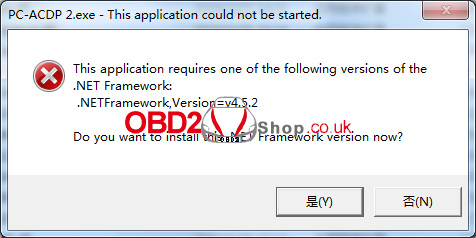
Solution: Download the "Running environment" in the picture, unzip it, and install the program. Then you can use the ACDP 2 app normally.
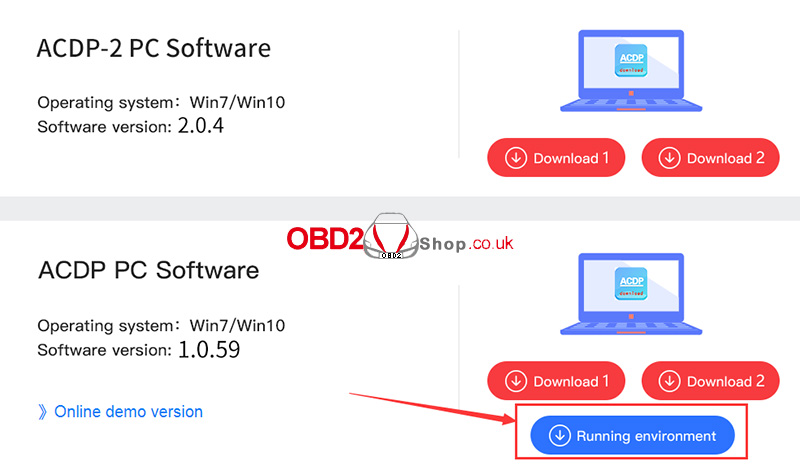

For more technical service support, please visit www.obd2shop.co.uk.
Oznake: yanhua acdp app
utorak, 26.11.2024.
Xhorse Multi-Prog + GODIAG GT107 Read Audi A3 DQ250 EGS
This is a tutorial on how to use Xhorse Multi-Prog&GODIAG GT107 to read VAG MQB DQ250 data by BENCH. Meanwhile, you'll need the new GODIAG G-V ECU Cable to connect them for reading, writing, or cloning ECU.

Follow the wiring diagram to connect Multi-Prog, DQ250(02E.0D9) and GODIAG.


Power on Multi-Prog and open software.
Device >> VAG_TEMIC_DQ250-MQB(Audi->A3) >> OK
INT EEPROM >> Read
Turn on GT107 power.
I am reading success.
Save the EEPROM file.


INT FLASH >> Read
Reading success.

www.obd2shop.co.uk
Oznake: xhorse multi prog
srijeda, 20.11.2024.
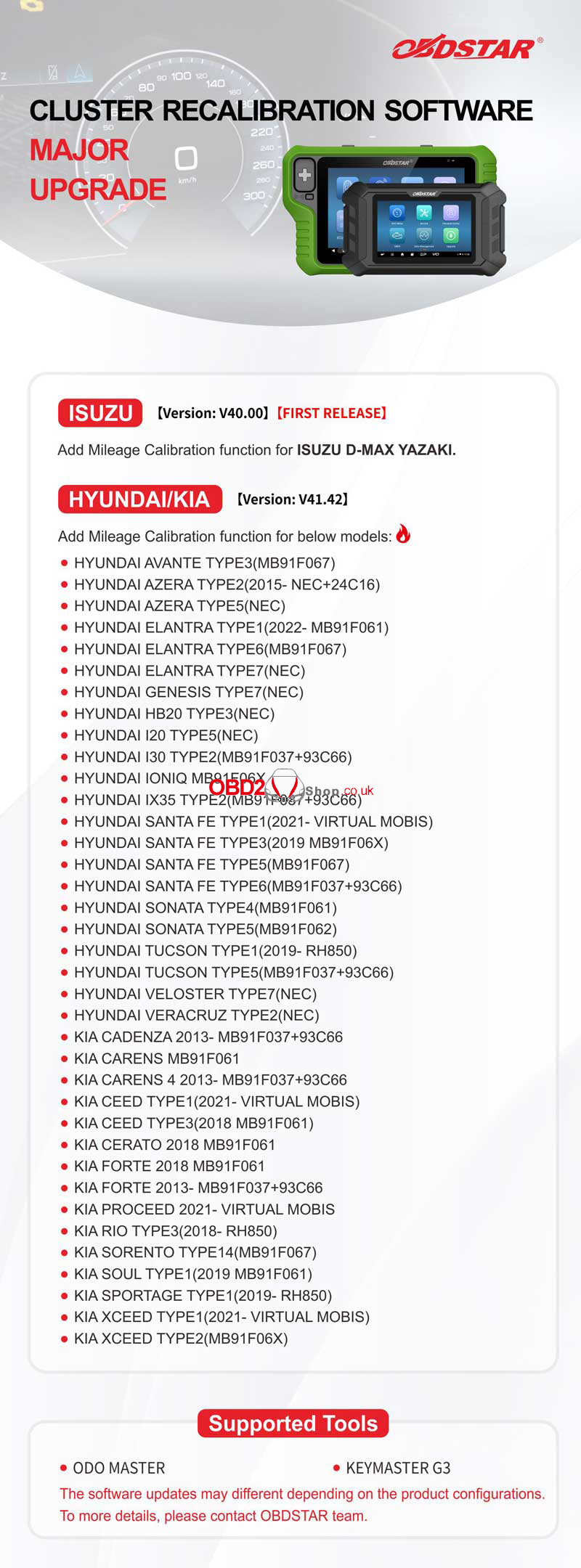
OBDSTAR ISUZU/HYUNDAI/KIA Cluster Recalibration Upgrade
OBDSTAR has released ISUZU/HYUNDAI/KIA Cluster Recalibration Software Major Upgrade this month. Now it's available on OBDSTAR ODO Master&X300 Classic G3. Please update your device in time for the latest features.
Upgrade Content
ISUZU Version: V40.00 [First Release]
Add mileage calibration function for ISUZU D-MAX YAZAKI.
HYUNDAI/KIA Version: V41.42
Add mileage calibration function for the below models:
HYUNDAI AVANTE TYPE3(MB91F067)
HYUNDAI AZERA TYPE2(2015-NEC+24C16)
HYUNDAI AZERA TYPE5(NEC)
HYUNDAI ELANTRA TYPE1(2022-MB91F061)
HYUNDAI ELANTRA TYPE6(MB91F067)
HYUNDAI ELANTRA TYPE7(NEC)
HYUNDAI GENESIS TYPE7(NEC)
HYUNDAI HB20 TYPE3(NEC)
HYUNDAI I20 TYPE5(NEC)
HYUNDAI 130 TYPE2(MB91F037+93C66)
HYUNDAI IONIQ MB91F06X
HYUNDAI IX35 TYPE2(MB91F037+93C66)
HYUNDAI SANTA FE TYPE1(2021-VIRTUAL MOBIS)
HYUNDAI SANTA FE TYPE3(2019 MB91F06X)
HYUNDAI SANTA FE TYPE5(MB91F067)
HYUNDAI SANTA FE TYPE6(MB91F037+93C66)
HYUNDAI SONATA TYPE4(MB91F061)
HYUNDAI SONATA TYPE5(MB91F062)
HYUNDAI TUCSON TYPE1(2019-RH850)
HYUNDAI TUCSON TYPE5(MB91F037+93C66)
HYUNDAI VELOSTER TYPE7(NEC)
HYUNDAI VERACRUZ TYPE2(NEC)
KIA CADENZA 2013-MB91F037+93C66
KIA CARENS MB91F061
KIA CARENS 4 2013-MB91F037+93C66
KIA CEED TYPE1(2021-VIRTUAL MOBIS)
KIA CEED TYPE3(2018 MB91F061)
KIA CERATO 2018 MB91F061
KIA FORTE 2018 MB91F061
KIA FORTE 2013-MB91F037+93C66
KIA PROCEED 2021-VIRTUAL MOBIS
KIA RIO TYPE3(2018-RH850)
KIA SORENTO TYPE14(MB91F067)
KIA SOUL TYPE1(2019 MB91F061)
KIA SPORTAGE TYPE1(2019-RH850)
KIA XCEED TYPE1(2021-VIRTUAL MOBIS)
KIA XCEED TYPE2(MB91F06X)
Supported Tools
ODO Master
Key Master G3
www.obd2shop.co.uk
Oznake: obdstar update
ponedjeljak, 18.11.2024.
Alientech KESS V3 2024 Black Friday Sale: Save 50% Off!
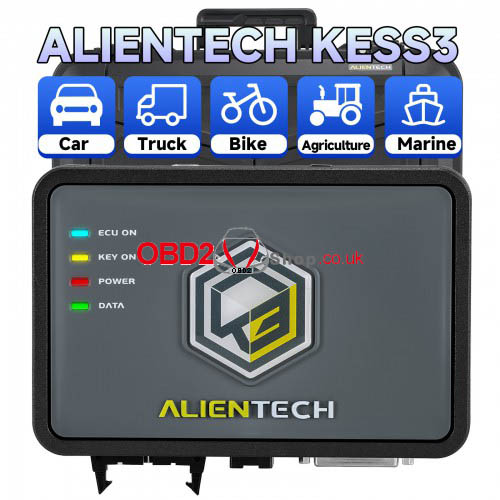
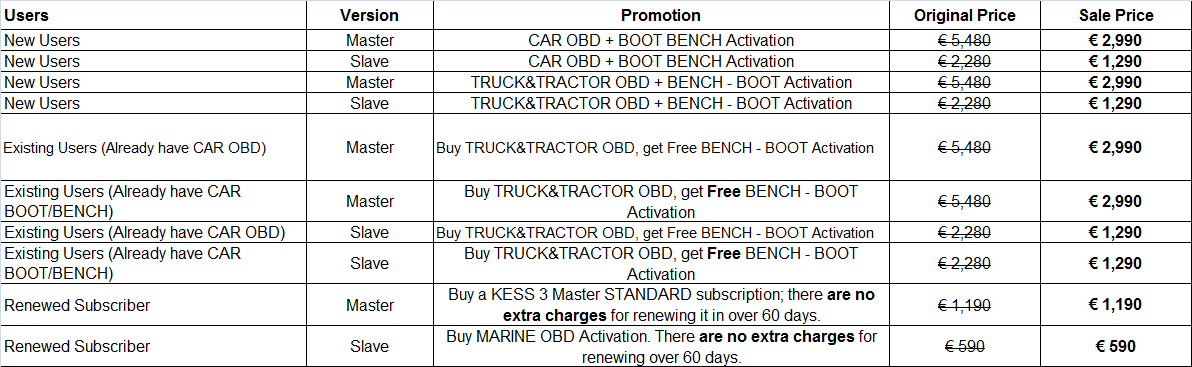
We're excited to inform you that the Alientech KESS V3 2024 Back Friday Sale has been released: save up to 50% off! The sale is valid from November 18th to December 3rd, 2024. This is the last sale of the year, so don't miss it!
Event Details
Contact Info
Email: Sales@OBD2shop.co.uk
WhatsApp: +86 13983755934
Telephone: +86 13983755934
WeChat: +86 13983755934
Skype: OBD2tool.co.uk
www.obd2shop.co.uk
Oznake: kess v3
srijeda, 13.11.2024.
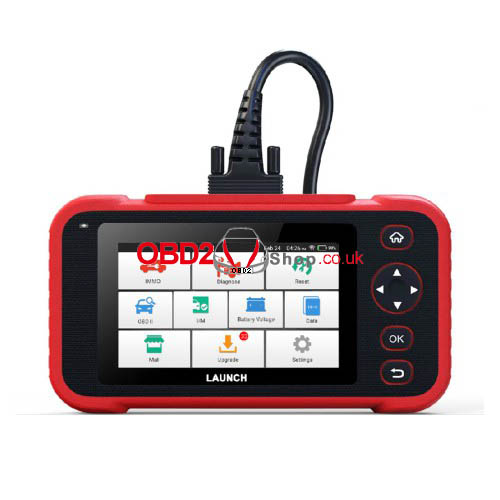
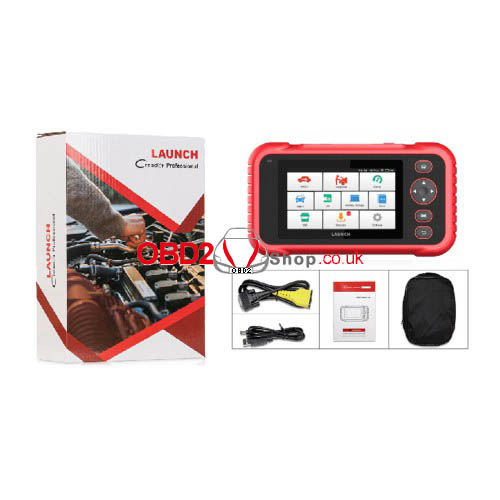
LAUNCH CRP IMMO Creader Diagnostic Scanner FAQs
LAUNCH CRP IMMO Creader Diagnostic Scanner is a 5-inch tablet based on Android 7.1 to integrate the functions and advantages of the Creader Professional 123i series. Here' collecting the most frequently asked questions and answers for reference.
Q1: System halts when reading data stream. What is the reason?
A: It may be caused by a slackened connector. Please turn this tool off, firmly connect the connector, and switch it on again.
Q2: Does the screen of the LAUNCH CRP main unit flash at engine ignition start?
A: Caused by electromagnetic disturbing, and this is a normal phenomenon.
Q3: There is no response when communicating with the on-board computer?
A: Please confirm the proper voltage of the power supply and check if the throttle has been closed, the transmission is in the neutral position, and the water is in the proper temperature.
Q4: What to do if the system fails to start auto VIN detection?
A: Please check the following possible reasons:
• Whether the tool is properly connected to the vehicle’s DLC.
• Whether the “Automatic detection on Connect” switch is OFF. If yes, slide it to ON.
Q5: Why are there so many fault codes?
A: Usually, it’s caused by poor connection or fault circuit grounding.
Q6: How to upgrade the LAUNCH CRP system software?
A: 1. Switch the LAUNCH CRP tool on and ensure a stable internet connection.
2. Tap “Setting” on the Job Menu, select “About” -> “Version”, and tap “Detect the System Version” to enter the system upgrading page.
3. Follow the on-screen instructions step by step to finish the process. Depending on the internet speed, it may take several minutes; please be patient. After the upgrade, the tool will automatically restart and enter the Job menu.
A: Please recharge it for at least 3 hours until the power LED lights up, then it can be switched on.
www.obd2shop.co.uk
Oznake: launch crp immo

| < | studeni, 2024 | > | ||||
| P | U | S | Č | P | S | N |
| 1 | 2 | 3 | ||||
| 4 | 5 | 6 | 7 | 8 | 9 | 10 |
| 11 | 12 | 13 | 14 | 15 | 16 | 17 |
| 18 | 19 | 20 | 21 | 22 | 23 | 24 |
| 25 | 26 | 27 | 28 | 29 | 30 | |
Svibanj 2026 (1)
Siječanj 2026 (19)
Prosinac 2025 (22)
Studeni 2025 (21)
Listopad 2025 (20)
Rujan 2025 (21)
Kolovoz 2025 (8)
Srpanj 2025 (13)
Lipanj 2025 (9)
Svibanj 2025 (12)
Travanj 2025 (10)
Ožujak 2025 (12)
Veljača 2025 (14)
Siječanj 2025 (8)
Prosinac 2024 (6)
Studeni 2024 (6)
Listopad 2024 (4)
Rujan 2024 (7)
Kolovoz 2024 (14)
Srpanj 2024 (12)
Lipanj 2024 (10)
Svibanj 2024 (13)
Travanj 2024 (12)
Ožujak 2024 (11)
Veljača 2024 (2)
Siječanj 2024 (10)
Prosinac 2023 (8)
Studeni 2023 (6)
Listopad 2023 (7)
Rujan 2023 (9)
Kolovoz 2023 (6)
Srpanj 2023 (10)
Lipanj 2023 (4)
Veljača 2023 (8)
Siječanj 2023 (14)
Prosinac 2022 (13)
Studeni 2022 (14)
Listopad 2022 (18)
Rujan 2022 (9)
Kolovoz 2022 (16)
Srpanj 2022 (11)
Lipanj 2022 (14)
Svibanj 2022 (13)
Travanj 2022 (12)
Ožujak 2022 (12)
Veljača 2022 (13)
Siječanj 2022 (10)
Srpanj 2021 (1)
Dnevnik.hr
Gol.hr
Zadovoljna.hr
Novaplus.hr
NovaTV.hr
DomaTV.hr
Mojamini.tv