OBD2 tools on OBD2shop.co.uk https://blog.dnevnik.hr/obd2shop
petak, 30.01.2026.
New Arrival: Yanhua ACDP BMW BDC2–LCD Encrypted Key Copy Kit
The Yanhua Mini ACDP BMW Encrypted Chip Key Copy Interface Board Kit is a professional solution designed for copying and writing BMW encrypted key data safely and efficiently. With a no-soldering, no-risk design, this kit significantly simplifies BMW key programming operations while minimizing the possibility of damage.
Note: This kit must be used together with the ACDP Module 38 license, and is compatible with ACDP and ACDP2 devices.
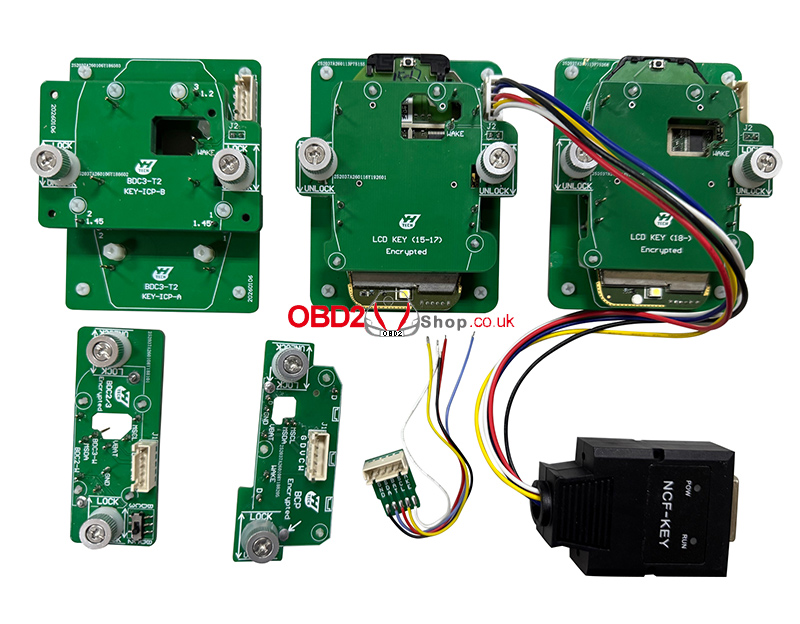
Key Features:
No soldering required – plug-and-play operation
No risk of damage to the original key or board
Supports BMW BDC2, BDC3, BCP, and LCD encrypted chip keys
Works seamlessly with Yanhua Mini ACDP / ACDP2
Designed for professional locksmiths and automotive technicians
Supported Functions
The interface board kit supports flexible key data writing across multiple BMW key types:
1. The BCD2 working key data can be written to original BDC2, BDC3, BCP, and LCD keys.
2. The BCD3 working key data can be written to original BDC2, BDC3, BCP, and LCD keys.
3. The LCD working key data can be written to the original BDC2, BDC3, BCP, and LCD keys.
4. The BCP (without UWB) working key data can be written to the original BDC2, BDC3, BCP, and LCD keys.
5. The BCP (with UWB) working key data can only be written to the original BCP (with UWB) keys.
Supported BMW Encrypted Key Types
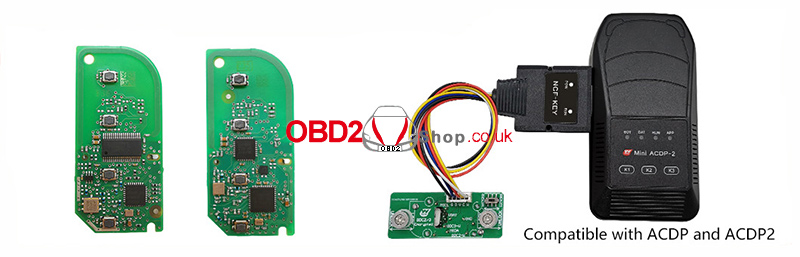
BMW BDC2 / BDC3 Encrypted Chip Keys
The kit supports secure data copying for BMW BDC2 and BDC3 encrypted chip keys using the interface board and ACDP device.
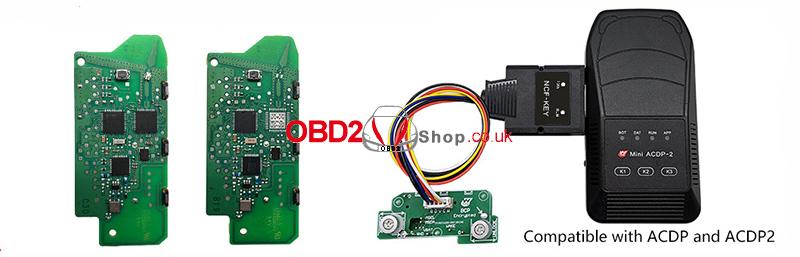
BMW BCP Encrypted Chip Keys
Both BCP keys without UWB and BCP keys with UWB are supported, with a clear distinction to ensure correct and safe data writing.
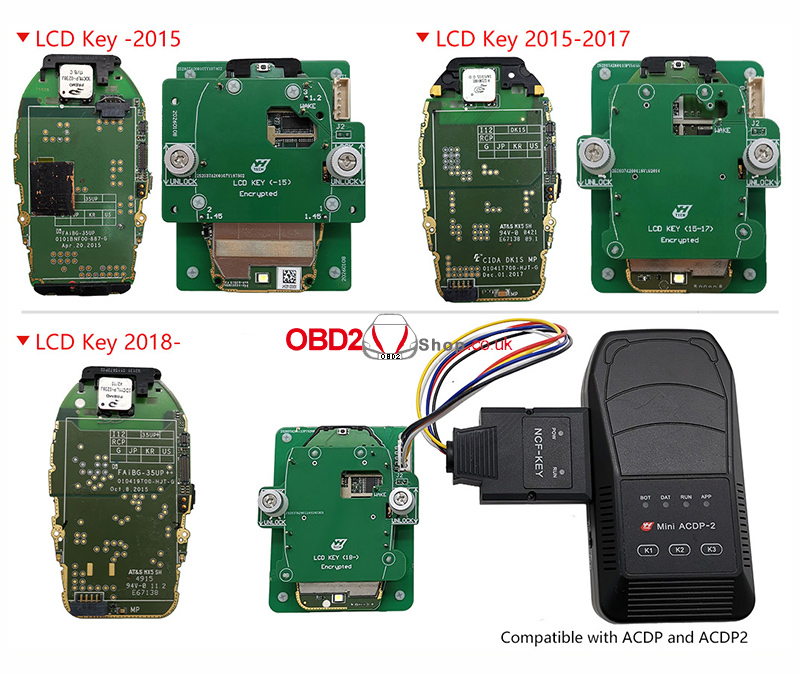
BMW LCD Encrypted Chip Keys
Compatible with multiple generations of BMW LCD keys, including:
LCD Key (before 2015)
LCD Key (2015–2017)
LCD Key (2018 and later)
Conclusion
The Yanhua Mini ACDP BMW BDC2/BDC3/BCP/LCD Encrypted Chip Key Copy Interface Board Kit is a reliable and efficient tool for modern BMW key programming. Its no-soldering design, wide compatibility, and precise key data handling make it an essential solution for professionals working with BMW encrypted keys.
For best results, ensure the ACDP Module 38 license is activated before use.
www.obd2shop.co.uk
Oznake: yanhua acdp bmw
četvrtak, 25.12.2025.
Yanhua ACDP BMW G Series Display Key Clone Now Supported
We are pleased to announce an upgrade to the Yanhua Mini ACDP system: it now supports cloning for BMW G Series smart display keys. This enhancement expands your diagnostic and key programming capabilities, allowing you to serve a wider range of BMW vehicles.
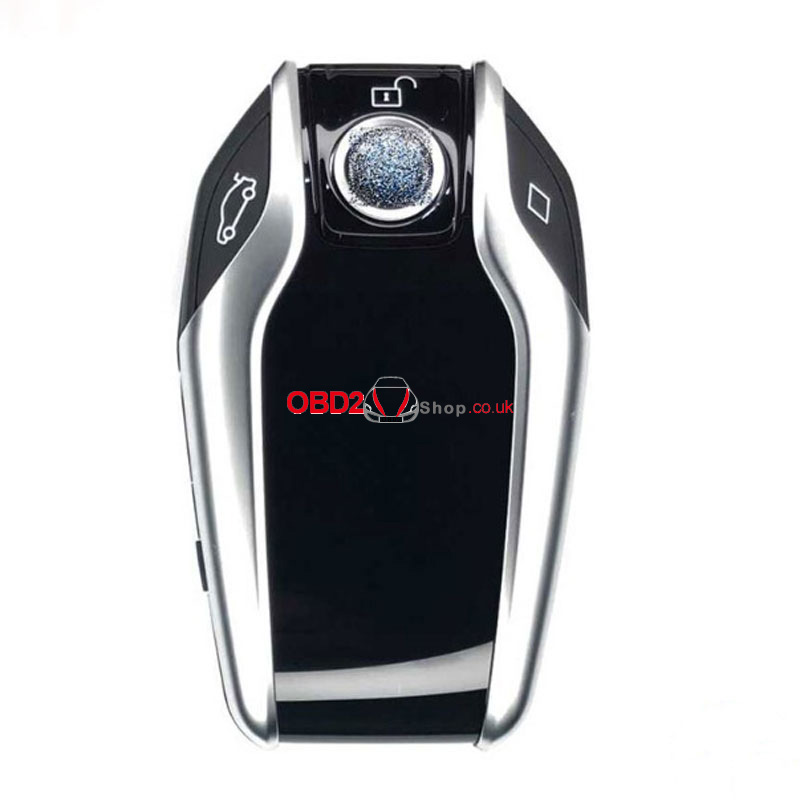
Key Features of the Update:
1. New Compatibility:
Clone BMW G Series smart display keys (in addition to existing functions).
2. Required Components:
YANHUA Mini ACDP 2
Module 38 license activation.
BMW BDC3/BCP Interface Board
3. How It Works:
The cloning process is performed through the BMW BDC3 menu. A dedicated display key copy option will be introduced in upcoming software releases for even more streamlined operation.
Wiring Support:
Refer to the included display key wiring diagrams for the correct setup and reliable performance.
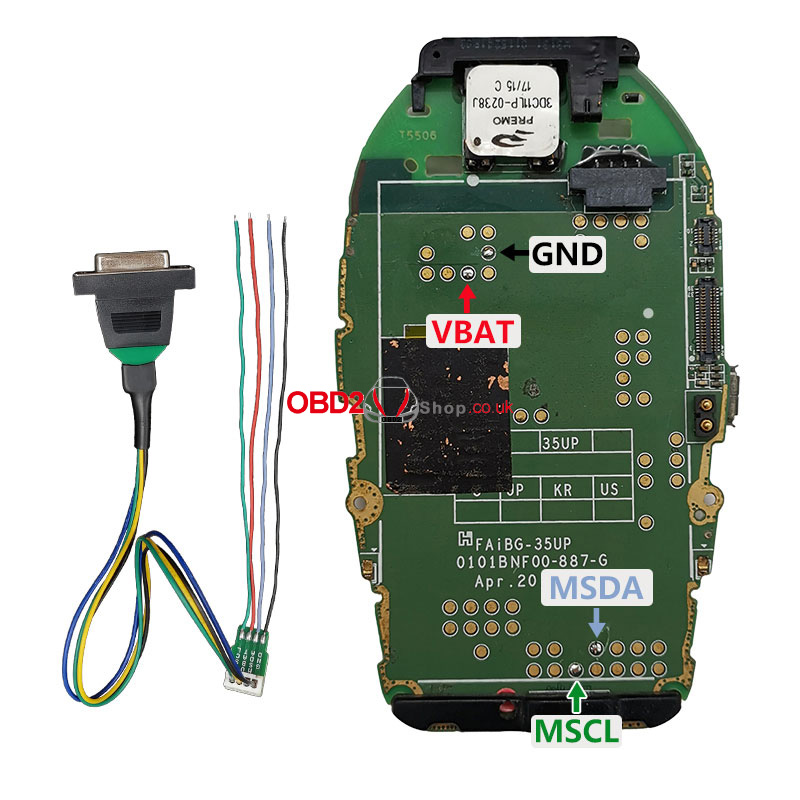
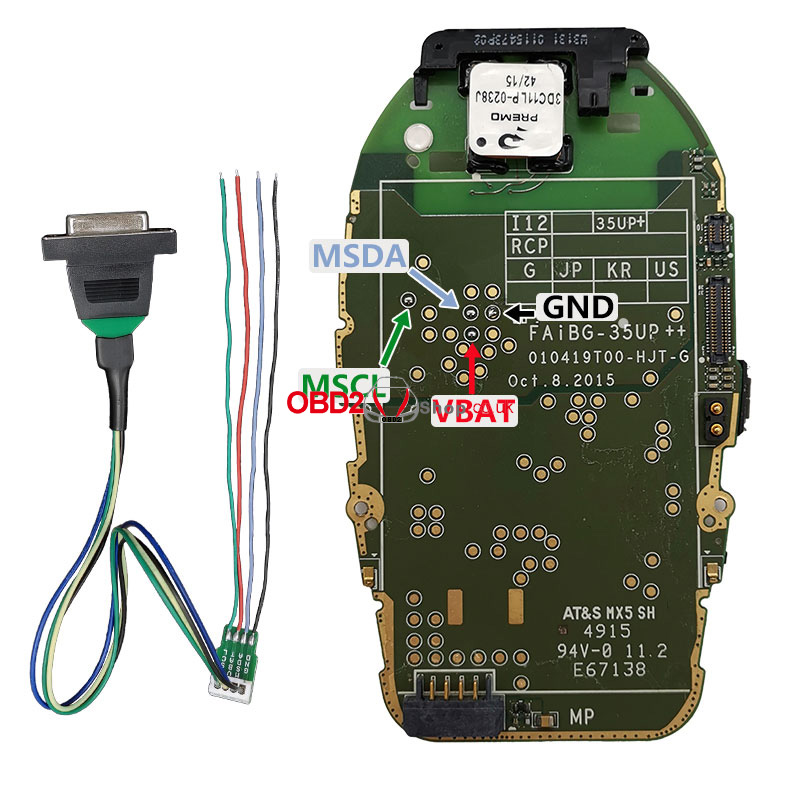

This update reinforces Yanhua ACDP's commitment to providing advanced, user-friendly solutions for automotive locksmiths and technicians. Stay ahead in the industry with tools that keep pace with the evolving technology of vehicles.
For more information, updates, and support, visit our website.
www.obd2shop.co.uk
Oznake: yanhua acdp bmw
utorak, 18.11.2025.
How to Copy BMW BDC3 ICP Keys with YANHUA Mini ACDP?
Learn how to copy BMW BDC3 ICP keys easily with the YANHUA Mini ACDP or Mini ACDP-2. This guide walks you through the process step by step.
Before You Begin - Check Your Software Version
Make sure your software is up to date before starting:
ACDP: Version 1.0.64 or higher
ACDP-2: Version 2.0.8 or higher
Android APP: Version 3.0.141 or higher
IOS APP: Version 3.6.4 or higher
You'll also need:
ACDP Module 38
BMW BDC3/BCP Key Copying Interface Board Kit
Check Operation Video:
https://www.youtube.com/watch?v=JyI6Zwwz6Fg
Step 1: Identify the Key
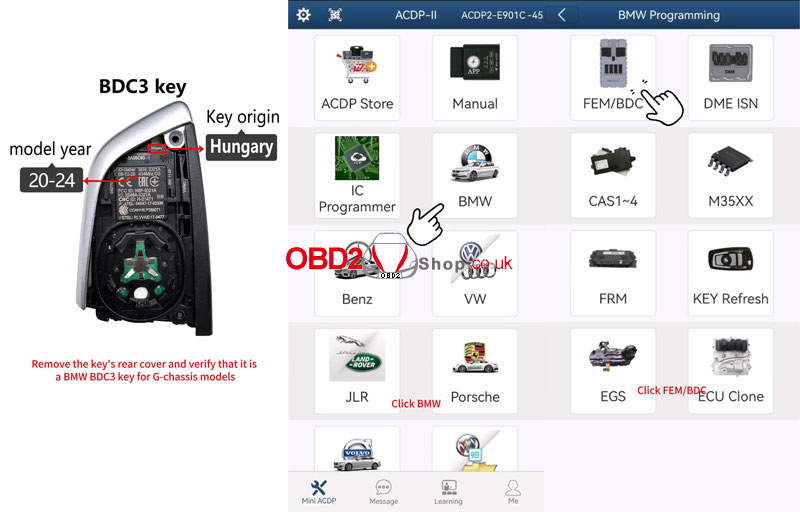
Remove the rear cover of the key and confirm it is a BMW BDC3 key used in G-chassis models made in Hungary between 2020 and 2024.
Step 2: Read the Original Key Data
1. Connect the ACDP to the BAV-key adapter and place the original car key into the adapter.
2. Go to: BMW ’ FEM/BDC ’ IMMO/Mileage ’ BDC3/BCP ICP CopyKey ’ Special Function.
3. Select Identify key info by BAV Adapter, then save the key data.
4. Verify the key information displayed.
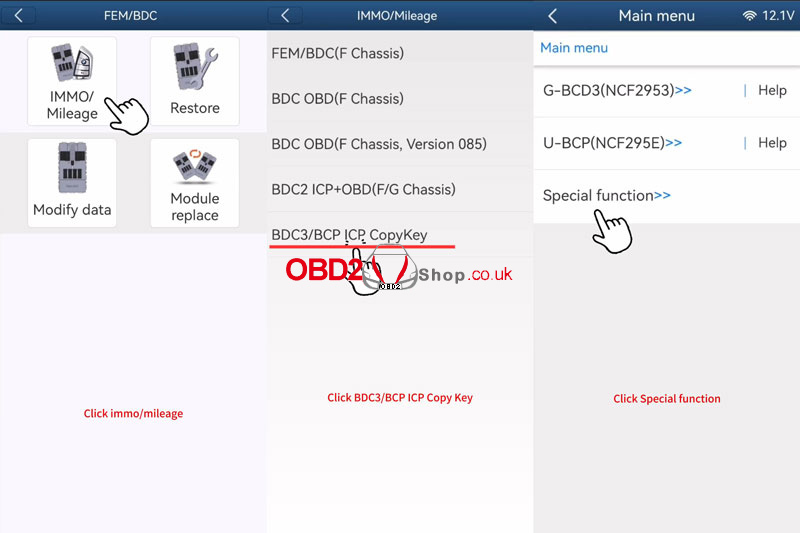
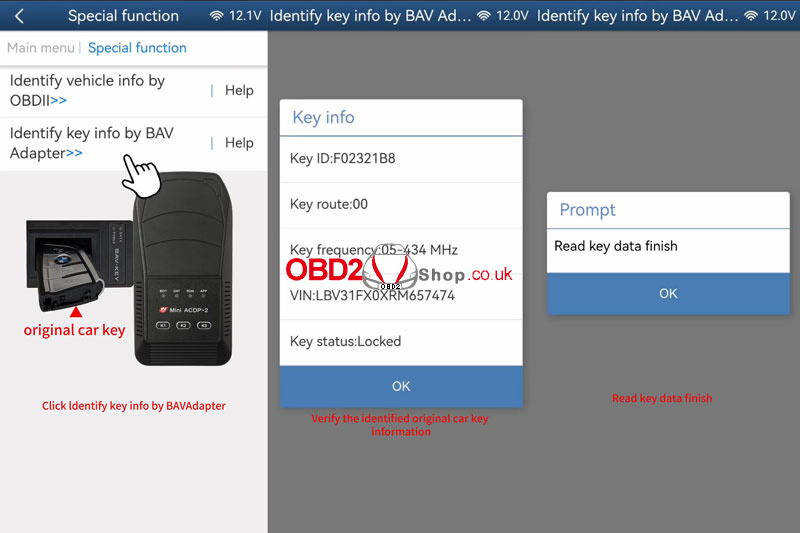
Step 3: Backup Original Key Data
1. Connect the original key, the BDC3 KEY-ICP Interface Board, and the ACDP.
2. Select G. BDC3(NCF2953) ’ Read Orig-Key Data.
3. Confirm the key details and wait for the backup to complete.
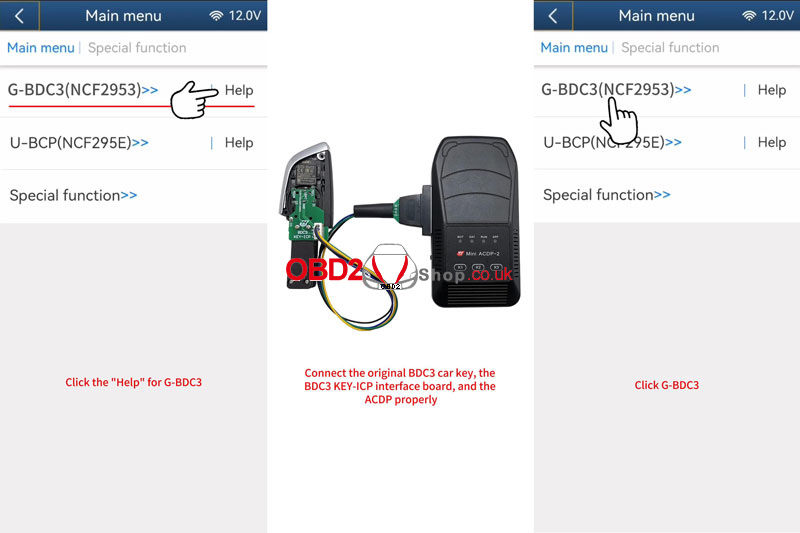
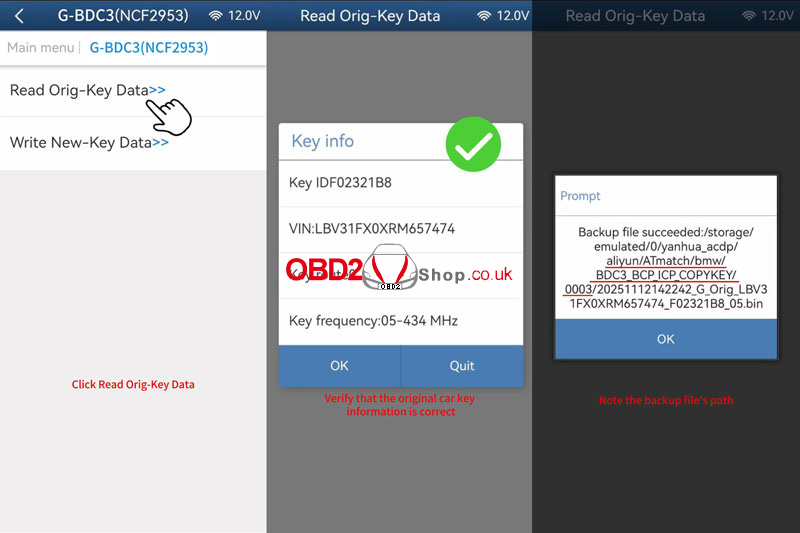
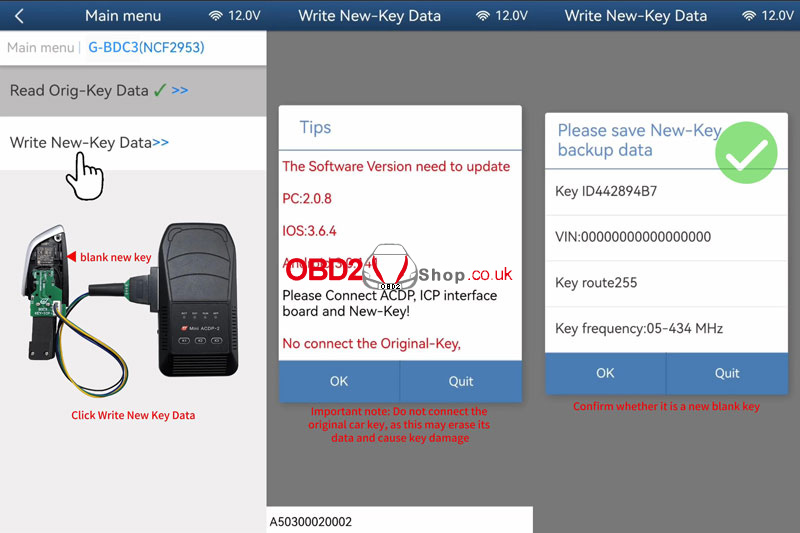
Step 4: Write Data to the New Key
1. Replace the original key with a new blank key.
2. Choose Write New-Key Data.
3. Important: Do not reconnect the original key during this step, as it may get erased.
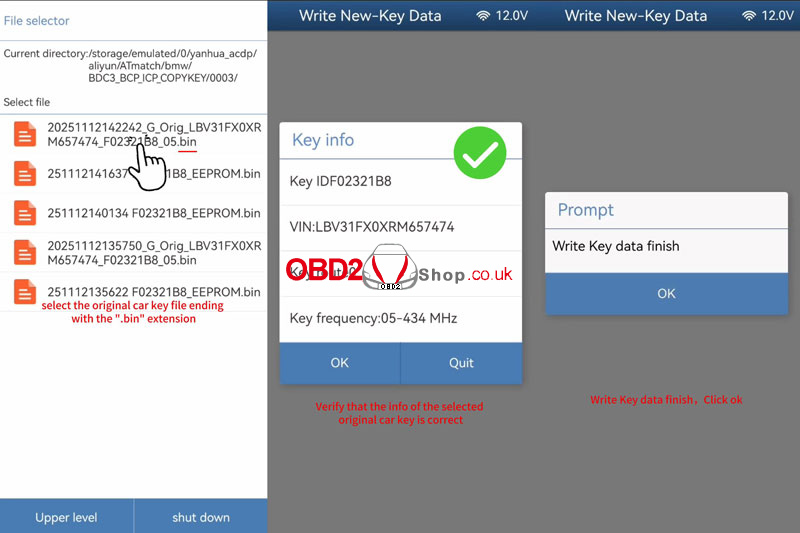
4. Select the original key backup file (with .bin extension) and confirm the details.
5. Wait for the writing process to finish.
Step 5: Verify the Copied Key
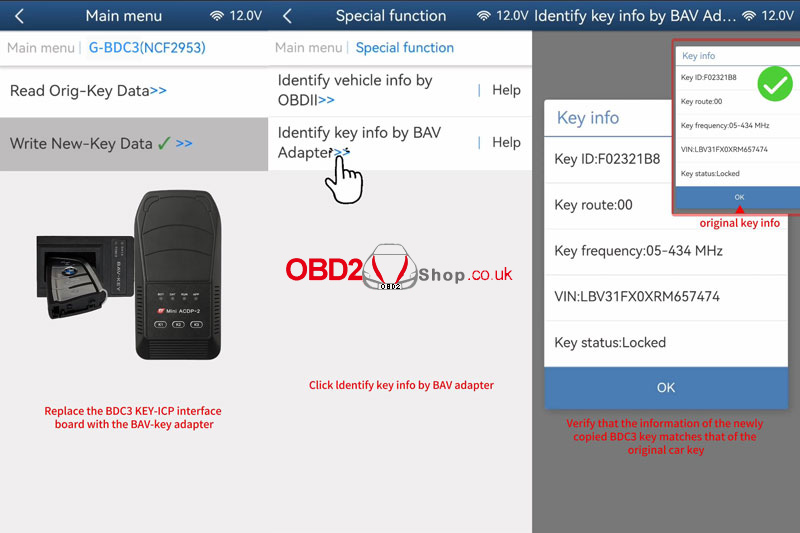
1. Switch back to the BAV-key adapter and insert the new copied key.
2. Use Special Function ’ Identify key info by BAV Adapter.
3. Confirm that the new key’s information matches the original.
4. Get in the car to test the keys.
Done!
You have successfully copied a BMW BDC3 key using the YANHUA Mini ACDP.
www.obd2shop.co.uk
Oznake: yanhua acdp bmw

| < | siječanj, 2026 | |||||
| P | U | S | Č | P | S | N |
| 1 | 2 | 3 | 4 | |||
| 5 | 6 | 7 | 8 | 9 | 10 | 11 |
| 12 | 13 | 14 | 15 | 16 | 17 | 18 |
| 19 | 20 | 21 | 22 | 23 | 24 | 25 |
| 26 | 27 | 28 | 29 | 30 | 31 | |
Svibanj 2026 (1)
Siječanj 2026 (19)
Prosinac 2025 (22)
Studeni 2025 (21)
Listopad 2025 (20)
Rujan 2025 (21)
Kolovoz 2025 (8)
Srpanj 2025 (13)
Lipanj 2025 (9)
Svibanj 2025 (12)
Travanj 2025 (10)
Ožujak 2025 (12)
Veljača 2025 (14)
Siječanj 2025 (8)
Prosinac 2024 (6)
Studeni 2024 (6)
Listopad 2024 (4)
Rujan 2024 (7)
Kolovoz 2024 (14)
Srpanj 2024 (12)
Lipanj 2024 (10)
Svibanj 2024 (13)
Travanj 2024 (12)
Ožujak 2024 (11)
Veljača 2024 (2)
Siječanj 2024 (10)
Prosinac 2023 (8)
Studeni 2023 (6)
Listopad 2023 (7)
Rujan 2023 (9)
Kolovoz 2023 (6)
Srpanj 2023 (10)
Lipanj 2023 (4)
Veljača 2023 (8)
Siječanj 2023 (14)
Prosinac 2022 (13)
Studeni 2022 (14)
Listopad 2022 (18)
Rujan 2022 (9)
Kolovoz 2022 (16)
Srpanj 2022 (11)
Lipanj 2022 (14)
Svibanj 2022 (13)
Travanj 2022 (12)
Ožujak 2022 (12)
Veljača 2022 (13)
Siječanj 2022 (10)
Srpanj 2021 (1)
Dnevnik.hr
Gol.hr
Zadovoljna.hr
Novaplus.hr
NovaTV.hr
DomaTV.hr
Mojamini.tv