OBD2 tools on OBD2shop.co.uk https://blog.dnevnik.hr/obd2shop
utorak, 18.11.2025.
How to Copy BMW BDC3 ICP Keys with YANHUA Mini ACDP?
Learn how to copy BMW BDC3 ICP keys easily with the YANHUA Mini ACDP or Mini ACDP-2. This guide walks you through the process step by step.
Before You Begin - Check Your Software Version
Make sure your software is up to date before starting:
ACDP: Version 1.0.64 or higher
ACDP-2: Version 2.0.8 or higher
Android APP: Version 3.0.141 or higher
IOS APP: Version 3.6.4 or higher
You'll also need:
ACDP Module 38
BMW BDC3/BCP Key Copying Interface Board Kit
Check Operation Video:
https://www.youtube.com/watch?v=JyI6Zwwz6Fg
Step 1: Identify the Key
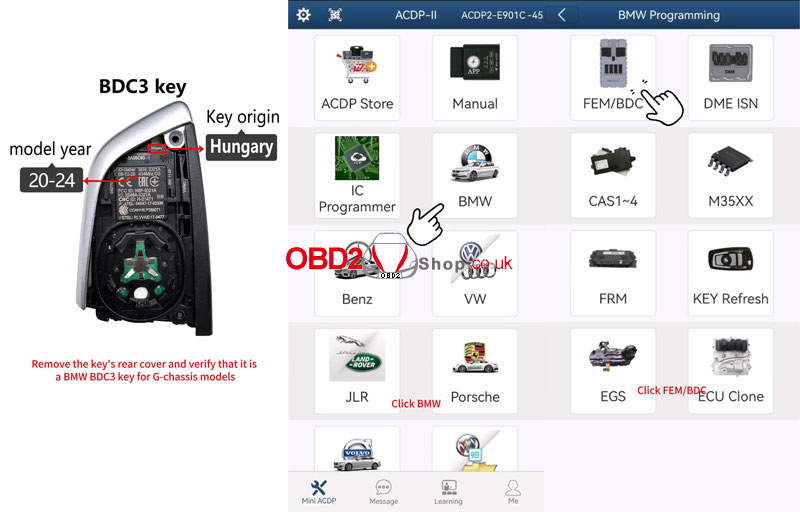
Remove the rear cover of the key and confirm it is a BMW BDC3 key used in G-chassis models made in Hungary between 2020 and 2024.
Step 2: Read the Original Key Data
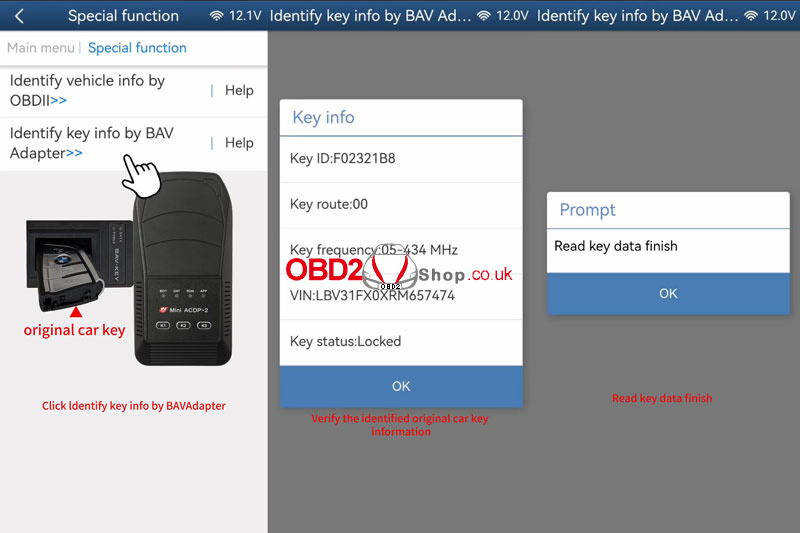
1. Connect the ACDP to the BAV-key adapter and place the original car key into the adapter.
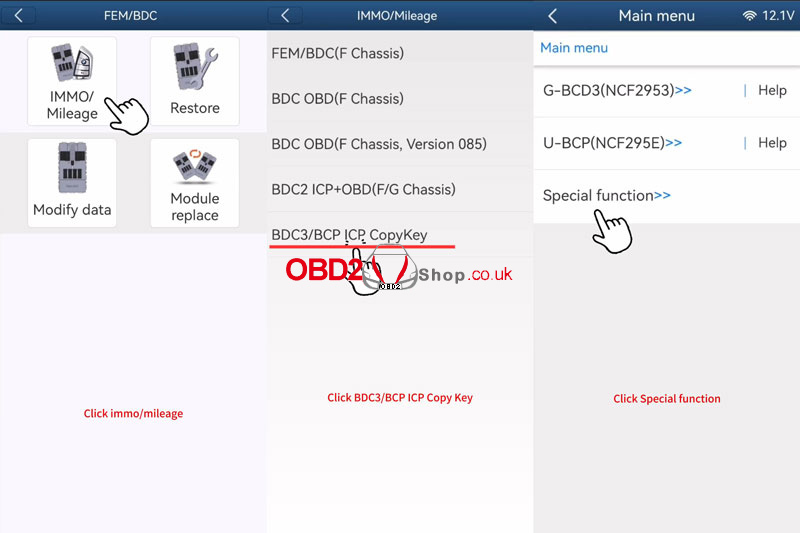
2. Go to: BMW ’ FEM/BDC ’ IMMO/Mileage ’ BDC3/BCP ICP CopyKey ’ Special Function.
3. Select Identify key info by BAV Adapter, then save the key data.
4. Verify the key information displayed.
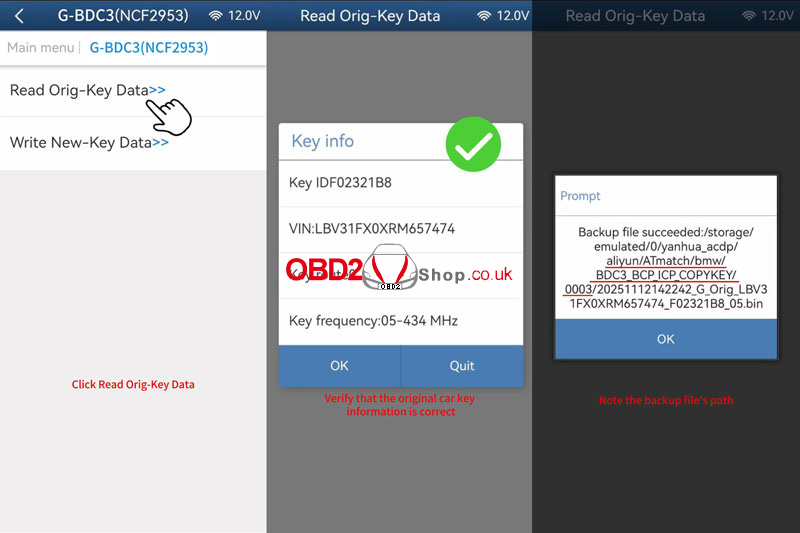
Step 3: Backup Original Key Data
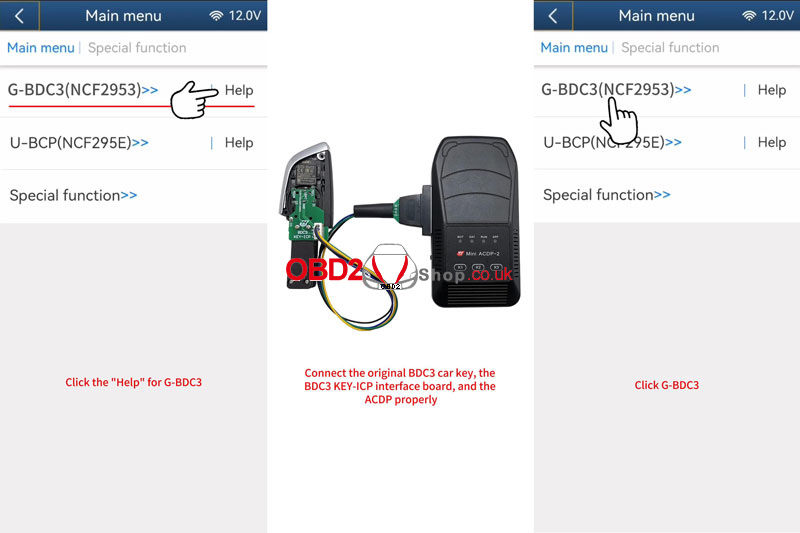
1. Connect the original key, the BDC3 KEY-ICP Interface Board, and the ACDP.
2. Select G. BDC3(NCF2953) ’ Read Orig-Key Data.
3. Confirm the key details and wait for the backup to complete.
Step 4: Write Data to the New Key
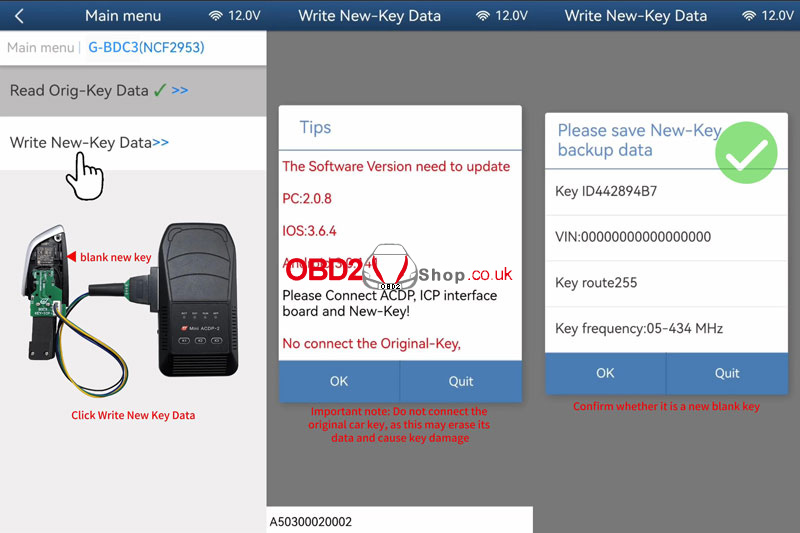
1. Replace the original key with a new blank key.
2. Choose Write New-Key Data.
3. Important: Do not reconnect the original key during this step, as it may get erased.
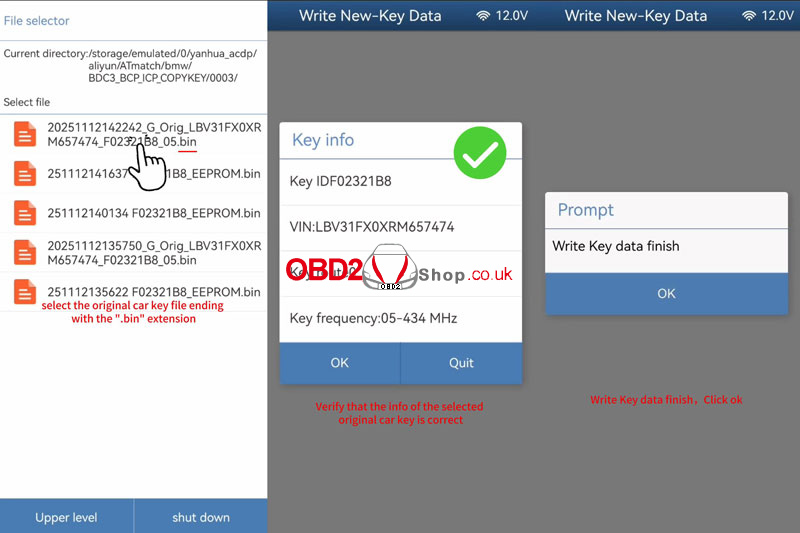
4. Select the original key backup file (with .bin extension) and confirm the details.
5. Wait for the writing process to finish.
Step 5: Verify the Copied Key
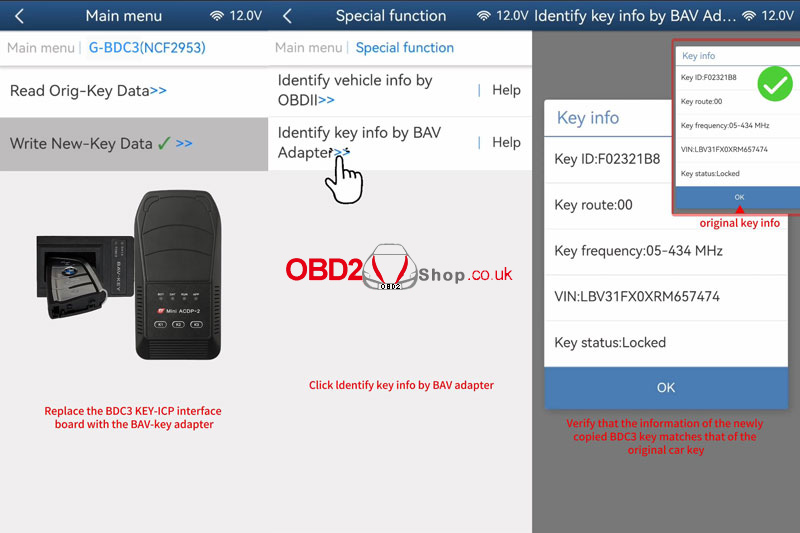
1. Switch back to the BAV-key adapter and insert the new copied key.
2. Use Special Function ’ Identify key info by BAV Adapter.
3. Confirm that the new key’s information matches the original.
4. Get in the car to test the keys.
Done!
You have successfully copied a BMW BDC3 key using the YANHUA Mini ACDP.
www.obd2shop.co.uk
Oznake: yanhua acdp bmw

| < | studeni, 2025 | > | ||||
| P | U | S | Č | P | S | N |
| 1 | 2 | |||||
| 3 | 4 | 5 | 6 | 7 | 8 | 9 |
| 10 | 11 | 12 | 13 | 14 | 15 | 16 |
| 17 | 18 | 19 | 20 | 21 | 22 | 23 |
| 24 | 25 | 26 | 27 | 28 | 29 | 30 |
Svibanj 2026 (1)
Siječanj 2026 (19)
Prosinac 2025 (22)
Studeni 2025 (21)
Listopad 2025 (20)
Rujan 2025 (21)
Kolovoz 2025 (8)
Srpanj 2025 (13)
Lipanj 2025 (9)
Svibanj 2025 (12)
Travanj 2025 (10)
Ožujak 2025 (12)
Veljača 2025 (14)
Siječanj 2025 (8)
Prosinac 2024 (6)
Studeni 2024 (6)
Listopad 2024 (4)
Rujan 2024 (7)
Kolovoz 2024 (14)
Srpanj 2024 (12)
Lipanj 2024 (10)
Svibanj 2024 (13)
Travanj 2024 (12)
Ožujak 2024 (11)
Veljača 2024 (2)
Siječanj 2024 (10)
Prosinac 2023 (8)
Studeni 2023 (6)
Listopad 2023 (7)
Rujan 2023 (9)
Kolovoz 2023 (6)
Srpanj 2023 (10)
Lipanj 2023 (4)
Veljača 2023 (8)
Siječanj 2023 (14)
Prosinac 2022 (13)
Studeni 2022 (14)
Listopad 2022 (18)
Rujan 2022 (9)
Kolovoz 2022 (16)
Srpanj 2022 (11)
Lipanj 2022 (14)
Svibanj 2022 (13)
Travanj 2022 (12)
Ožujak 2022 (12)
Veljača 2022 (13)
Siječanj 2022 (10)
Srpanj 2021 (1)
Dnevnik.hr
Gol.hr
Zadovoljna.hr
Novaplus.hr
NovaTV.hr
DomaTV.hr
Mojamini.tv