OBD2 tools on OBD2shop.co.uk https://blog.dnevnik.hr/obd2shop
četvrtak, 11.09.2025.
How to Reset Your Launch X-431 Diagnostic Tool Password
If you have forgotten the password for your Launch X-431 diagnostic tool, you can easily reset it by following the steps below.
Step 1: Access Password Reset Option
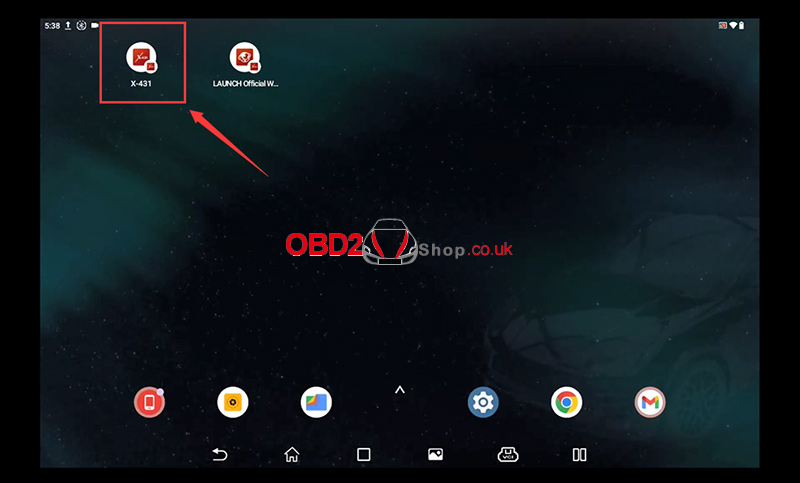
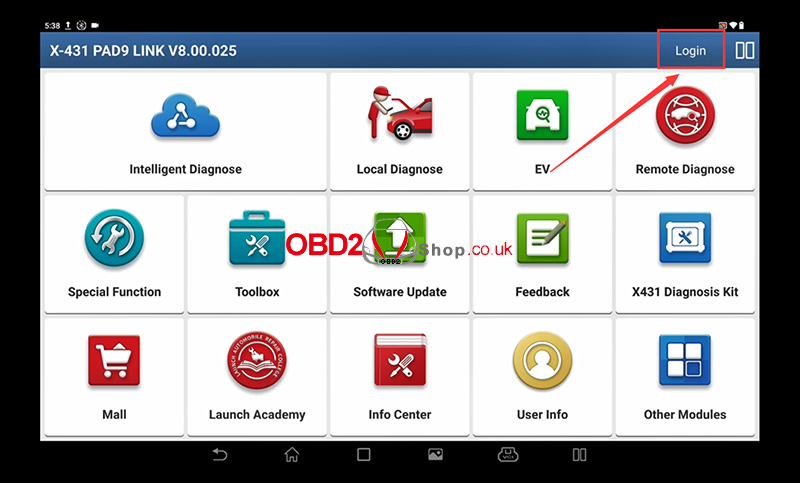
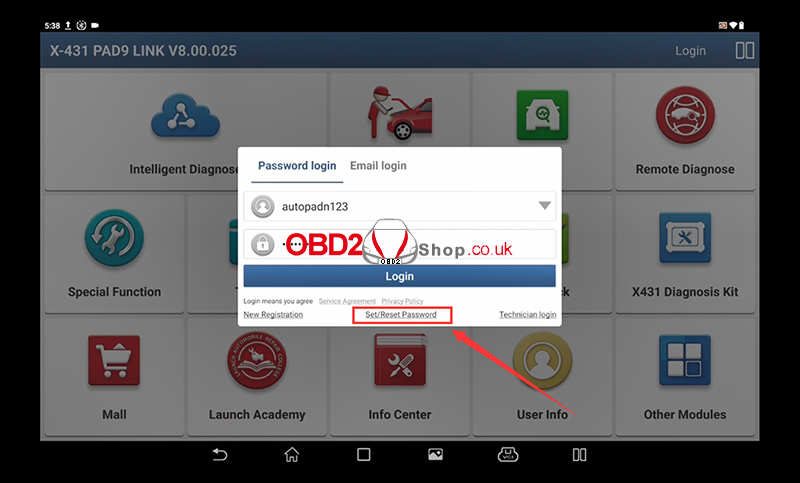
Select the “Set/Reset Password” option on your device. This will take you to the password recovery screen.
Step 2: Enter Device Serial Number
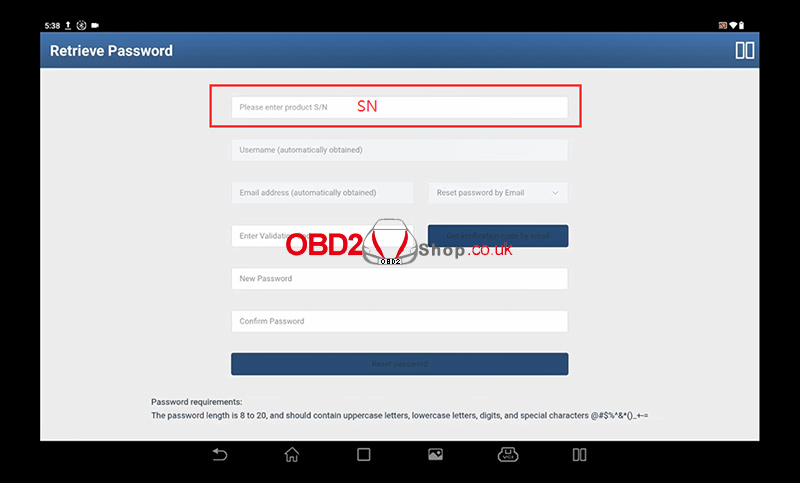
You will be prompted to enter your device serial number.
This is a 12-digit number starting with 9.
Once entered, the system will automatically display the registered username and email address associated with the device.
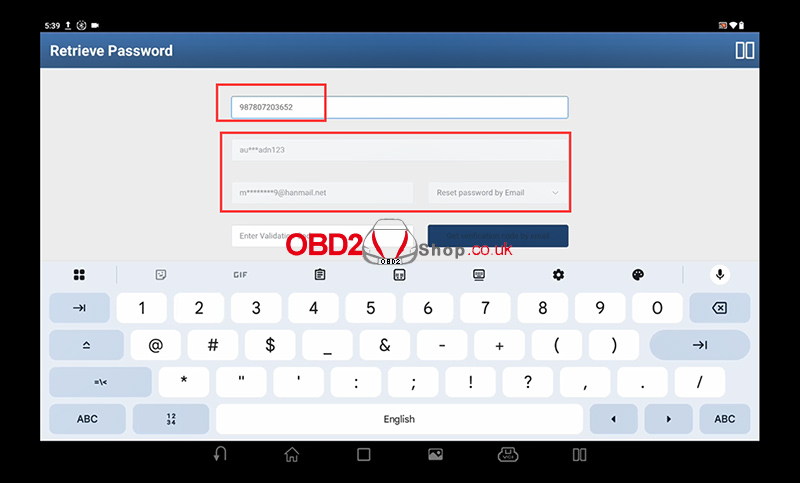
Step 3: Choose Password Reset Method
Select the option to reset your password via email.
Step 4: Get Verification Code
A verification code will be sent automatically to your registered email address.
Check your inbox (and spam/junk folder, if necessary) for the email containing the code.
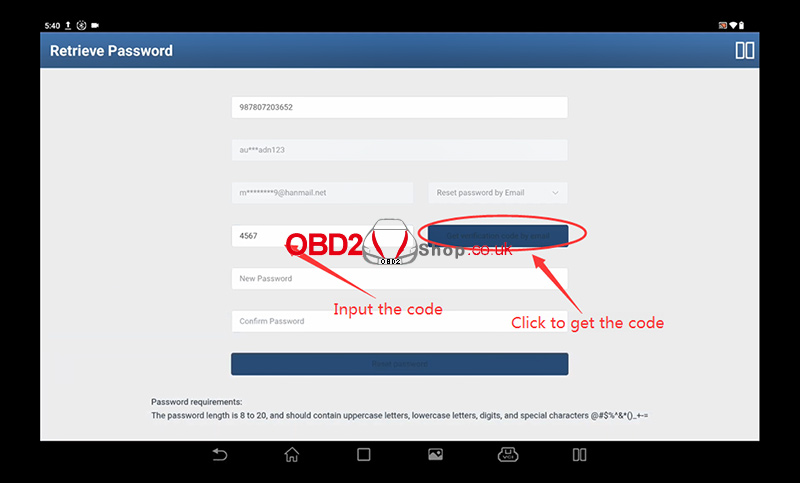
Step 5: Enter Verification Code and New Password
Enter the verification code you received.
Create a new password. You will need to enter it twice for confirmation.
Your password must meet the following requirements:
Length between 8 and 20 characters
Must include:
Uppercase letters
Lowercase letters
Digits (0-9)
Special characters (e.g., @#$%^&*()_+-=)
If the two entries do not match, you will see an error message:
“The passwords entered twice are inconsistent.”
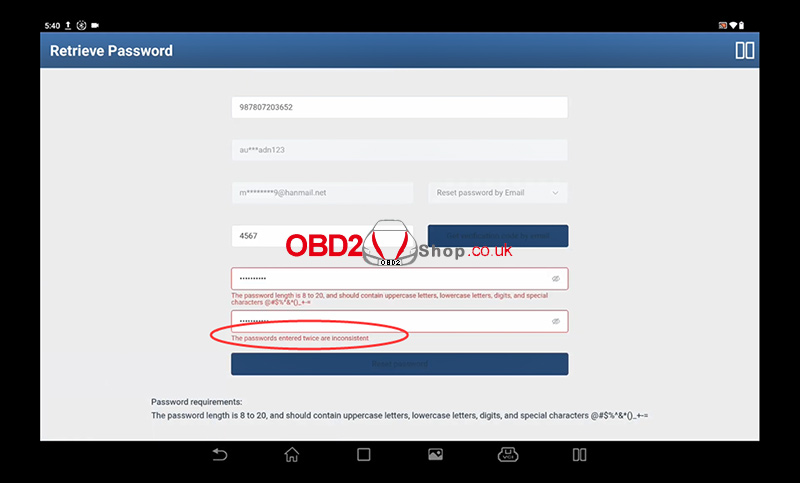
Important Note:
If you no longer have access to the registered email address or encounter any issues during the process, please contact support at www.obd2shop.co.uk.
Oznake: Launch X431

| < | rujan, 2025 | > | ||||
| P | U | S | Č | P | S | N |
| 1 | 2 | 3 | 4 | 5 | 6 | 7 |
| 8 | 9 | 10 | 11 | 12 | 13 | 14 |
| 15 | 16 | 17 | 18 | 19 | 20 | 21 |
| 22 | 23 | 24 | 25 | 26 | 27 | 28 |
| 29 | 30 | |||||
Svibanj 2026 (1)
Siječanj 2026 (19)
Prosinac 2025 (22)
Studeni 2025 (21)
Listopad 2025 (20)
Rujan 2025 (21)
Kolovoz 2025 (8)
Srpanj 2025 (13)
Lipanj 2025 (9)
Svibanj 2025 (12)
Travanj 2025 (10)
Ožujak 2025 (12)
Veljača 2025 (14)
Siječanj 2025 (8)
Prosinac 2024 (6)
Studeni 2024 (6)
Listopad 2024 (4)
Rujan 2024 (7)
Kolovoz 2024 (14)
Srpanj 2024 (12)
Lipanj 2024 (10)
Svibanj 2024 (13)
Travanj 2024 (12)
Ožujak 2024 (11)
Veljača 2024 (2)
Siječanj 2024 (10)
Prosinac 2023 (8)
Studeni 2023 (6)
Listopad 2023 (7)
Rujan 2023 (9)
Kolovoz 2023 (6)
Srpanj 2023 (10)
Lipanj 2023 (4)
Veljača 2023 (8)
Siječanj 2023 (14)
Prosinac 2022 (13)
Studeni 2022 (14)
Listopad 2022 (18)
Rujan 2022 (9)
Kolovoz 2022 (16)
Srpanj 2022 (11)
Lipanj 2022 (14)
Svibanj 2022 (13)
Travanj 2022 (12)
Ožujak 2022 (12)
Veljača 2022 (13)
Siječanj 2022 (10)
Srpanj 2021 (1)
Dnevnik.hr
Gol.hr
Zadovoljna.hr
Novaplus.hr
NovaTV.hr
DomaTV.hr
Mojamini.tv