OBD2 tools on OBD2shop.co.uk https://blog.dnevnik.hr/obd2shop
četvrtak, 04.12.2025.
How to Download and Upgrade Launch CR HD V2 Software
Keeping your Launch CR HD V2 device updated ensures optimal performance, improved compatibility, and access to the latest diagnostic features. Follow the step-by-step guide below to download and upgrade the software using the official Launch upgrade tool.
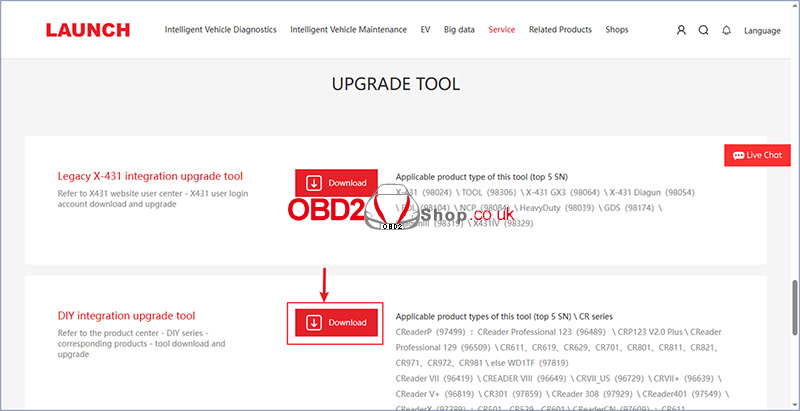
Step 1: Download the DIY Integration Upgrade Tool
Open your browser and go to the official Launch download page:
https://en.cnlaunch.com/download/
Locate the option labeled [DIY Integration Upgrade Tool].
Click [Download] to begin downloading the installer.
Step 2: Install and Open the Upgrade Tool
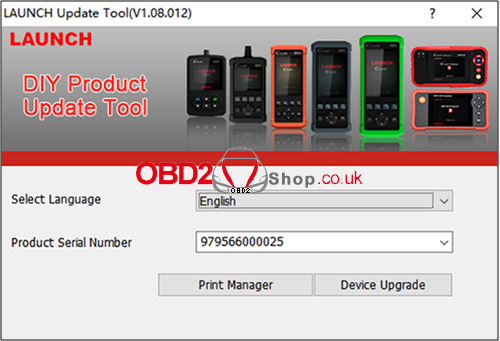
After the download is complete, install the software following the on-screen instructions.
Launch the client software.
Select your preferred language (English is set as the default).
Enter the serial number of your CR HD V2 device.
Click [Device Upgrade] to continue.
Step 3: Enter the Registration Code
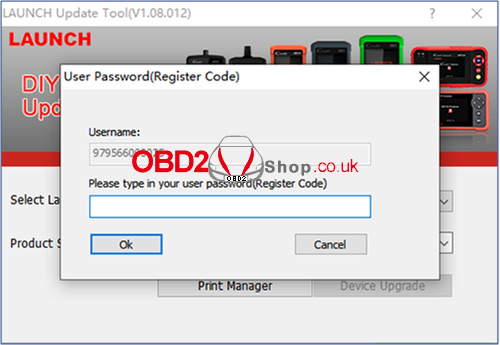
The system will prompt you to enter the Registration Code.
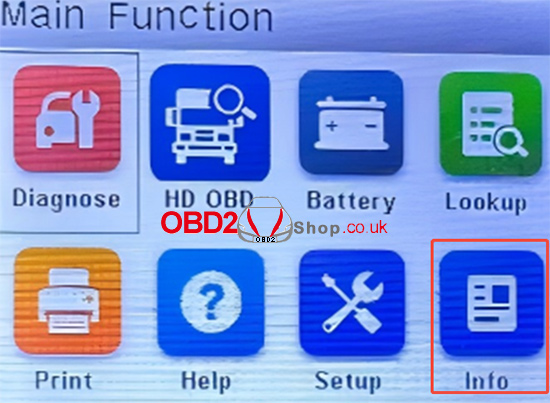
On your CR HD V2 device, go to:
Function Homepage ’ Info ’ Register Code
Copy the registration code displayed on your device and enter it into the upgrade tool.
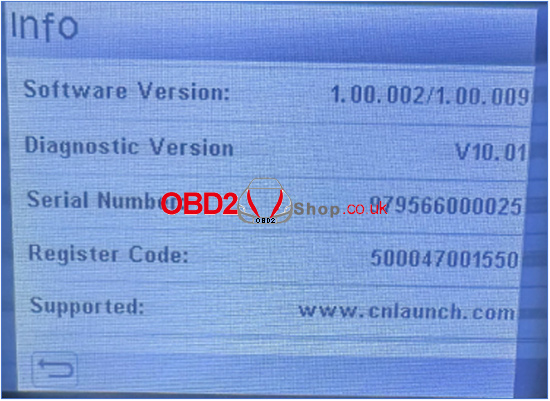
Step 4: Select and Install Available Updates
Once the registration code is verified, the available software versions will be displayed.
Select the updates you want to install.
If your device is already up to date, the software list will appear empty.
Click [Upgrade] to begin updating your device.
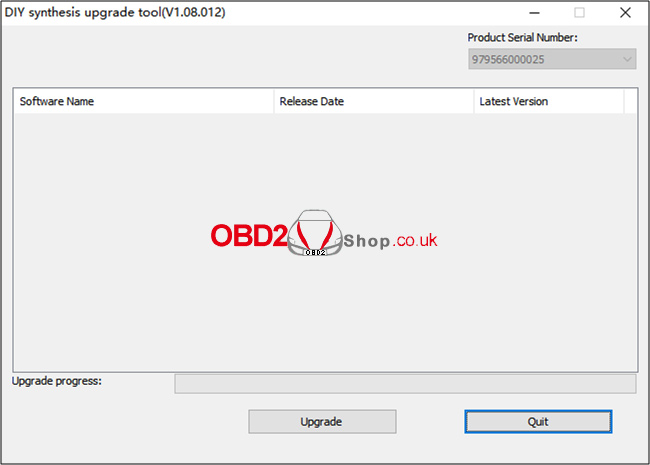
For more diagnostic tools and accessories, visit:
www.obd2shop.co.uk
Oznake: launch cr hd v2

| < | siječanj, 2026 | |||||
| P | U | S | Č | P | S | N |
| 1 | 2 | 3 | 4 | |||
| 5 | 6 | 7 | 8 | 9 | 10 | 11 |
| 12 | 13 | 14 | 15 | 16 | 17 | 18 |
| 19 | 20 | 21 | 22 | 23 | 24 | 25 |
| 26 | 27 | 28 | 29 | 30 | 31 | |
Svibanj 2026 (1)
Siječanj 2026 (19)
Prosinac 2025 (22)
Studeni 2025 (21)
Listopad 2025 (20)
Rujan 2025 (21)
Kolovoz 2025 (8)
Srpanj 2025 (13)
Lipanj 2025 (9)
Svibanj 2025 (12)
Travanj 2025 (10)
Ožujak 2025 (12)
Veljača 2025 (14)
Siječanj 2025 (8)
Prosinac 2024 (6)
Studeni 2024 (6)
Listopad 2024 (4)
Rujan 2024 (7)
Kolovoz 2024 (14)
Srpanj 2024 (12)
Lipanj 2024 (10)
Svibanj 2024 (13)
Travanj 2024 (12)
Ožujak 2024 (11)
Veljača 2024 (2)
Siječanj 2024 (10)
Prosinac 2023 (8)
Studeni 2023 (6)
Listopad 2023 (7)
Rujan 2023 (9)
Kolovoz 2023 (6)
Srpanj 2023 (10)
Lipanj 2023 (4)
Veljača 2023 (8)
Siječanj 2023 (14)
Prosinac 2022 (13)
Studeni 2022 (14)
Listopad 2022 (18)
Rujan 2022 (9)
Kolovoz 2022 (16)
Srpanj 2022 (11)
Lipanj 2022 (14)
Svibanj 2022 (13)
Travanj 2022 (12)
Ožujak 2022 (12)
Veljača 2022 (13)
Siječanj 2022 (10)
Srpanj 2021 (1)
Dnevnik.hr
Gol.hr
Zadovoljna.hr
Novaplus.hr
NovaTV.hr
DomaTV.hr
Mojamini.tv