OBD2 tools on OBD2shop.co.uk https://blog.dnevnik.hr/obd2shop
utorak, 23.12.2025.
How to Use CGDI K2: Easy Setup & Key Programming Guide
The CGDI K2 is a versatile remote key programmer that generates, copies, and reprograms car keys and remotes. Follow this simple guide to get started.
1. First-Time Setup
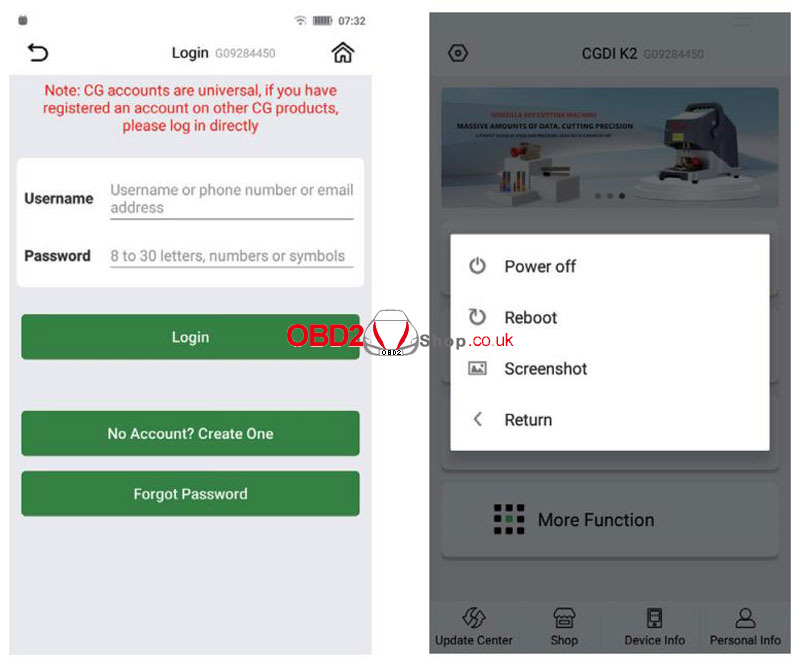
(1) Press and hold the power button to turn on.
(2) Connect to Wi-Fi to activate the device and update software/firmware.
(3) Log in to your CGDI account, or create one if you don't have one.
2. Basic Controls
(1) Short-press the power button: turns the screen on/off.
(2) Hold the power button for 5 seconds: forces a shutdown.
(3) Device auto-shuts down when battery is below 5%.
(4) Charge using a 4.5V–5.5V/1A charger and Type-C cable.
Main Functions
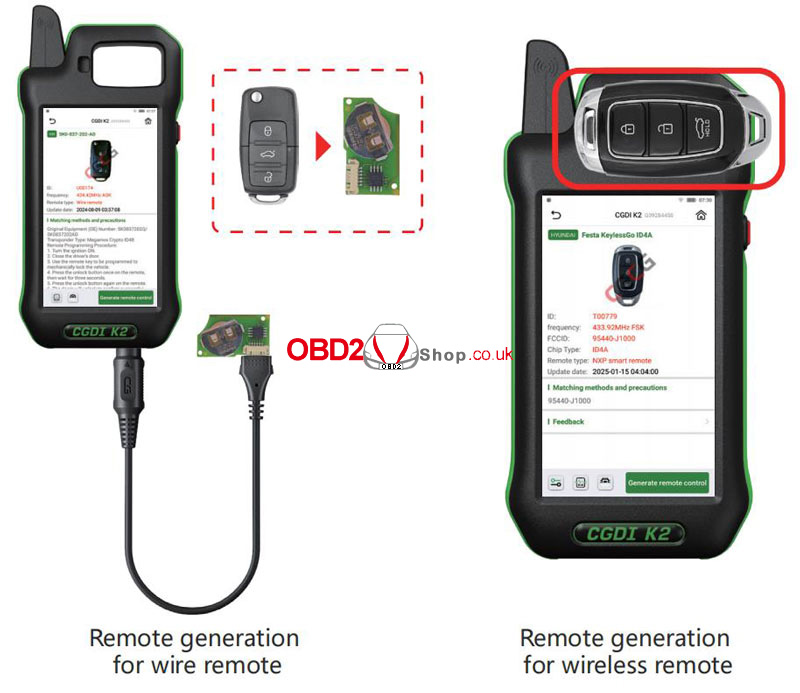
1. Generate Wireless Remote
` Go to Remote Generation from the home screen.
a Select your car model.
b Connect the remote to the device using the programming cable.
c Choose Wired Generation and confirm.
2. Generate Smart Remote
` Select the car model.
a Place the CG Smart Key on the device coil.
b Click Generate Remote and wait for completion.
3. Frequency Detection
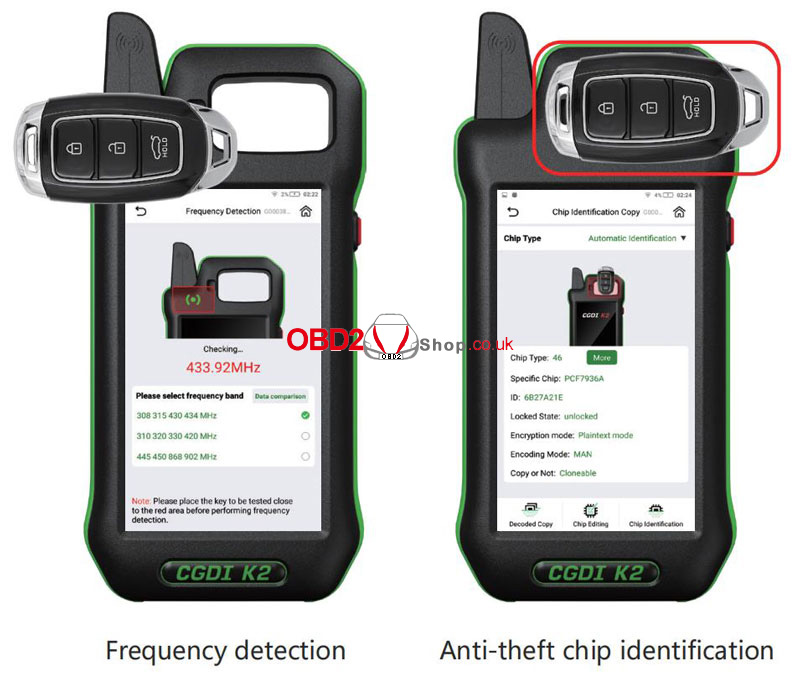
` Enter Frequency Detection from the main menu.
a Choose a frequency band and place the remote near the detection area.
b Press any button on the remote.
4. Chip Identification
` Select Chip Identification Copy.
a Choose Auto or Manual chip detection.
b Place the key on the coil and view chip details.
5. Remote Renew
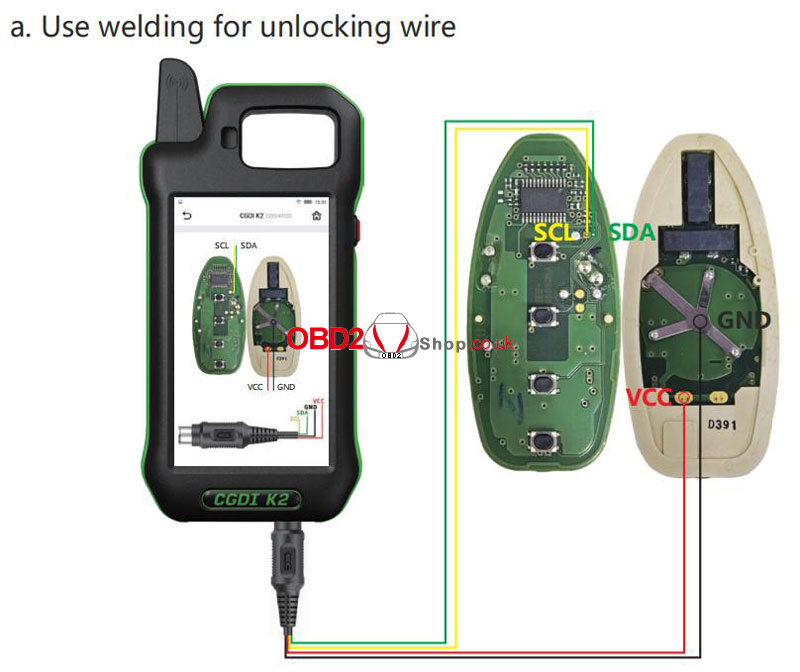
` Access via More Functions ’ Remote Renew.
a Choose solder or solderless wiring.
b Connect the key with the Unlock Solder-free Cable correctly, confirm the model, and click Renew.
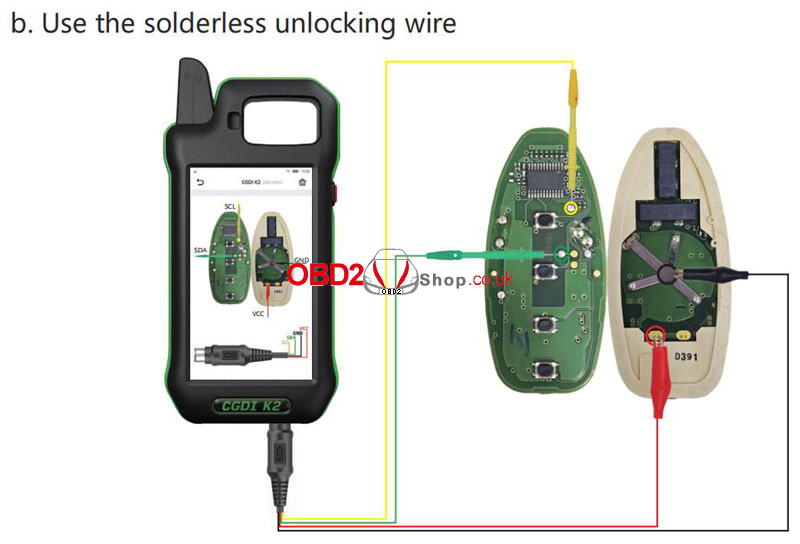
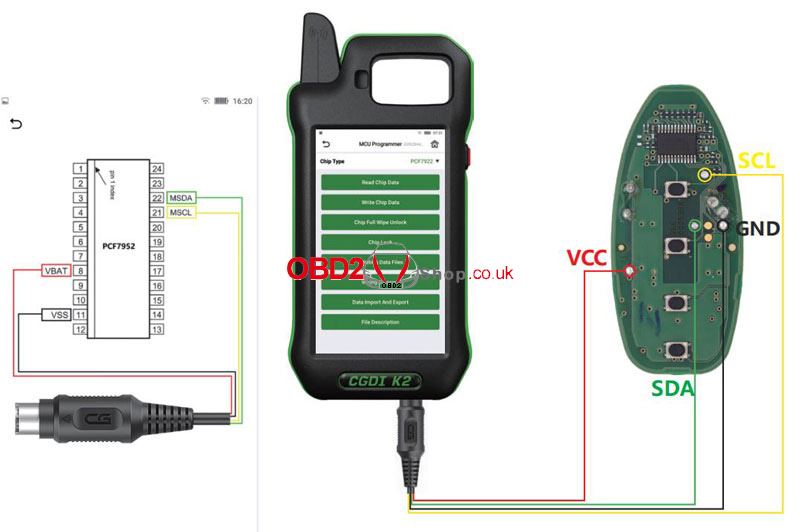
6. MCU Programmer
` Go to More Functions ’ MCU Programmer.
a Select the model and connect according to the wiring diagram.
b Read, write, or program the MCU as needed.
This CGDI K2 Remote Key Programmer guide is optimized for clarity and ease of use. Perfect for locksmiths, auto technicians, and car owners looking for a straightforward key programming solution.
www.obd2shop.co.uk
Oznake: cgdi k2

| < | prosinac, 2025 | > | ||||
| P | U | S | Č | P | S | N |
| 1 | 2 | 3 | 4 | 5 | 6 | 7 |
| 8 | 9 | 10 | 11 | 12 | 13 | 14 |
| 15 | 16 | 17 | 18 | 19 | 20 | 21 |
| 22 | 23 | 24 | 25 | 26 | 27 | 28 |
| 29 | 30 | 31 | ||||
Svibanj 2026 (1)
Siječanj 2026 (19)
Prosinac 2025 (22)
Studeni 2025 (21)
Listopad 2025 (20)
Rujan 2025 (21)
Kolovoz 2025 (8)
Srpanj 2025 (13)
Lipanj 2025 (9)
Svibanj 2025 (12)
Travanj 2025 (10)
Ožujak 2025 (12)
Veljača 2025 (14)
Siječanj 2025 (8)
Prosinac 2024 (6)
Studeni 2024 (6)
Listopad 2024 (4)
Rujan 2024 (7)
Kolovoz 2024 (14)
Srpanj 2024 (12)
Lipanj 2024 (10)
Svibanj 2024 (13)
Travanj 2024 (12)
Ožujak 2024 (11)
Veljača 2024 (2)
Siječanj 2024 (10)
Prosinac 2023 (8)
Studeni 2023 (6)
Listopad 2023 (7)
Rujan 2023 (9)
Kolovoz 2023 (6)
Srpanj 2023 (10)
Lipanj 2023 (4)
Veljača 2023 (8)
Siječanj 2023 (14)
Prosinac 2022 (13)
Studeni 2022 (14)
Listopad 2022 (18)
Rujan 2022 (9)
Kolovoz 2022 (16)
Srpanj 2022 (11)
Lipanj 2022 (14)
Svibanj 2022 (13)
Travanj 2022 (12)
Ožujak 2022 (12)
Veljača 2022 (13)
Siječanj 2022 (10)
Srpanj 2021 (1)
Dnevnik.hr
Gol.hr
Zadovoljna.hr
Novaplus.hr
NovaTV.hr
DomaTV.hr
Mojamini.tv