OBD2 tools on OBD2shop.co.uk https://blog.dnevnik.hr/obd2shop
petak, 07.11.2025.
3 Ways to Connect Your Launch X431 Tablet to the VCI Connector
This guide will show you three methods for connecting your Launch X431 Diagnostic Tablet to the VCI connector.
The available connection modes are:
Cable connection
Wi-Fi connection
Bluetooth connection
Each method is easy to set up and ensures stable communication between your X431 diagnostic tablet and the vehicle.
1. Wi-Fi and Bluetooth Connection
To switch between Wi-Fi and Bluetooth communication modes:
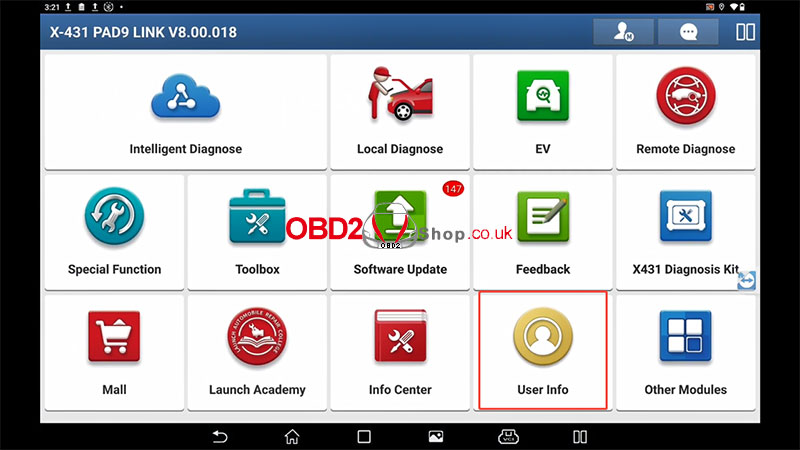
On the main tablet, tap [User Info].
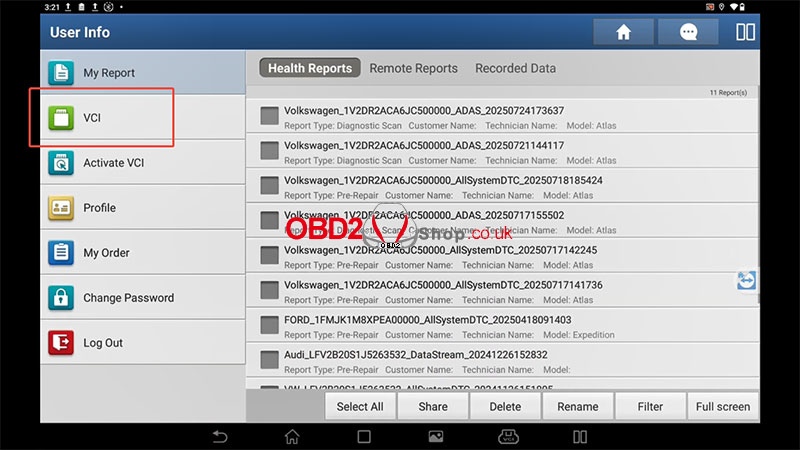
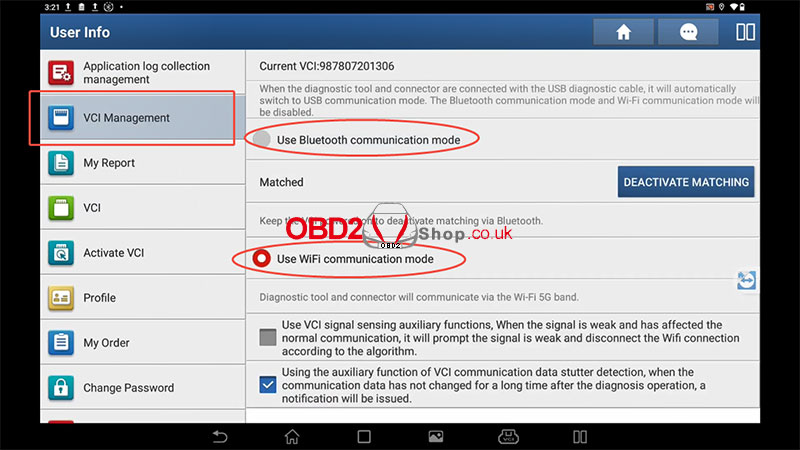
Tap the [VCI] menu five times continuously — this will open the [VCI Management] menu.
In the VCI Management menu, you can select:
[Use Bluetooth communication mode]
[Use Wi-Fi communication mode]
2. Cable Connection
To use a wired connection between the X431 tablet and the VCI connector:
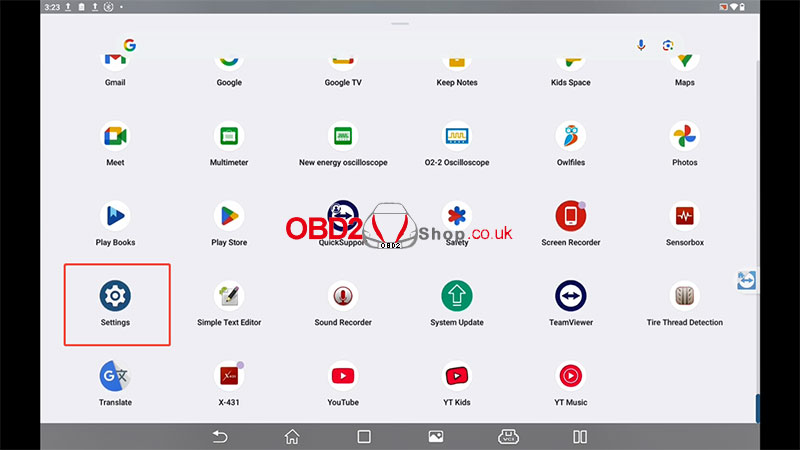
Tap [Settings] on the tablet.
Go to [USB Management].
When the diagnostic tablet and connector are connected using the USB diagnostic cable, the system will automatically switch to USB communication mode.
At this time, the Bluetooth and Wi-Fi communication modes will be disabled.
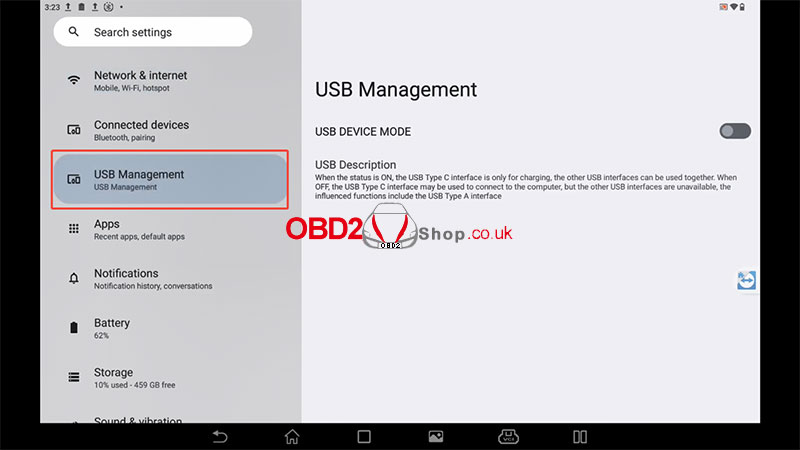
Tips:
When using the USB cable, there’s no need to switch connection modes manually. The system will detect and configure automatically.
For wireless connections, ensure that both the tablet and the VCI connector are powered on and within range.
For more information or to purchase diagnostic tools, please visit:
www.obd2shop.co.uk
Video guides:
https://youtu.be/W3vte1-ltIc
Oznake: Launch X431

| < | studeni, 2025 | > | ||||
| P | U | S | Č | P | S | N |
| 1 | 2 | |||||
| 3 | 4 | 5 | 6 | 7 | 8 | 9 |
| 10 | 11 | 12 | 13 | 14 | 15 | 16 |
| 17 | 18 | 19 | 20 | 21 | 22 | 23 |
| 24 | 25 | 26 | 27 | 28 | 29 | 30 |
Svibanj 2026 (1)
Siječanj 2026 (19)
Prosinac 2025 (22)
Studeni 2025 (21)
Listopad 2025 (20)
Rujan 2025 (21)
Kolovoz 2025 (8)
Srpanj 2025 (13)
Lipanj 2025 (9)
Svibanj 2025 (12)
Travanj 2025 (10)
Ožujak 2025 (12)
Veljača 2025 (14)
Siječanj 2025 (8)
Prosinac 2024 (6)
Studeni 2024 (6)
Listopad 2024 (4)
Rujan 2024 (7)
Kolovoz 2024 (14)
Srpanj 2024 (12)
Lipanj 2024 (10)
Svibanj 2024 (13)
Travanj 2024 (12)
Ožujak 2024 (11)
Veljača 2024 (2)
Siječanj 2024 (10)
Prosinac 2023 (8)
Studeni 2023 (6)
Listopad 2023 (7)
Rujan 2023 (9)
Kolovoz 2023 (6)
Srpanj 2023 (10)
Lipanj 2023 (4)
Veljača 2023 (8)
Siječanj 2023 (14)
Prosinac 2022 (13)
Studeni 2022 (14)
Listopad 2022 (18)
Rujan 2022 (9)
Kolovoz 2022 (16)
Srpanj 2022 (11)
Lipanj 2022 (14)
Svibanj 2022 (13)
Travanj 2022 (12)
Ožujak 2022 (12)
Veljača 2022 (13)
Siječanj 2022 (10)
Srpanj 2021 (1)
Dnevnik.hr
Gol.hr
Zadovoljna.hr
Novaplus.hr
NovaTV.hr
DomaTV.hr
Mojamini.tv