OBD2 tools on OBD2shop.co.uk https://blog.dnevnik.hr/obd2shop
utorak, 16.09.2025.
Toyota R7F701441 Mileage Correction with ACDP Module 41
This article provides a step-by-step guide on how to perform mileage correction on a Toyota R7F701441 instrument cluster via OBD/CAN method using the Yanhua ACDP 2 and ACDP Module 41.
Preparation:
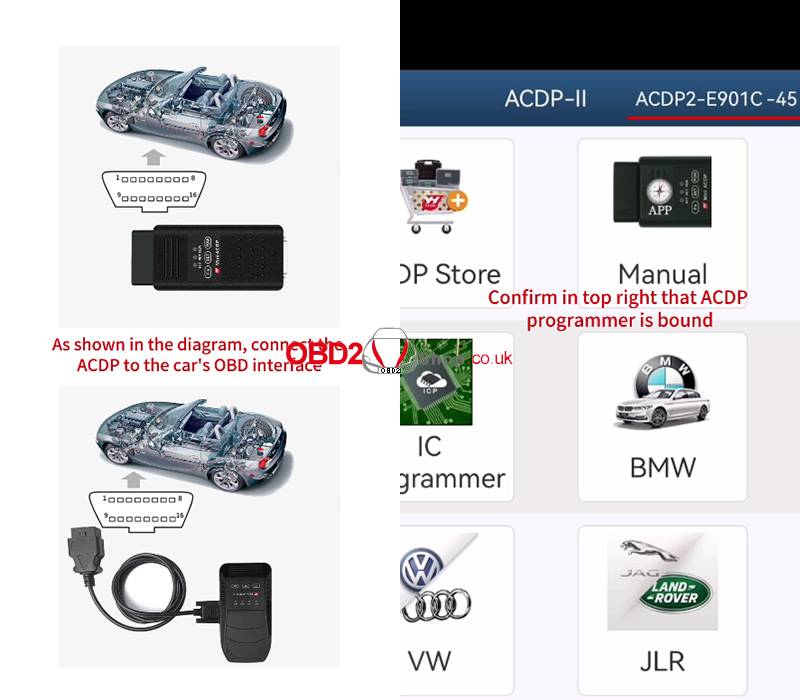
As shown in the picture, connect the ACDP device to the vehicle’s OBD interface.
Open the ACDP application and ensure that the ACDP programmer is bound (check the top right corner of the screen).
Entering the Correction Menu
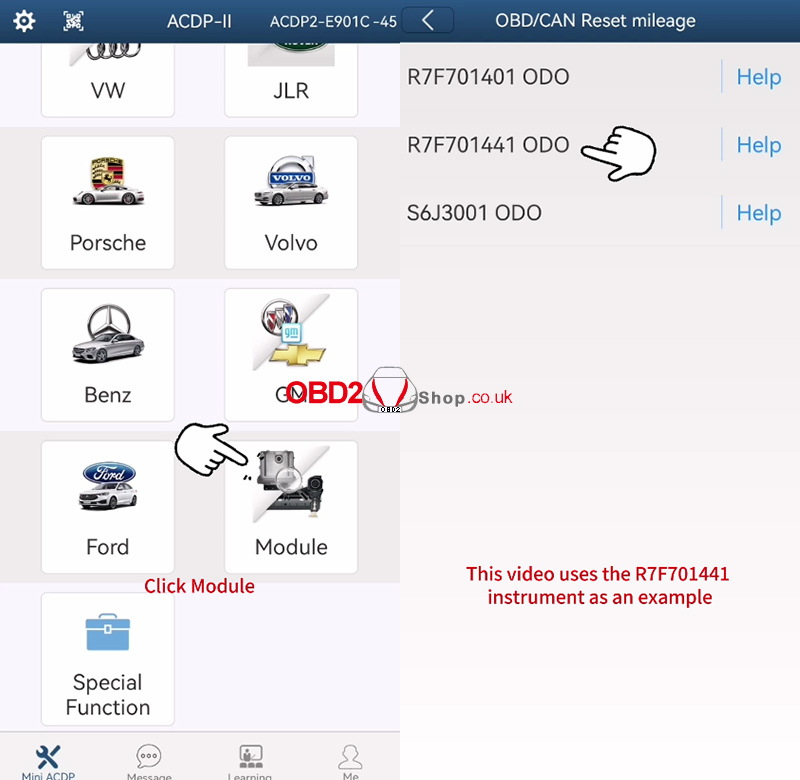
In the ACDP app, navigate to:
"Module" ’ "TOYOTA ODO" ’ "OBD/CAN Reset mileage"
Then, select the instrument model. This demonstration uses the R7F701441 instrument as an example.
Toyota S6J3001 mileage correction can refer to the following article:
http://blog.obd2shop.co.uk/toyota-s6j3001-mileage-correction-with-acdp-module-41/
Step 1: Identify Info
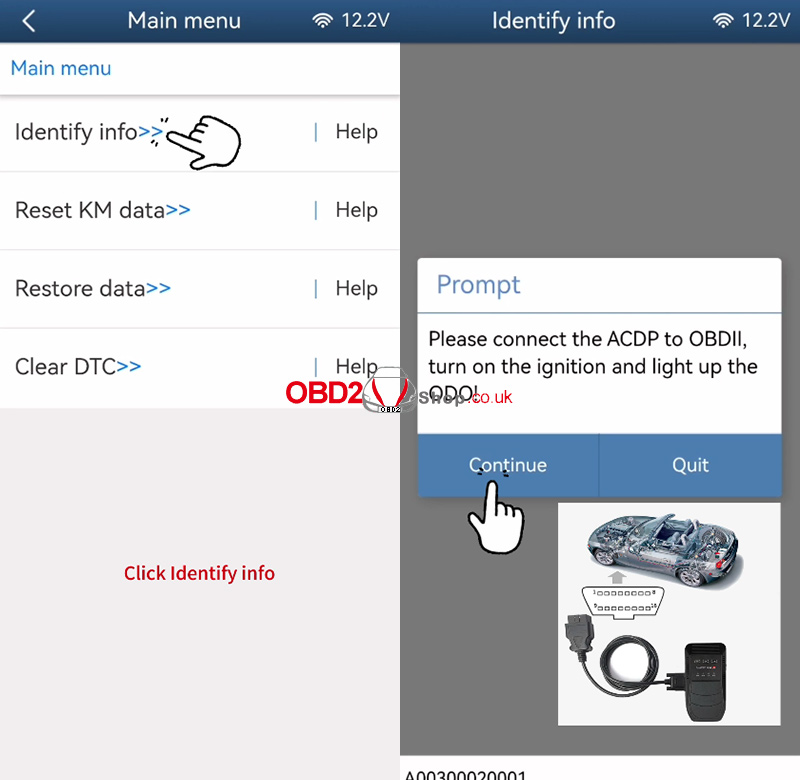
Connect ACDP to the OBD-II port.
Turn on the ignition — the ODO display must be lit.
Click "Identify Info".
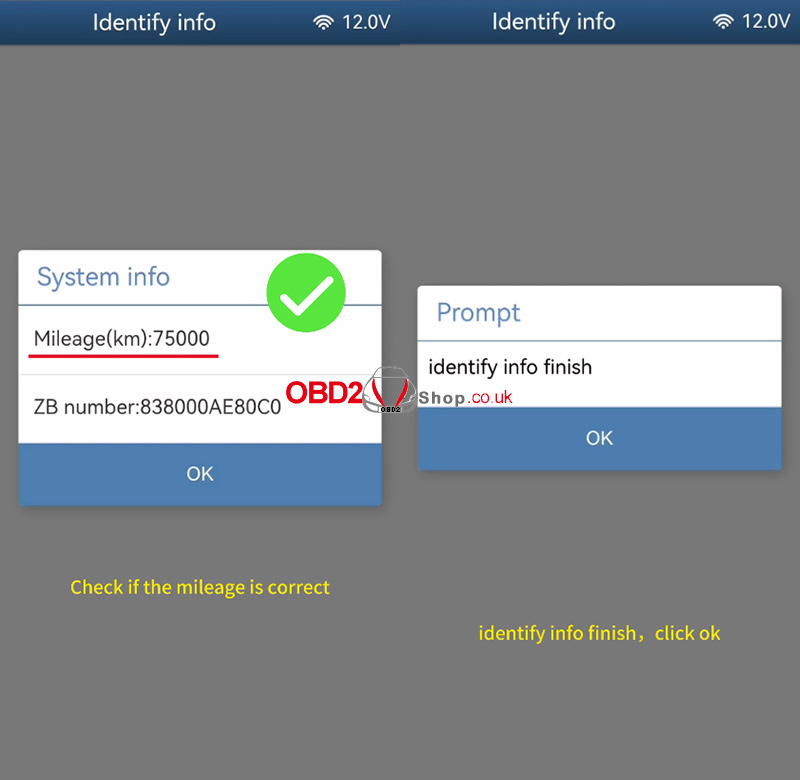
The system will read instrument information. Wait until the process completes.
Step 2: Reset KM Data
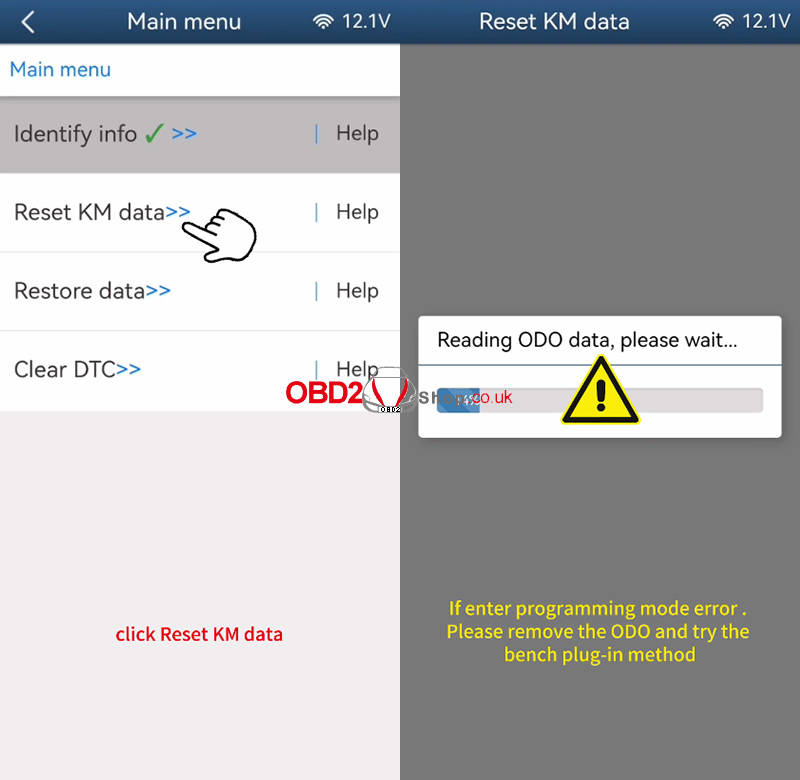
Click "Reset KM data".
The system will attempt to read ODO data.
If an error occurs indicating that programming mode cannot be entered, remove the instrument cluster from the dashboard and proceed with the bench wiring method as described in the ACDP help documentation.
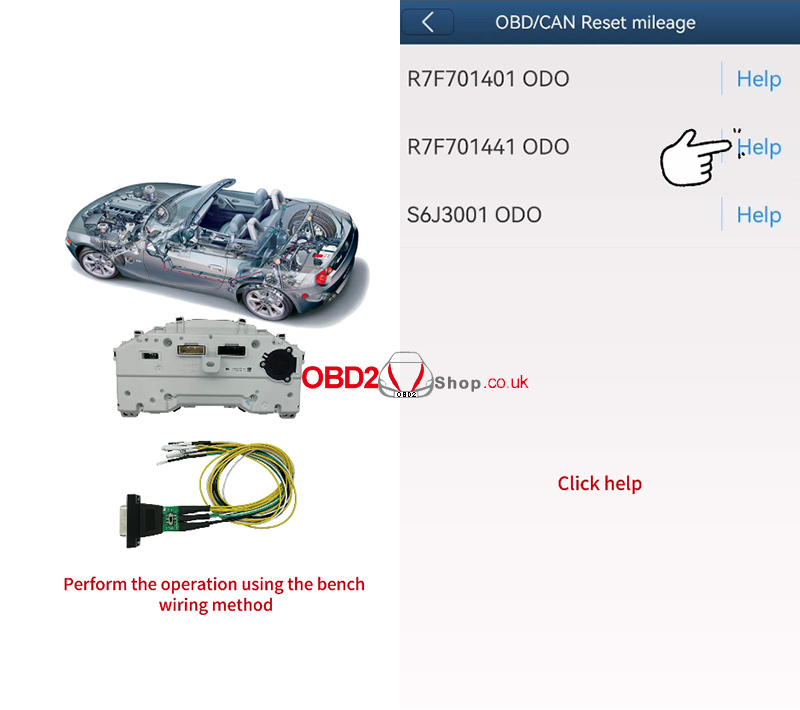
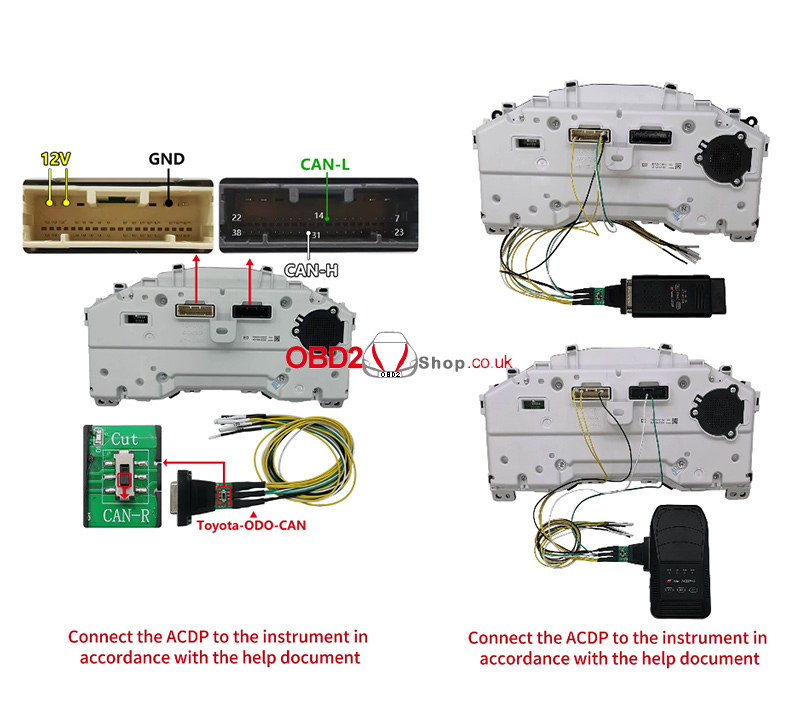
Step 3: Bench Connection & Data Reset
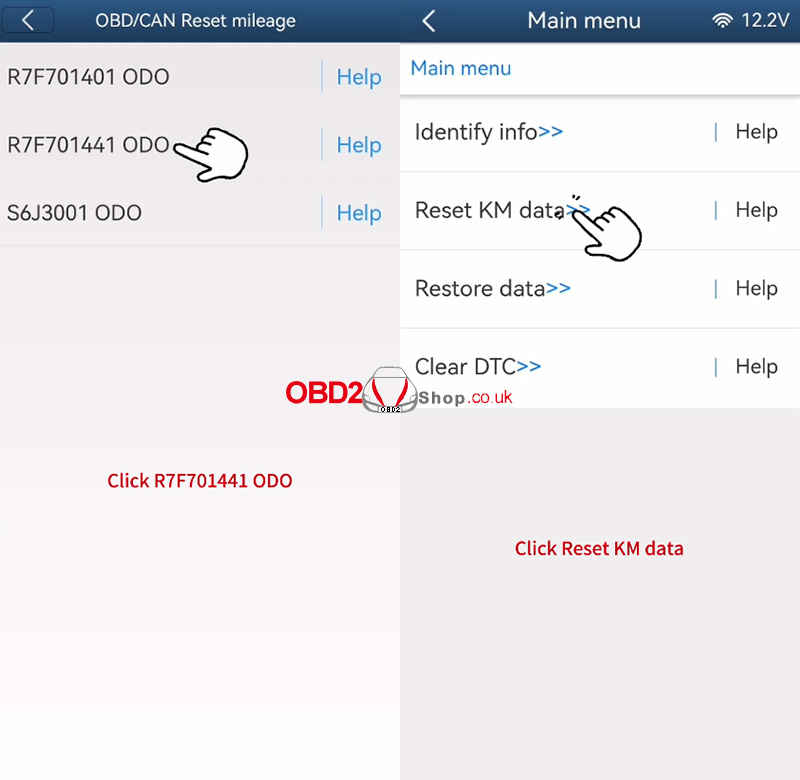
After connecting the ACDP to the instrument via the bench method, select again:
"R7F701441 ODO" ’ "Reset KM data"
The system will prompt you to back up the original ODO data. Save the file with a name ending in Orig.bin and note the backup path and time.
Enter the new mileage value.
A warning will appear:
“Programming is about to begin. Do NOT power off or unplug the device!”
Click "Continue" to start the process.
Once completed, the system will confirm: “Reset mileage finish.”
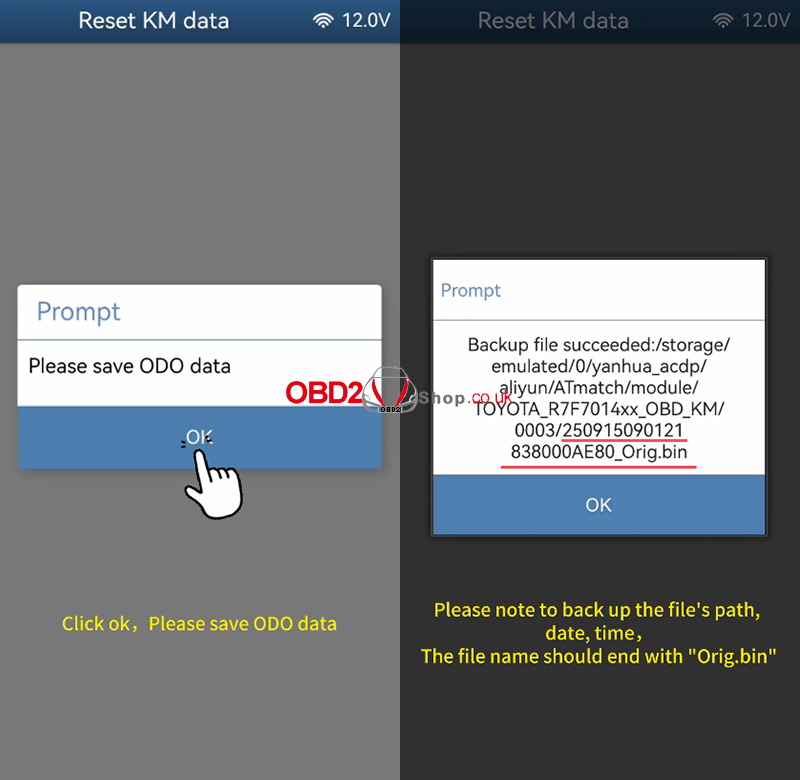
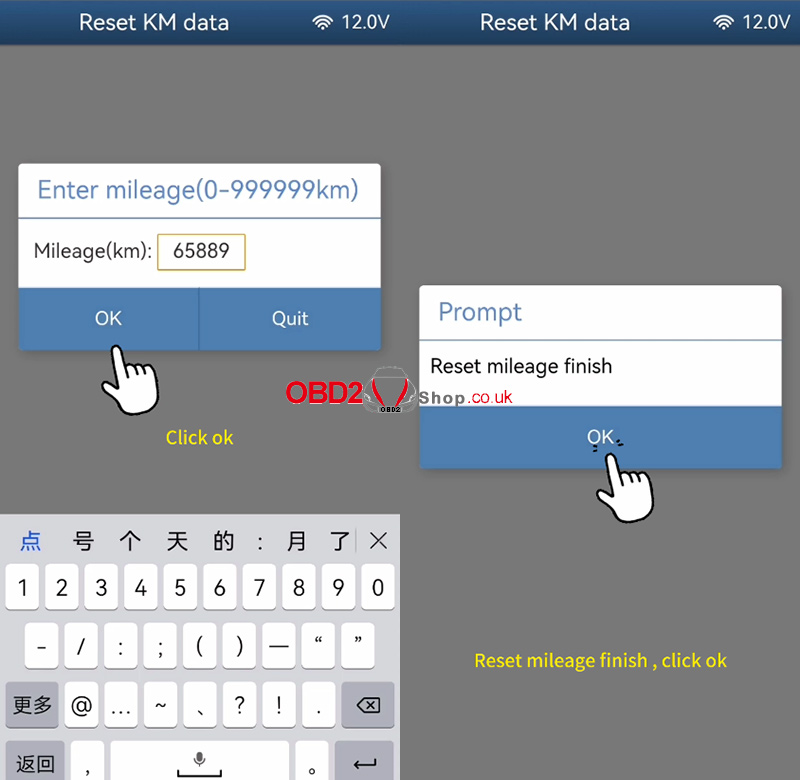
Step 4: Verify Changes
Click "Identify Info" again to check the instrument information.
The mileage should now be updated successfully.
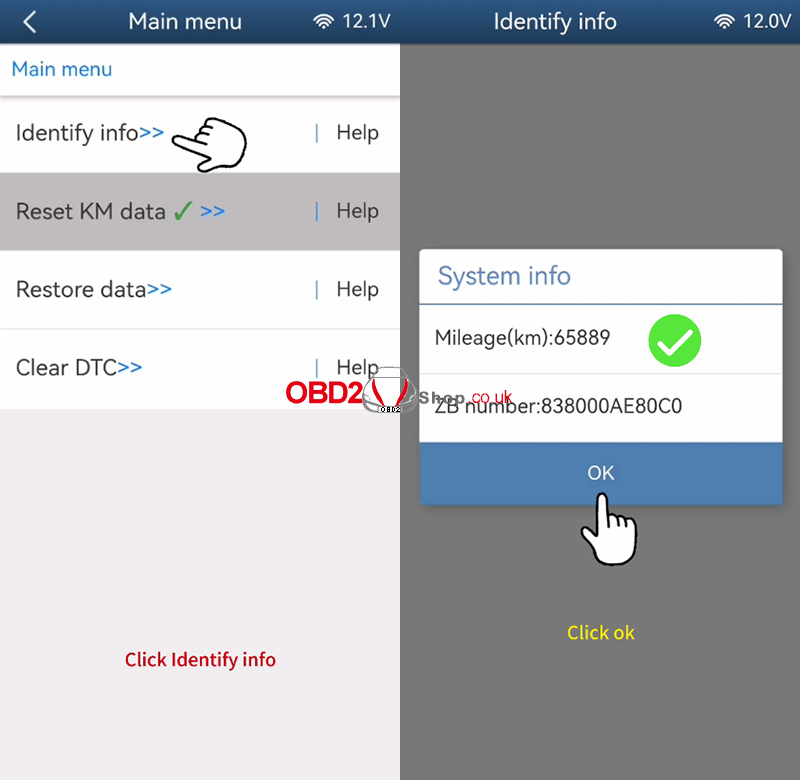
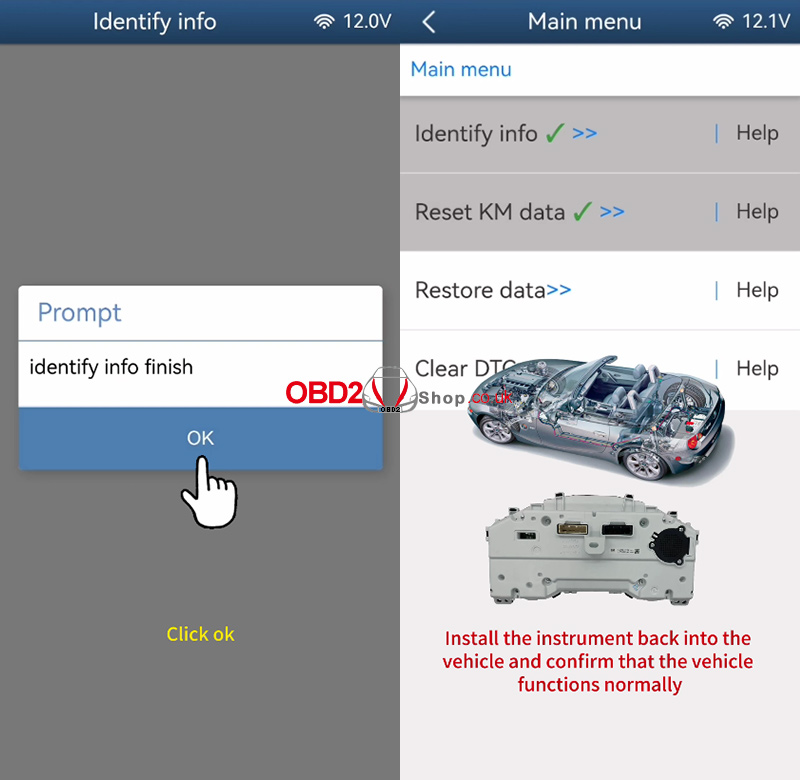
Video Tutorial
For a visual demonstration, please watch the video:
https://www.youtube.com/shorts/HdDovtuxZ-I
Notes:
Always back up the original data before programming.
Use anti-static precautions when handling the instrument cluster.
Ensure stable power and connection during writing.
For further support, refer to the ACDP user manual or contact technical support.
www.obd2shop.co.uk
Oznake: yanhua acdp module 41
petak, 12.09.2025.
Toyota S6J3001 Mileage Correction with ACDP Module 41
This article provides a step-by-step guide on how to perform mileage correction on a Toyota S6J3001 instrument cluster using the ACDP and ACDP Module 41.
Preparation:
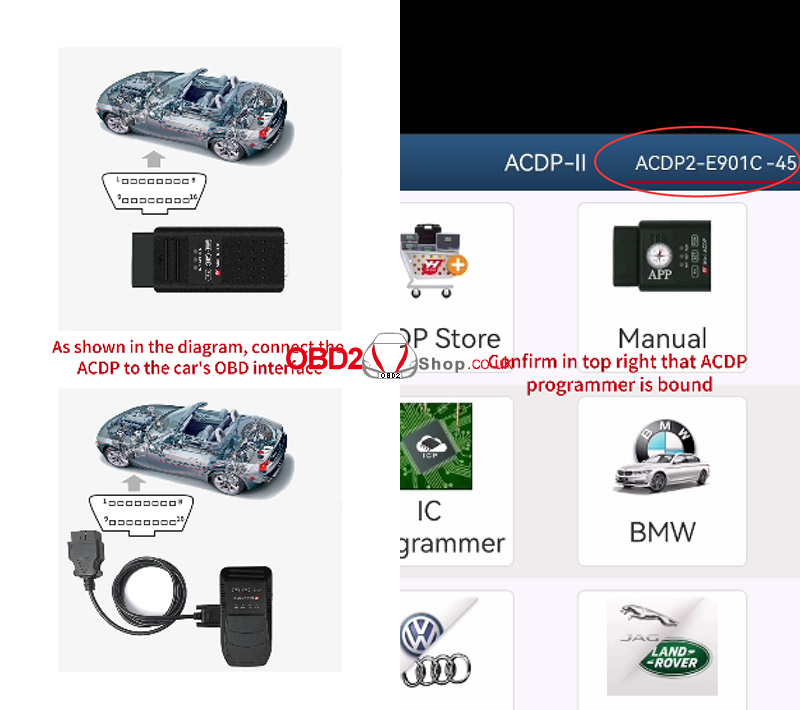
As shown in the picture, connect the ACDP device to the vehicle’s OBD interface.
Open the ACDP application and ensure that the ACDP programmer is bound (check the top right corner of the screen).
Entering the Correction Menu
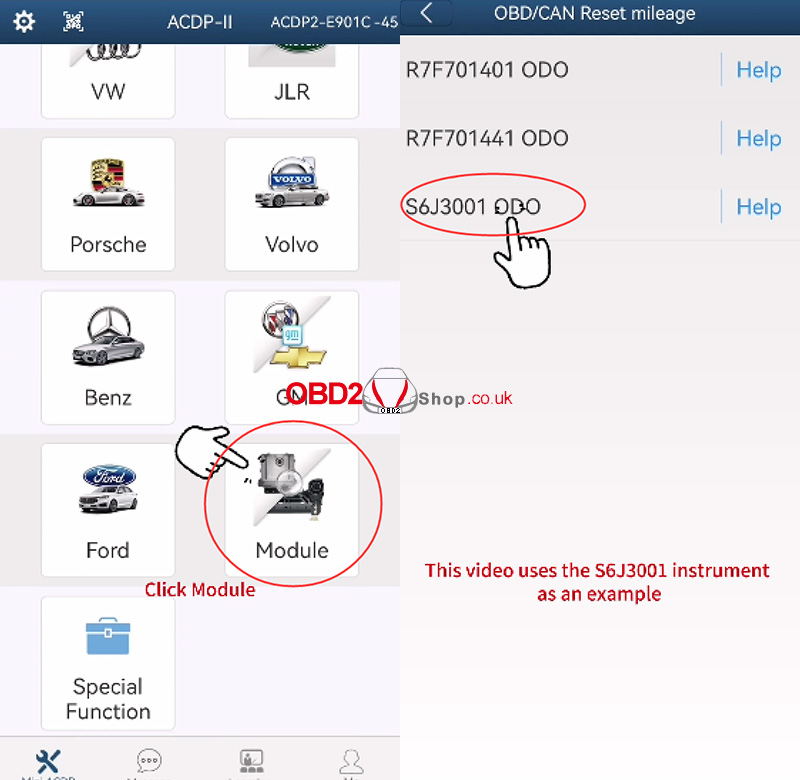
In the ACDP app, navigate to:
"Module" ’ "TOYOTA ODO" ’ "OBD/CAN Reset mileage"
Then, select the instrument model. This demonstration uses the S6J3001 instrument as an example.
Step 1: Identify Info
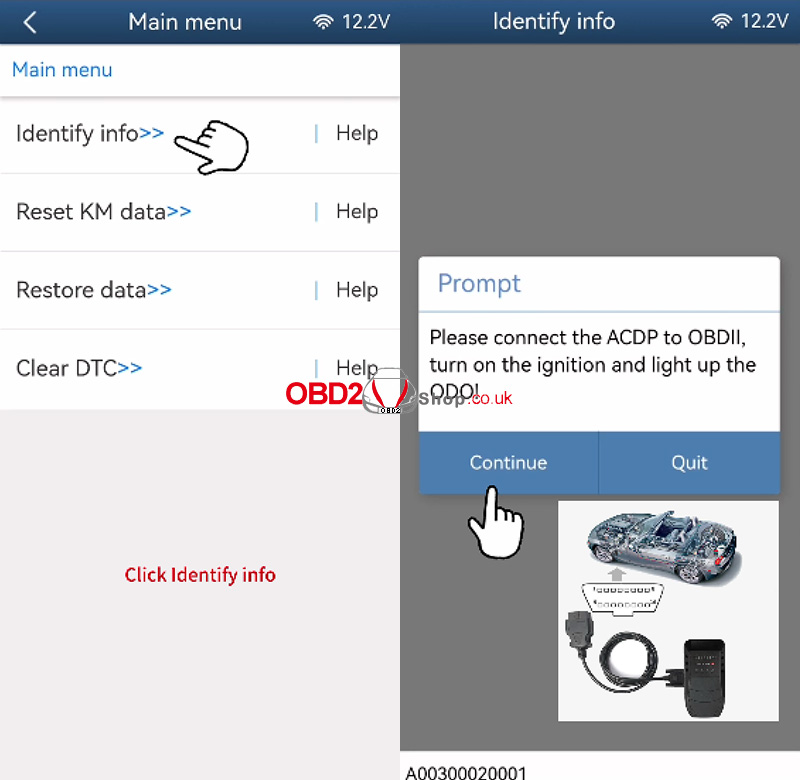
Connect ACDP to the OBD-II port.
Turn on the ignition — the ODO display must be lit.
Click "Identify Info".
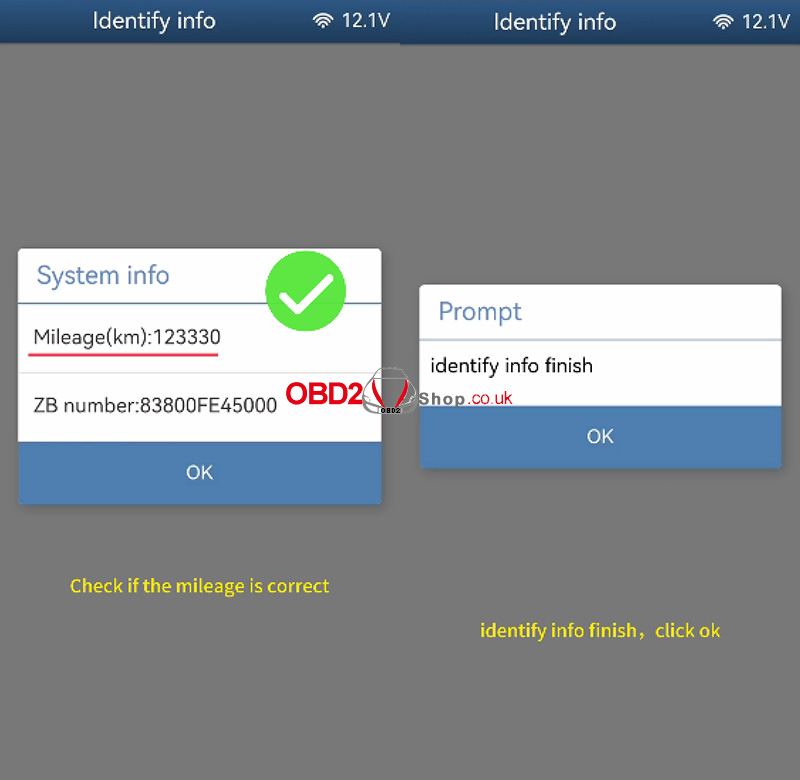
The system will read instrument information. Wait until the process completes.
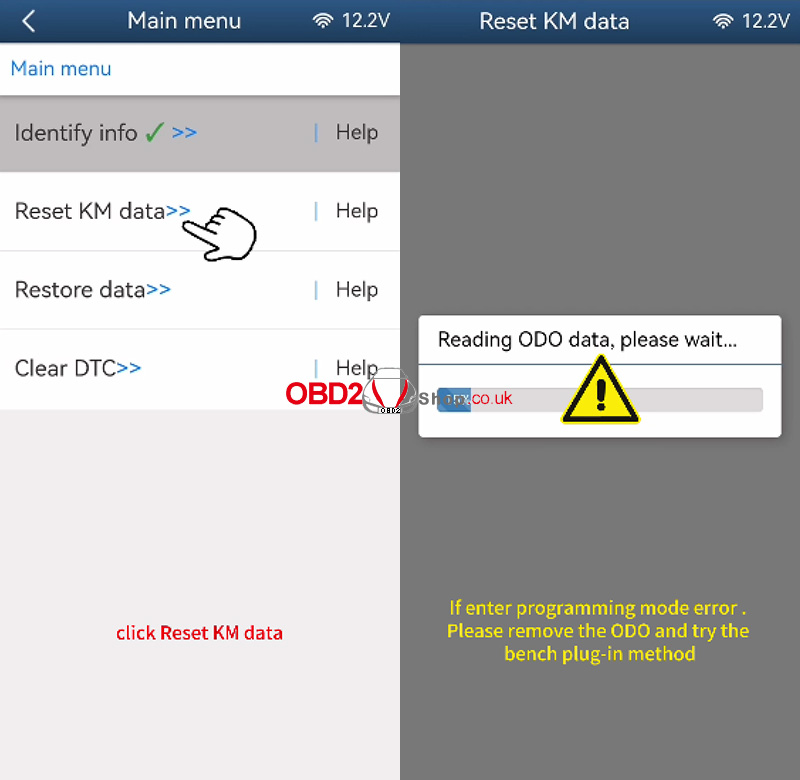
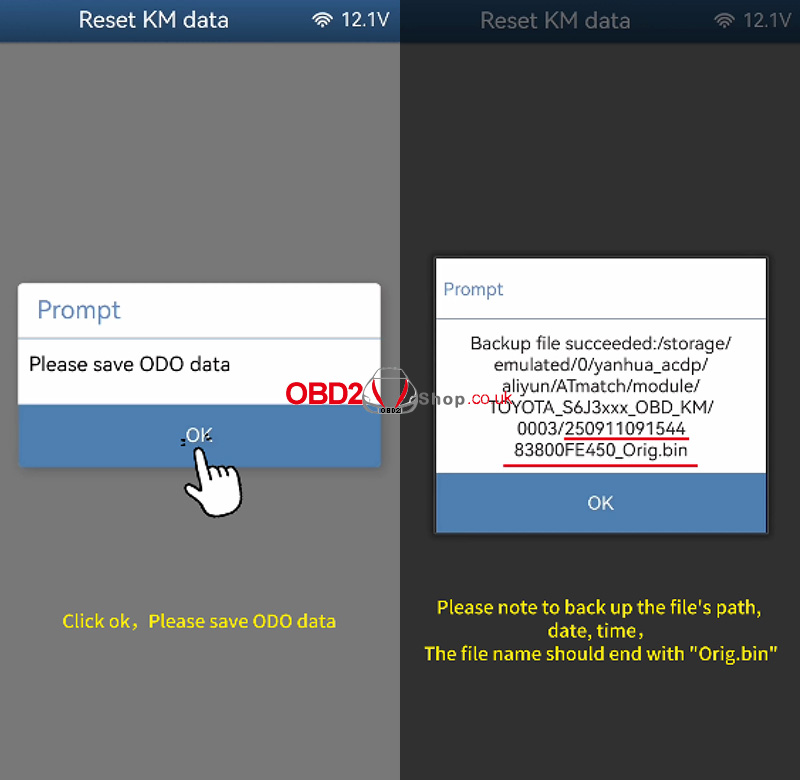
Step 2: Reset KM Data
Click "Reset KM data".
The system will attempt to read ODO data.
If an error occurs indicating that programming mode cannot be entered, remove the instrument cluster from the dashboard and proceed with the bench wiring method as described in the ACDP help documentation.
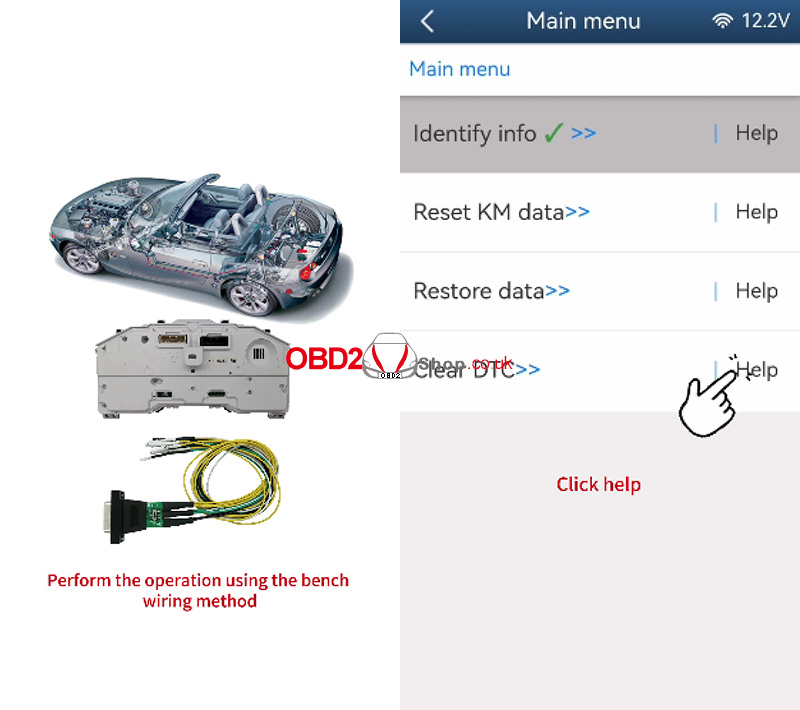
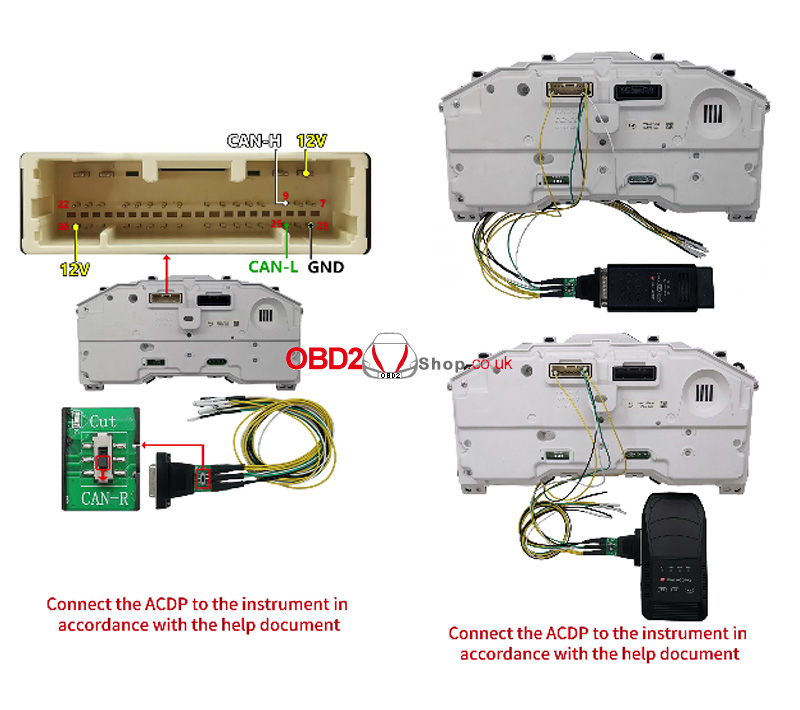
Step 3: Bench Connection & Data Reset
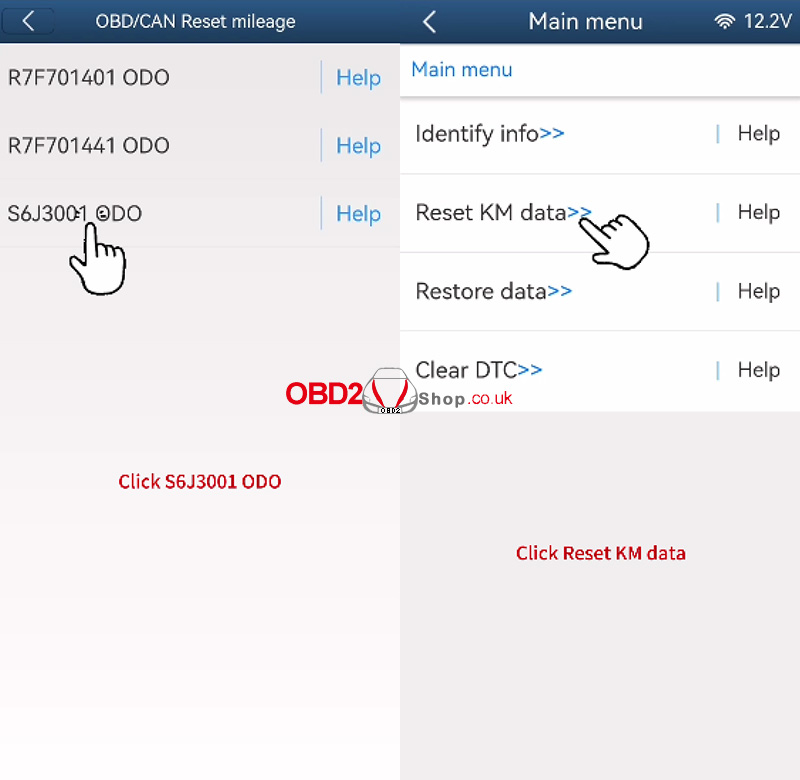
After connecting the ACDP to the instrument via the bench method, select again:
"S6J3001 ODO" ’ "Reset KM data"
The system will prompt you to back up the original ODO data. Save the file with a name ending in Orig.bin and note the backup path and time.
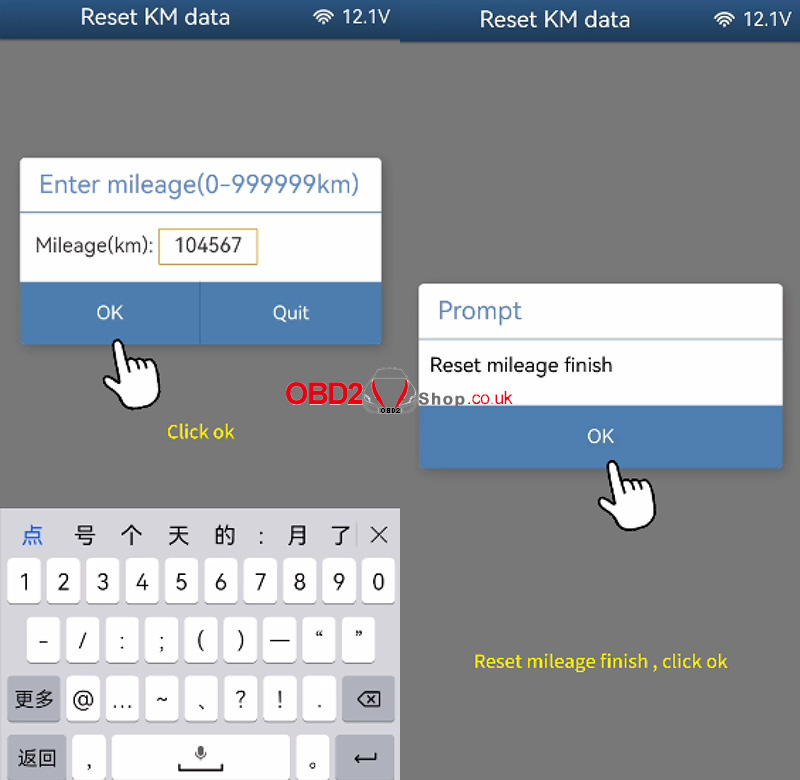
Enter the new mileage value.
A warning will appear:
“Programming is about to begin. Do NOT power off or unplug the device!”
Click "Continue" to start the process.
Once completed, the system will confirm: “Reset mileage finish.”
Step 4: Verify Changes
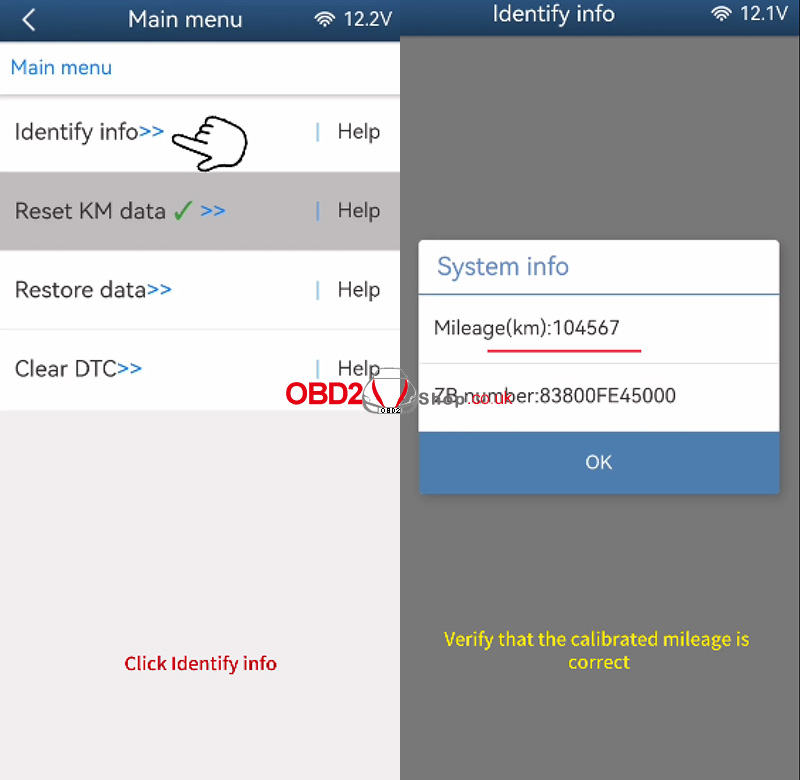
Click "Identify Info" again to check the instrument information.
The mileage should now be updated successfully.
Video Tutorial
For a visual demonstration, please watch the video:
https://youtu.be/-tOxF4RO_E4
Notes:
Always back up the original data before programming.
Use anti-static precautions when handling the instrument cluster.
Ensure stable power and connection during writing.
For further support, refer to the ACDP user manual or contact technical support.
www.obd2shop.co.uk
Oznake: yanhua acdp module 41
utorak, 09.09.2025.
Mastering Toyota Cluster Mileage Correction with Yanhua ACDP Module 41
In the field of automotive repair and adjustment, odometer (mileage) correction is a highly specialized task. It’s often required in scenarios such as instrument cluster replacement, ECU swap, or restoring a repaired dashboard. The Yanhua ACDP system, with its modular design and user-friendly interface, has become a trusted solution for professionals worldwide.
Today, let’s take a closer look at ACDP Module 41, which is specifically designed for Toyota clusters using R7F7014xx and S6J3xx chips.
Two Versions Available:
1. Module 41 License (for users who already own Module 35)
If you already have Module 35, you only need to purchase the Module 41 license to unlock mileage correction features. This is a cost-effective solution since you don’t need to buy extra hardware.
2. Full Module 41 Package (standalone)
For new users who don’t own Module 35, the standalone Module 41 is the right choice. It includes the necessary authorization and works independently for Toyota mileage correction.
Supported Chip Types:
Both versions of Module 41 support the following instrument cluster chips:
1. Support Toyota S6J3001 (2019-) encrypted/unencrypted chips instrument mileage correction via OBD/CAN method.
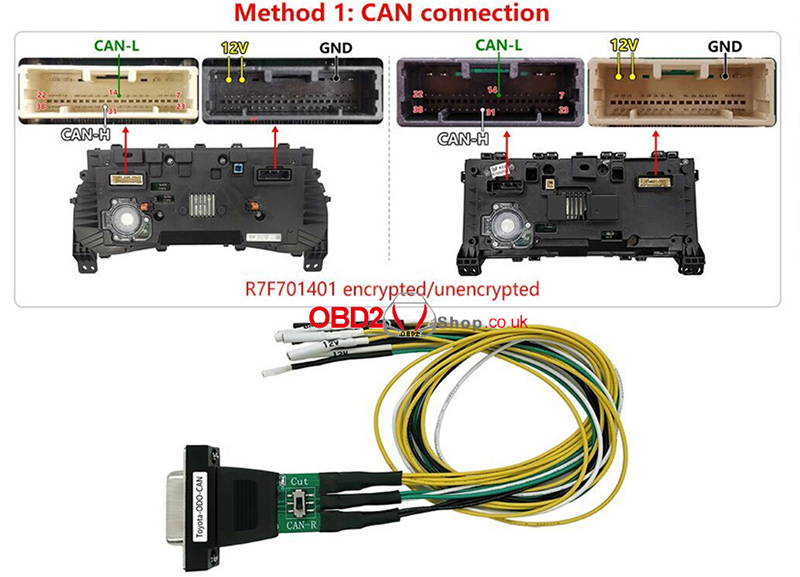
2. Support Toyota R7F701401 (2021-) encrypted/unencrypted chips instrument mileage correction via OBD/CAN method.
3. Support Toyota R7F701441 encrypted chips instrument mileage correction via the OBD/CAN method.
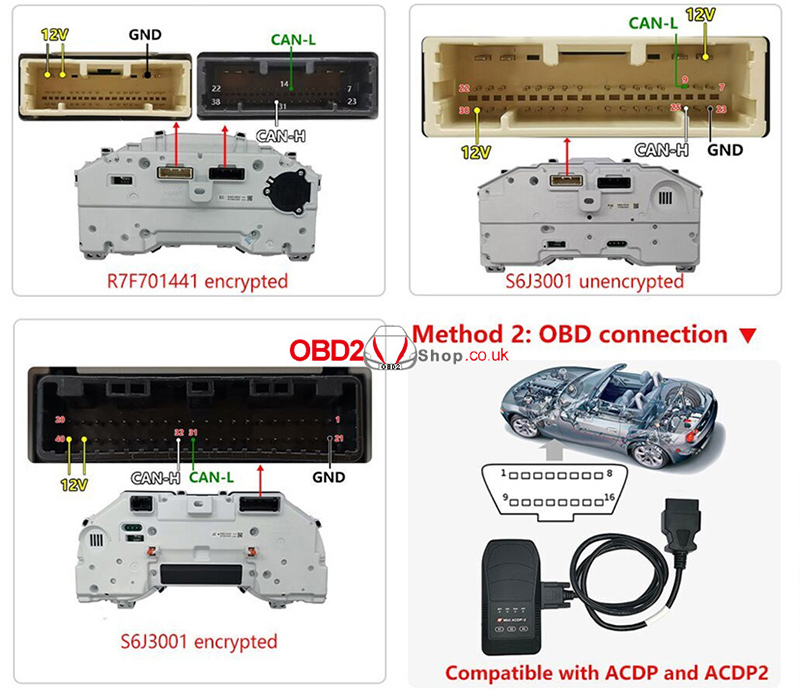
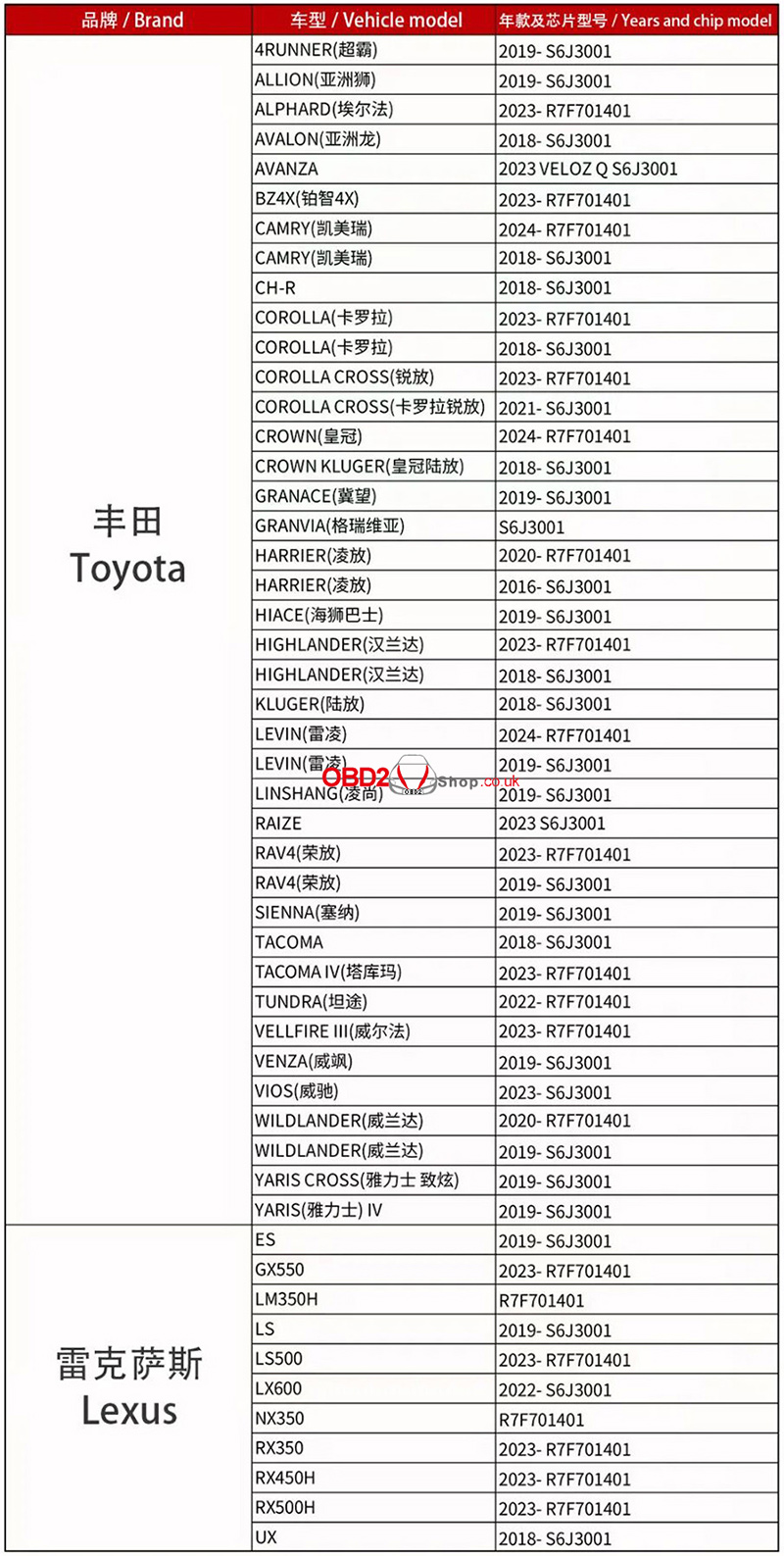
Supported Vehicle List:
Please note that the car model list below is for reference purposes only. If you have any questions, please feel free to contact us.
Conclusion:
Yanhua ACDP Module 41 is a powerful and flexible tool for Toyota mileage correction, offering options that suit both existing ACDP users and newcomers. Whether you’re maintaining, repairing, or replacing Toyota clusters, this module provides a safe and efficient solution.
www.obd2shop.co.uk
Oznake: yanhua acdp module 41

| < | siječanj, 2026 | |||||
| P | U | S | Č | P | S | N |
| 1 | 2 | 3 | 4 | |||
| 5 | 6 | 7 | 8 | 9 | 10 | 11 |
| 12 | 13 | 14 | 15 | 16 | 17 | 18 |
| 19 | 20 | 21 | 22 | 23 | 24 | 25 |
| 26 | 27 | 28 | 29 | 30 | 31 | |
Svibanj 2026 (1)
Siječanj 2026 (19)
Prosinac 2025 (22)
Studeni 2025 (21)
Listopad 2025 (20)
Rujan 2025 (21)
Kolovoz 2025 (8)
Srpanj 2025 (13)
Lipanj 2025 (9)
Svibanj 2025 (12)
Travanj 2025 (10)
Ožujak 2025 (12)
Veljača 2025 (14)
Siječanj 2025 (8)
Prosinac 2024 (6)
Studeni 2024 (6)
Listopad 2024 (4)
Rujan 2024 (7)
Kolovoz 2024 (14)
Srpanj 2024 (12)
Lipanj 2024 (10)
Svibanj 2024 (13)
Travanj 2024 (12)
Ožujak 2024 (11)
Veljača 2024 (2)
Siječanj 2024 (10)
Prosinac 2023 (8)
Studeni 2023 (6)
Listopad 2023 (7)
Rujan 2023 (9)
Kolovoz 2023 (6)
Srpanj 2023 (10)
Lipanj 2023 (4)
Veljača 2023 (8)
Siječanj 2023 (14)
Prosinac 2022 (13)
Studeni 2022 (14)
Listopad 2022 (18)
Rujan 2022 (9)
Kolovoz 2022 (16)
Srpanj 2022 (11)
Lipanj 2022 (14)
Svibanj 2022 (13)
Travanj 2022 (12)
Ožujak 2022 (12)
Veljača 2022 (13)
Siječanj 2022 (10)
Srpanj 2021 (1)
Dnevnik.hr
Gol.hr
Zadovoljna.hr
Novaplus.hr
NovaTV.hr
DomaTV.hr
Mojamini.tv