OBD2 tools on OBD2shop.co.uk https://blog.dnevnik.hr/obd2shop
četvrtak, 17.07.2025.
Solved: MINI Key Tool Error – "Combine SN with Xhorse App!"
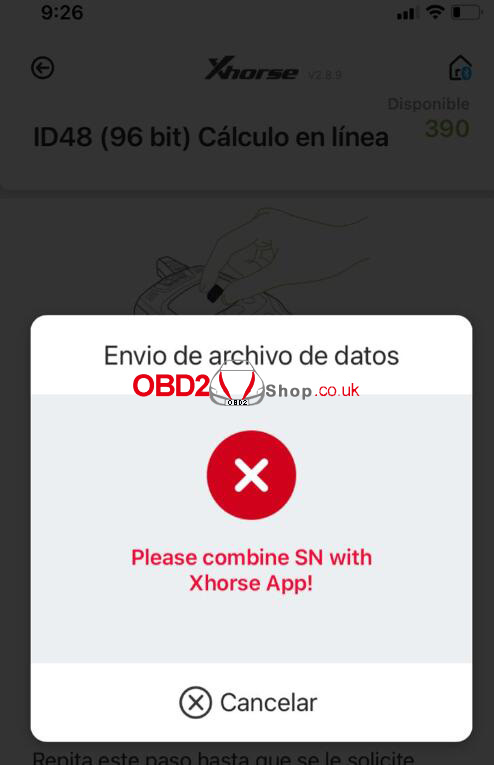
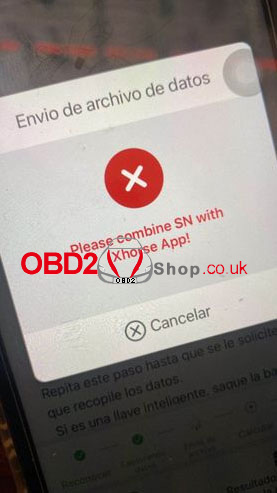
Problem: When using the Xhorse VVDI MINI Key Tool to clone ID48 (96-bit), the device shows the following error message:
"Sending data file (Envio de archivo de datos): Please combine SN with Xhorse App!"
However, the SN (serial number) was already combined with the Xhorse App.
Solution:
Make sure you are logged into the same Xhorse account on the MINI Key Tool that was used to bind the serial number.
Important: Do NOT log in with a different or new account, or the error will persist.
Once you log in with the correct account, the issue will be resolved.
Technical Support:
www.obd2shop.co.uk
Oznake: vvdi mini key tool
četvrtak, 26.06.2025.
How to Change Super Chip Type with VVDI MINI Key Tool
The Xhorse VVDI MINI Key Tool allows for easy modification of the super chip type for XT27A01 / XT27A66 super chips without erasing data. This allows users to directly set the transponder type, making the process fast and efficient.
Supported Feature Highlights:
No chip erasing required
Direct transponder type setting
Simple operation via VVDI MINI Key Tool
How to Set VVDI Super Chip Type
Step-by-Step Instructions
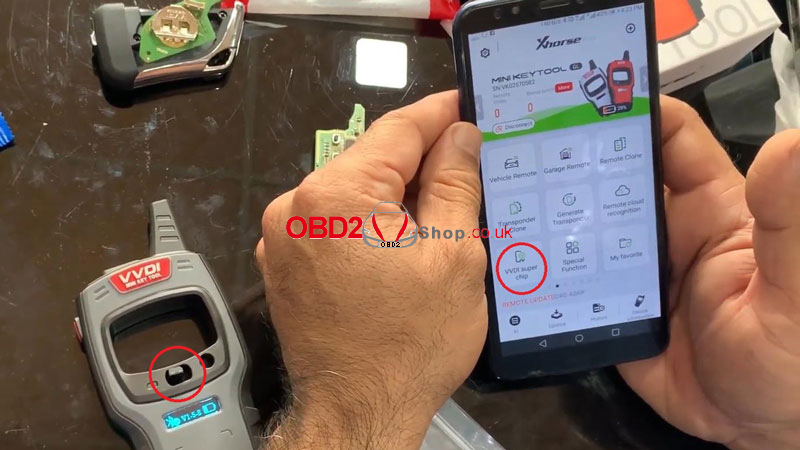
1. Place the VVDI super chip into the coil area of the VVDI MINI Key Tool.
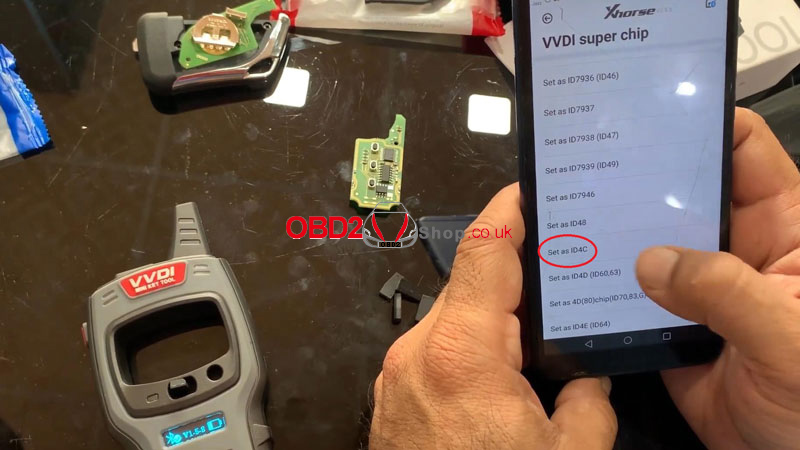
2. On the device, follow the menu path:
Mini Key Tool ’ VVDI Super Chip ’ Set as ID4C
3. Enter the required details and tap OK.
4. Once completed, the setup will be successful.
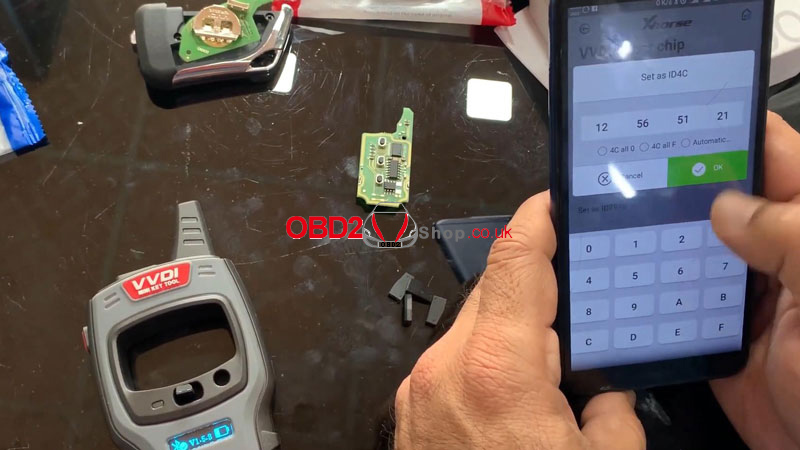
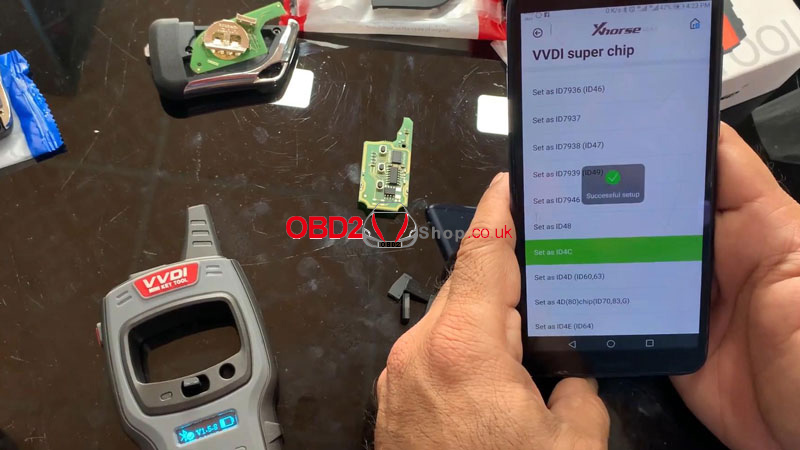
How to Change to Another Transponder Type
1. Select “Set as ID4E (ID64)” from the menu.
2. Confirm the operation.
3. The transponder type will be changed successfully.
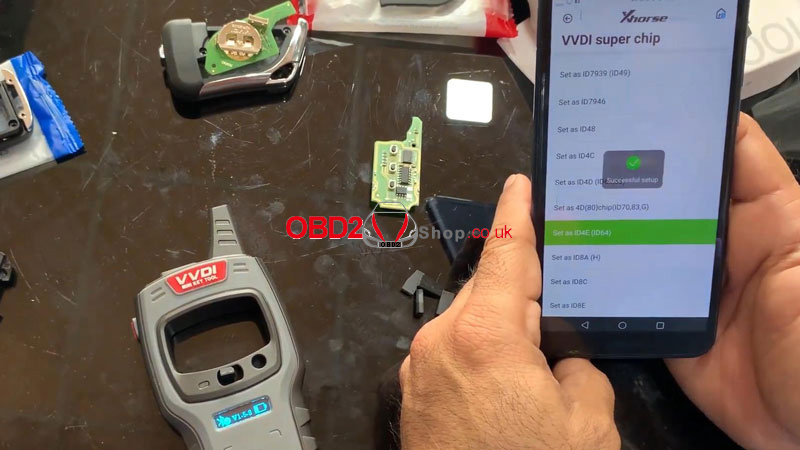
Supported Transponder Types
The VVDI MINI Key Tool supports the following transponder types:
ID11
ID12
ID13
IDPCF7935
IDPCF7936
IDPCF7937
IDPCF7938
IDPCF7939
IDPCF7946
ID48
ID4C
ID4D
ID4D (80)
ID4E
ID8A
ID8C
ID8E
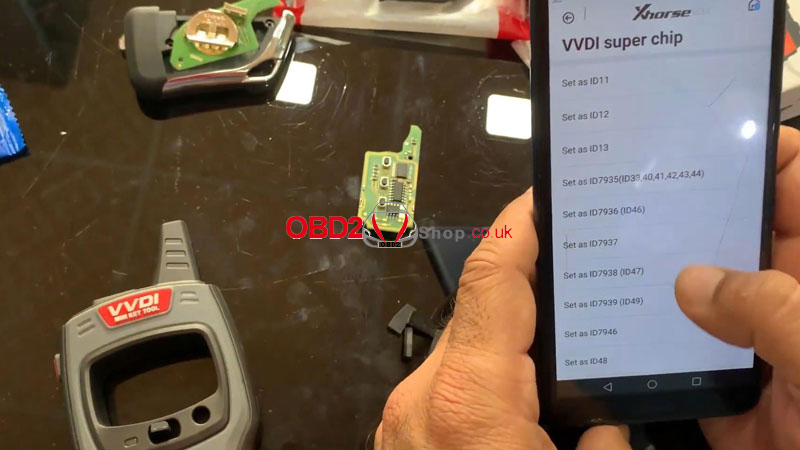
With this function, the Xhorse VVDI MINI Key Tool enables locksmiths and technicians to quickly and reliably configure VVDI super chips for various vehicle requirements.
For more professional automotive diagnostic and key programming tools, visit: www.obd2shop.co.uk.
Oznake: vvdi mini key tool
utorak, 09.08.2022.
Renew BMW F series 868MHz Remote via VVDI Mini Key Tool
This post will show you how to use Xhorse vvdi mini key tool to renew your BMW F series 868MHz remote.
Tools you need:
VVDI Mini Key Tool
BMW F series 868MHz remote
Xhorse Remote Renew Cable
Smartphone
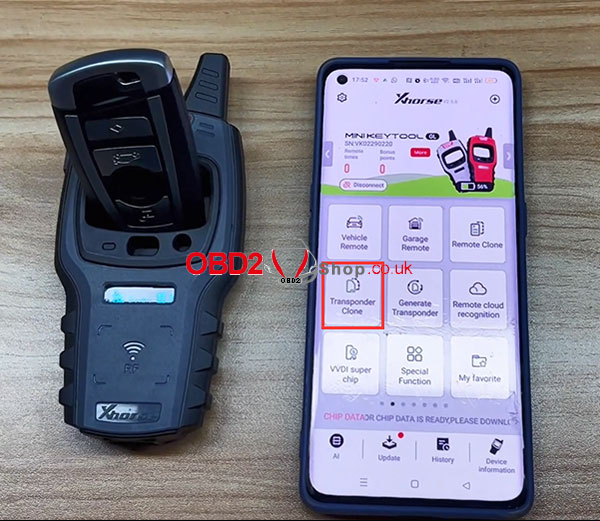
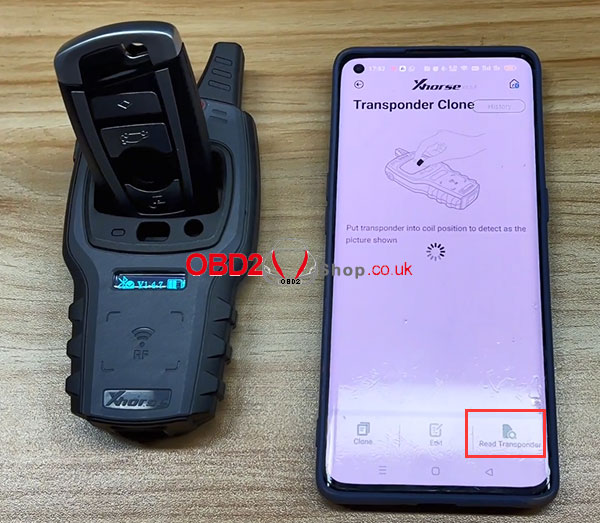
Step 1. Insert the remote into the mini key tool slot, select "Transponder Clone " and click "Read transponder" in the lower right corner.
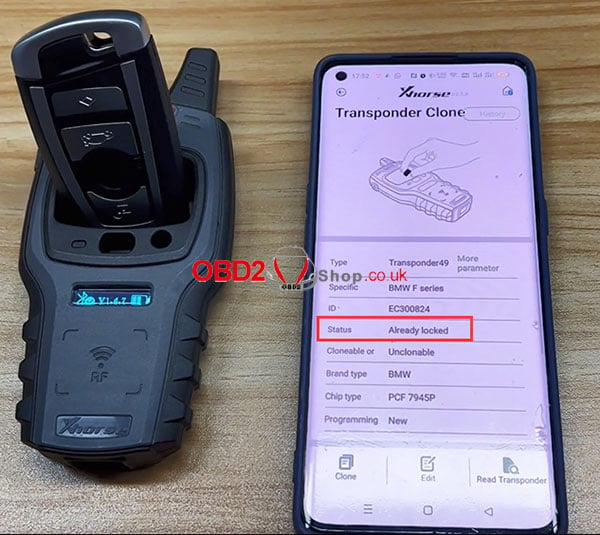
You can see that the current status of the remote is "Already locked".
Step 2. Disassemble the BMW remote and connect it to the mini key tool via the Xhorse remote renew cable.
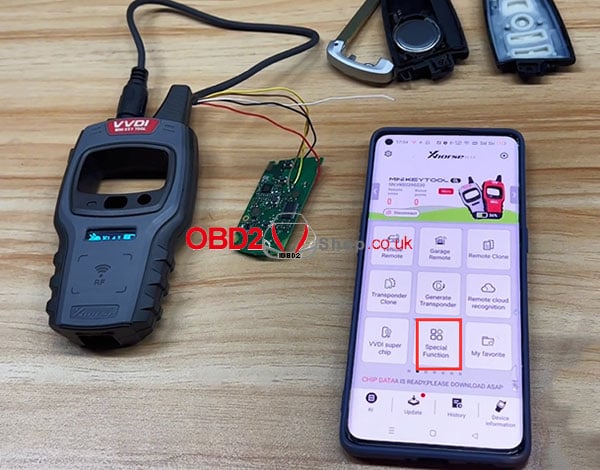
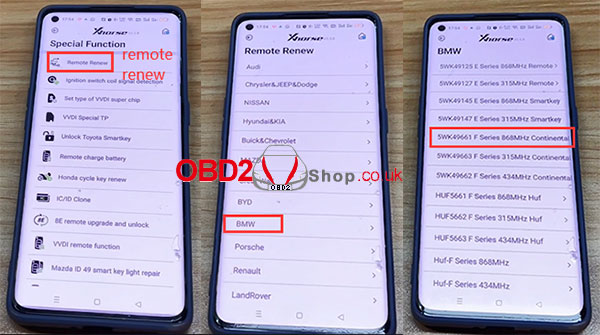
Select "Special function" ’ "Remote Renew" ’ "BMW" ’ "SWK49661 F Series 868MHz Continental"
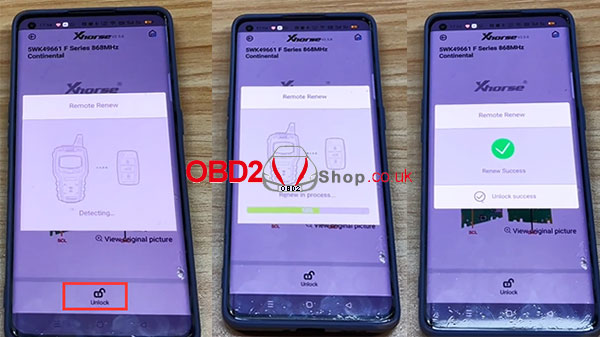
Click "Unlock"
Renew in the process...
Renew Success.
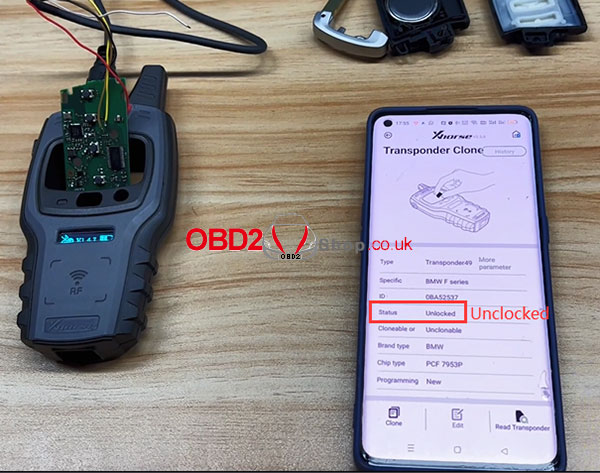
Step 3. Go back to the original interface and repeat step 1.
At this point, you can see that the current status of the remote is "Unlocked".
Video guides:
https://youtu.be/PYC0dqY_zOQ
Oznake: vvdi mini key tool

| < | siječanj, 2026 | |||||
| P | U | S | Č | P | S | N |
| 1 | 2 | 3 | 4 | |||
| 5 | 6 | 7 | 8 | 9 | 10 | 11 |
| 12 | 13 | 14 | 15 | 16 | 17 | 18 |
| 19 | 20 | 21 | 22 | 23 | 24 | 25 |
| 26 | 27 | 28 | 29 | 30 | 31 | |
Svibanj 2026 (1)
Siječanj 2026 (19)
Prosinac 2025 (22)
Studeni 2025 (21)
Listopad 2025 (20)
Rujan 2025 (21)
Kolovoz 2025 (8)
Srpanj 2025 (13)
Lipanj 2025 (9)
Svibanj 2025 (12)
Travanj 2025 (10)
Ožujak 2025 (12)
Veljača 2025 (14)
Siječanj 2025 (8)
Prosinac 2024 (6)
Studeni 2024 (6)
Listopad 2024 (4)
Rujan 2024 (7)
Kolovoz 2024 (14)
Srpanj 2024 (12)
Lipanj 2024 (10)
Svibanj 2024 (13)
Travanj 2024 (12)
Ožujak 2024 (11)
Veljača 2024 (2)
Siječanj 2024 (10)
Prosinac 2023 (8)
Studeni 2023 (6)
Listopad 2023 (7)
Rujan 2023 (9)
Kolovoz 2023 (6)
Srpanj 2023 (10)
Lipanj 2023 (4)
Veljača 2023 (8)
Siječanj 2023 (14)
Prosinac 2022 (13)
Studeni 2022 (14)
Listopad 2022 (18)
Rujan 2022 (9)
Kolovoz 2022 (16)
Srpanj 2022 (11)
Lipanj 2022 (14)
Svibanj 2022 (13)
Travanj 2022 (12)
Ožujak 2022 (12)
Veljača 2022 (13)
Siječanj 2022 (10)
Srpanj 2021 (1)
Dnevnik.hr
Gol.hr
Zadovoljna.hr
Novaplus.hr
NovaTV.hr
DomaTV.hr
Mojamini.tv