48 Port Gigabit Switch Recommendations
petak , 08.12.2017.As long as there is network deployment, gigabit switch is always the hot spot. According to different standards, ethernet switches have various types, such as 1 gigabit switch, 10 gigabit switch, 40 gigabit switch and 100g ethernet switch. Also, there are network switches classified by port number, such as 8 port, 24 port and 48 port. This article will recommend several 48 port Gigabit switches for you.
48 Port Gigabit Switch Recommendation 1—Dell PowerConnect 5548 Switch
Dell PowerConnect 5548 switch has 48 auto-sensing Gigabit Ethernet (GbE) switching ports and it provides exceptional performance through a switch fabric capacity of 176 Gbps, 2 HDMI stacking sorts with 10Gb per port for 40Gb total per switch, and a forwarding rate of 100.2 Mpps. In addition, Dell PowerConnect 5548 switch offers wire-speed performance that can grow alongside your evolving business needs. The price is about $495.00.
48 Port Gigabit Switch Recommendation 2—Ubiquiti US-48 Unifi Switch
Ubiquiti US-48 Unifi switch is designed with 48 Gigabit RJ45 ports, 2 SFP ports and 2 SFP+ ports. For its total, non—blocking throughput, Ubiquiti US-48 Unifi switch supports up to 70 Gbps. And it can offer 140 Gbps forwarding capacity to simultaneously process traffic on all ports at line rate without any packet loss. Ubiquiti US-48 Unifi switch is a fully managed switch, delivering robust performance and intelligent switching for your growing networks. The price is about $397.53.
48 Port Gigabit Switch Recommendation 3—TP-Link TL-SG1048 Switch
TP-Link TL-SG1048 switch is designed to meet the needs of the most demanding workgroup and departmental connectivity requirements. It provides 48 10/100/1000Mbps ports. Besides, it combines ease of use with unsurpassed performance resulting in an exceptional value for any cost-conscious network administrator who wants the best possible solution at the best possible price $271.99. TP-Link TL-SG1048 switch is a reliable, easy-to-use switch without the complexity of management.
48 Port Gigabit Switch Recommendation 4—FS S1600-48T4S Switch
FS S1600-48T4S switch is a PoE switch comes with 48 10/100/1000Base-T RJ45 Ethernet ports, 1 console port, 4 SFP+ slots. It offers enterprise-class features, high-performance of both hardware and software , stable and reliable fast Ring Protection Protocol(RSTP), free configuration, strong network security, convenient management and maintenance. This 48 port switch price is about $689.00.

48 Port Gigabit Switch Recommendation 5—Quanta LB4M Switch
Quanta LB4M switch offers 48 Gbit ports and 2 SFP+ ports that makes it stackable and suitable to scenarios that require a strong scalability. These ports can function in 10 GBE switching mode, or in HiGig+ Uplink mode. It is a Layer 2 and Layer 3 switch with IPv6 and clustering features. The price of Quanta LB4M switch is about $225.00.
Conclusion
High density port switch is popular with small business data center. And 48 port gigabit switch is a heat topic. This article recommends five cheap 48 port switches for you and I hope it can help you make a choice for your network deployment.
Oznake: gigabit switch, poe switch, ethernet switches, 48 port switch price
komentiraj (0) * ispiši * #
Talk About 2.5G And 5G
srijeda , 25.10.2017.Network technology is developing rapidly. To keep up with the trend, data centers are required to upgrade constantly, from 10G to 40G, 40G to 100G and even 100G to 400G. However, for some small business data centers with 1G infrastructures, directly migrating from 1G to 10G is a little fast. Is there any slower Ethernet standards to fill the gap between 1G Ethernet and 10G Ethernet speeds? The answer is Yes—2.5 Ethernet and 5G Ethernet. This article will talk about 2.5G and 5G.
The physical (PHY) layer transmission technology of IEEE 802.3bz is based on 10GBASE-T, but operates at a lower signaling rate. By reducing the original signal rate to
1/4 or
1/2, the transfer rate drops to 2.5 or 5 Gbit/s, respectively. The spectral bandwidth of the signal is reduced accordingly, lowering the requirements on the cabling, so that 2.5GBASE-T and 5GBASE-T can be deployed at a cable length of 100 meters on unshielded Cat5e cable and Cat6 cable, respectively. The following figure shows the comparison of twisted pair based Ethernet technologies.
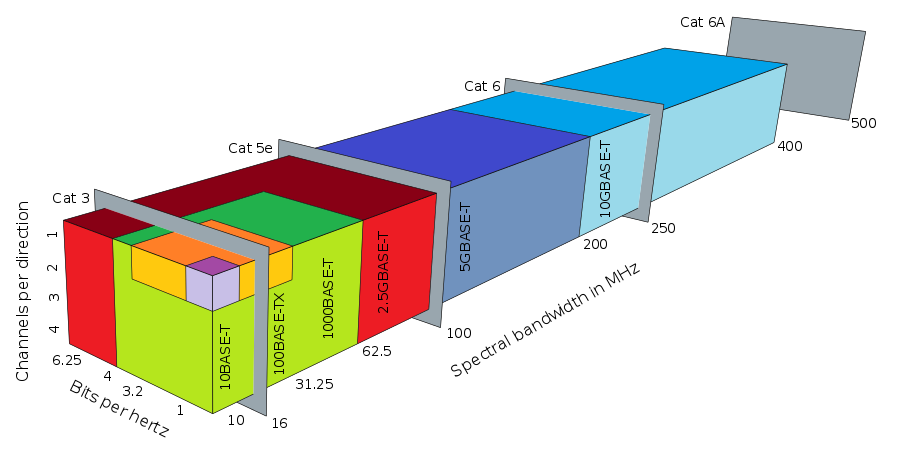
As 2.5G and 5G Ethernet standards came out after 10G Ethernet standard, there are mixed reviews for them. This part will focus on cons and pros of 2.5G/5G Ethernet standards.
When 2.5G Ethernet and 5G Ethernet standards came out, many people didn’t think much of them. They commented that:
- 5GBase-T and 5GBase-T are more going to be used for wifi rollouts. And they are pretty much strictly for enterprise wireless deployments.
- 10GbE is getting pretty cheap. Lots of new desktop motherboards now have 10G NICs inside them and the premium seems to be less than $100 too, which isn't too bad. What's missing is a bunch of 10G home switches and routers.
- As for the availability, the 10G has 2 models out while the 2.5G and 5G are both "coming soon". Due to the economies of scale and the penetration, 10G already has IMO. While 2.5G and 5G will never be widely adopted or supported.
- There are not that many chip sets that support 2.5G Ethernet and 5G Ethernet yet as they really only got finalized. Also, most cards that support them right now also support 10Gbe.
What exists is reasonable. One estimate is that there are 70 billion meters of Cat5e and Cat6 cabling have been sold between 2003 and 2014. With such a significant amount of existing infrastructure at stake, it's hardly surprising that most enterprises want to extend the existing cabling, component and equipment investments in the standard Ethernet wireless closet. Therefore, it is not difficult to find that 2.5G Ethernet and 5G Ethernet standards have their advantages.
- Cat5 and Cat6 cabling can’t support 10G Ethernet up to 100 meters, but they will be able to support the emerging 2.5Gbps and 5Gbps standards, thereby preserving the value of the existing copper cable plant.
- Adopting new 2.5G and 5G can satisfy the need of increasing data rates of wireless networking. The new 802.11ac Wi-Fi standard increases wireless bandwidth, supporting Ethernet speeds of 1.7 Gbps to 2.5 Gbps. With the coming of the next generation of wireless networking, 802.11ac Wi-Fi Wave 2, wireless network speeds could increase to as high as 6.8 Gbps.
- Besides the need from the Wi-Fi industry, a 2.5G/5G version will also aid in other applications such as enterprise infrastructure, cellular Wi-Fi offloads, small cells, security cameras, multiple industrial uses and PoE technology.
- These two new Ethernet standards have plenty of attributes to ensure success, such as ease of use, backward compatibility, faster speeds without requiring a cable upgrade, incremental speed upgrades, multi-vendor interoperability, not to mention optimized cost and performance.
From the above content, we can conclude that 2.5G/5G Ethernet standards have both pros and cons. For those who want to upgrade cabling system to 10G, 2.5G/5G is not useful. While for small business and home network, 2.5G/5G is a cost-effective solution. No matter what your cable plant is, choosing a suitable migration path is the most important thing.
Originally published at: http://www.fiber-optical-networking.com/talk-about-2-5g-and-5g.html
Oznake: cat5e cable, poe switch, 2.5G, 5G
komentiraj (0) * ispiši * #
The Application of PoE
ponedjeljak , 02.10.2017.With the development of communication technology, different communication products are available on the market. Among them, there are some products popular with home network deployment, such as IP phone, wireless access point and IP camera. Recently, PoE technology is highly recommend for home network application. It is an IEEE standard for simultaneously transmitting data and low-voltage power throughout a network using a single Ethernet cable. This article will introduce the application of PoE.
Before we come to the application of PoE, let’s have a look at PoE devices at first.
A PoE switch is a network switch that has Power over Ethernet injection built-in. It is straightforward to add PoE to your network. Simply connect other network devices to the PoE switch as normal, and the switch will detect whether they are POE-compatible and enable power automatically. PoE switches are available to suit all applications, from low-cost unmanaged edge switches with a few ports, up to complex multi-port rack-mounted units with sophisticated management.
A PoE injector is used to add PoE capability to regular non-POE network links. It can be used to upgrade existing LAN installations to PoE, and provide a versatile solution where fewer PoE ports are required. A PoE splitter also supplies power to a device and it is useful for deploying devices such as access points that are not POE ready and where there are no nearby AC outlets. The main difference between PoE injector and PoE splitter is that PoE splitter splits the power from the data to a separate input that the device can use, and there will be two cables for output: one for data and one for power. Here is a figure that show typical PoE Injector and PoE Splitter applications.

From the figure we can see that, upgrading each network connection to PoE is as simple as patching it through the PoE injector, and as with PoE switch, power injection is controlled and automatic. It is also possible to upgrade powered devices to PoE by using a PoE splitter.
Without PoE, you have to make a choice between running a power cable to the area where you want to deploy a network device or deploying network devices based on where existing power outlets are available. PoE provides greater flexibility and ensures that you will never have to compromise when deploying network devices. It dramatically simplifies the process of installing APs, IP cameras, IP phones, and other PoE enabled devices in hard-to-reach, outdoor, and remote areas.
With PoE technology, PoE switch is specifically designed to supply power to network devices. Managed and unmanaged PoE switch are available on the market, allowing you to transmit electrical power and data via a single network cable. This makes it easier than ever to expand your network into areas where power sockets are not accessible.
Oznake: Ethernet cable, 8 port poe switch, poe switch, network cable
komentiraj (0) * ispiši * #
A Closer Look At Hub, Switch And Router
četvrtak , 28.09.2017.In Ethernet network deployment, there are three components which are similar in shape—hub, switch and router. All of them are small plastic or metal box-shaped electronic devices. However, they play different roles in the network. This article will guide you to have a closer look at hub, switch and router.
A hub, also called a network hub, is a common connection point for devices in a network. Containing multiple ports, the hub is commonly used to connect segments of a LAN. When a packet arrives at one port, it is copied to the other ports so that all segments of the LAN can see all packets.

In a network, a switch filters and forwards packets between LAN segments. It usually operates at the data link layer (layer 2) and sometimes the network layer (layer 3) of the OSI Reference Model and therefore supports any packet protocol. LANs that use switches to join segments are called switched LANs or, in the case of Ethernet networks, switched Ethernet LANs.

A router is designed to join together multiple LANs with a WAN. Serving as intermediate destination for network traffic, the router receives incoming network packets, looks inside each packet to identify the source and target network addresses, then forwards these packets where needed to ensure the data reaches its final destination.

From the outside, hub, switch and router are identical:
- They are small plastic or metal box-shaped electronic devices.
- They make computers connect to them through network cable for getting access to the Internet.
- They have a number of physical ports on the front or back of the unit that provide the connection points for computers, a connection for electric power and LED lights to display device status.
But when applied in a network, there are some differences among them:
- We know that router is designed specifically to join the home network to the Internet for the purpose of Internet connection sharing. However, switch and hub are not capable of joining multiple networks or sharing an Internet connection. A network with only switch and hub must instead designate one computer as the gateway to the Internet, and that device must possess two network adapters for sharing, one for the home facing connection and one for the Internet facing connection.
- Router is smarter in other ways. For example, router is featured with integrated DHCP server and network firewall support. Some wireless routers even incorporate a built-in Ethernet switch for supporting wired computer connections (and enabling network expansion via connecting additional switches if needed).
- Router is the only one of these three devices that will allow you to share a single IP (Internet Protocol) address among multiple network clients.
- Switch is higher-performance alternative to hub. For example, both pass data between devices connected to them, hub broadcasts the data to all other connected devices, while switch first determines which device is the intended recipient of the data and then sends it to that one device directly via a so-called "virtual circuit". On busy networks, this behavior allows switch to generate less overall network traffic compared to hubs.

For home network deployment, switch and router are used more commonly, especially PoE switch and wireless router. I hope after reading this article, you can have a better understanding of hub, switch and router. FS.COM provides network cable with multiple lengths and colors for network cabling. Also, they have quality PoE switch for PoE devices.
Oznake: network cable, poe switch
komentiraj (0) * ispiši * #
Have You Upgraded to Cisco Nexus 9000 Series Switches?
petak , 08.09.2017.As the nerve of the whole network deployment, data switch can provide high performance and density to ensure the normal operation of all connections. The smart switch of Cisco has gained great popularity among engineers. in February, 2017, Cisco has announced the significant advancements and enhancements to the Cisco Nexus 9000 portfolio. Have you upgraded to Cisco Nexus 9000 Series switches? This article will guide you to have a close look at Cisco Nexus 9000.
Cisco Nexus 9000 Series delivers proven high performance and density, low latency, and exceptional power efficiency in a range of form factors. The switches operate in Cisco NX-OS Software or Application Centric Infrastructure (ACI) modes with ground-breaking Cloud Scale ASIC technology. They are ideal for traditional or fully automated data center deployments. Here is figure of Cisco Nexus 9000 Series switches.

Many experts said that the Cisco Nexus 9000 Series is the right choice as the foundation for today’s hybrid enterprise data centers. Why? This part will show you the shining points of Cisco Nexus 9000.
- To address rapidly changing and increasingly complex hybrid data centers, customers are recommended to choose the Cisco Cloud Scale ASIC that powers the Cisco Nexus 9000 Series. Compared to other products, Cloud Scale ASIC gives customers at least a two-year advantage in the functions, such as providing greater scalability, deeper analytics and visibility, and greater performance. In addition, Cloud Scale ASIC offers significantly greater scale and more features at an optimized price with capabilities that include segment routing, group-based security policy, network service headers, and fullfeatured Virtual Extensible LAN (VXLAN) overlays.
- Open Cisco NX-OS Software is the industry’s most extensible, open, and programmable network operating system. It enables customers to programmatically provision and configure Cisco Nexus 9000 Series switches through well-documented, comprehensive APIs offered by both Cisco and third parties. Customers can provision their switches using familiar tool integrations (such as Puppet, Chef, and Ansible) and have access to a robust API and community support.
- Cisco ACI is the industry’s number one Software Defined Networking (SDN) solution, delivering the most comprehensive automation capability. It enhances business agility, reduces total cost of ownership (TCO), automates IT tasks, and accelerates application deployment. It allows customers to accelerate their application deployment cycles from weeks to minutes by using centralized, policy-defined automation management.
- The Cisco Nexus 9000 Series with the Cloud Scale ASIC come configured with support for the Cisco Tetration Analytics and Cisco Nexus Data Broker solutions, providing customers with real-time visibility into application performance as well as enhanced security. IT can better understand the current system, helping prepare IT for whatever the future may bring.
- The Cisco Nexus 9000 Series offers tools such as Cisco Data Center Network Manager (DCNM) that enable customers to deploy switches efficiently and optimize the fabric through automatable capabilities. It automatically provisions Cisco Nexus switches and configures switch fabric virtual machine management (VMM) tools for the network manager.
The Cisco Nexus 9000 Series provides multiyear, sustained differentiation between Cisco and point-product network providers and providers of proprietary, single-vendor public clouds, supporting greater performance and enhanced operations through features including intelligent services, programmability, automation, analytics, and manageability. If you want to get higher performance of your network deployment, it is time to upgrade to Cisco Nexus 9000. FS.COM provides Gigabit PoE switch, 10G/40G/100G layer 2/layer 3 switch. Also, they have cost-effective Cisco compatible fiber optic transceiver, such as Cisco gigabit SFP, Cisco 10gb SFP+, Cisco 10GBASE-T transceiver and so on.
Oznake: Cisco Nexus 9000, data switch, smart switch, poe switch, layer 3 switch
komentiraj (0) * ispiši * #
