The Application of PoE
ponedjeljak , 02.10.2017.With the development of communication technology, different communication products are available on the market. Among them, there are some products popular with home network deployment, such as IP phone, wireless access point and IP camera. Recently, PoE technology is highly recommend for home network application. It is an IEEE standard for simultaneously transmitting data and low-voltage power throughout a network using a single Ethernet cable. This article will introduce the application of PoE.
Before we come to the application of PoE, let’s have a look at PoE devices at first.
A PoE switch is a network switch that has Power over Ethernet injection built-in. It is straightforward to add PoE to your network. Simply connect other network devices to the PoE switch as normal, and the switch will detect whether they are POE-compatible and enable power automatically. PoE switches are available to suit all applications, from low-cost unmanaged edge switches with a few ports, up to complex multi-port rack-mounted units with sophisticated management.
A PoE injector is used to add PoE capability to regular non-POE network links. It can be used to upgrade existing LAN installations to PoE, and provide a versatile solution where fewer PoE ports are required. A PoE splitter also supplies power to a device and it is useful for deploying devices such as access points that are not POE ready and where there are no nearby AC outlets. The main difference between PoE injector and PoE splitter is that PoE splitter splits the power from the data to a separate input that the device can use, and there will be two cables for output: one for data and one for power. Here is a figure that show typical PoE Injector and PoE Splitter applications.

From the figure we can see that, upgrading each network connection to PoE is as simple as patching it through the PoE injector, and as with PoE switch, power injection is controlled and automatic. It is also possible to upgrade powered devices to PoE by using a PoE splitter.
Without PoE, you have to make a choice between running a power cable to the area where you want to deploy a network device or deploying network devices based on where existing power outlets are available. PoE provides greater flexibility and ensures that you will never have to compromise when deploying network devices. It dramatically simplifies the process of installing APs, IP cameras, IP phones, and other PoE enabled devices in hard-to-reach, outdoor, and remote areas.
With PoE technology, PoE switch is specifically designed to supply power to network devices. Managed and unmanaged PoE switch are available on the market, allowing you to transmit electrical power and data via a single network cable. This makes it easier than ever to expand your network into areas where power sockets are not accessible.
Oznake: Ethernet cable, 8 port poe switch, poe switch, network cable
komentiraj (0) * ispiši * #
How to Choose the Right Ethernet Cable for Your Network?
srijeda , 25.01.2017.To build your Ethernet network, the transmission media Ethernet cable is indispensable. And there are a variety of choices for Ethernet cables, such as Cat5e, Cat6, Cat6a and so on. If you are familiar with the differences between these different types of Ethernet cables, you may think it’s very simple to choose the right Ethernet cable for your network. However, is this really enough to help you make the decision? Are there any other factors you have to take into consideration? This article will give you the answer.
First, let’s have a quick review of the basic knowledge of these different types of Ethernet cables. For data speed, Cat5e is designed to support 1 Gigabit Ethernet with bandwidth up to 100MHz; Cat6 can support higher data rate of 10 Gigabit Ethernet with bandwidth up to 250 MHz; Cat6a is defined at frequencies up to 500MHz among 10G Ethernet applications. For transmission distance, Cat5e can reach 100 meters at the speed of 1Gbps; Cat6 is able to run 100 meters with data speed up to 1Gbps and only 55 meters at the speed of 10Gbps; Cat6a can support the distance over 100 meters at the speed of 10Gbps. Which types of Ethernet cables to choose depends on your requirement for transmission speed and distance. After you make a decision on this, there are some other factors you have to consider—straight-through or crossover cable, UTP (unshielded twisted pair) or STP (shielded twisted pair) cable, length and color. The following part will focus on these factors.
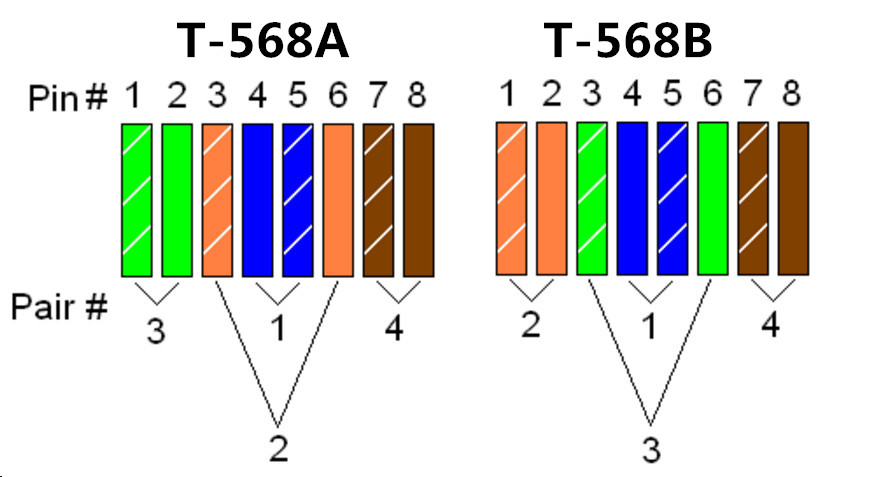
Ethernet cable terminated with RJ45 connector contains eight color-coded wires. The color-coded wiring sequences exist as a cabling industry standard. When linking RJ45 connector to a cable, there are two wiring standards—T-568A and T-568B. The two wiring standards are used to create a straight-through cable (T-568A or T-568B on both ends), or a crossover cable (T-568A on one end and T-568B on the other end). To choose a straight-through cable, you have to use either T-568A or T-568B on both ends of the cable; to choose a crossover cable, you need to wire T-568A on one end and T-568B on the other end of the cable. Here is a figure of T-568A and T-568B, from which you can see the difference between these two wiring standards.
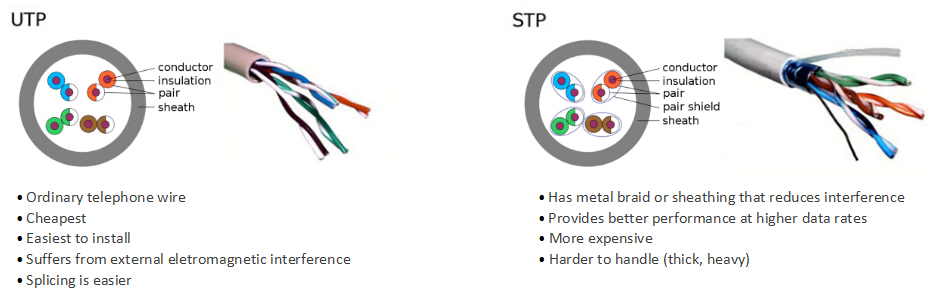
STP cable has a metal shield around each twisted pair which is composed of copper tape, a layer of conducting polymer or a braid (mostly made of copper or aluminum). With the shield, EMI (electromagnetic interference) and crosstalk can be greatly reduced, which enables the high performance of data transmission between different devices. While UTP cable has no shielding. It is designed to cancel electromagnetic interference through the way the pairs are twisted inside the cable. If the Ethernet cable runs in the environment where the interference or crosstalk is not the main concern, it is suggested to choose UTP cables which are lower in cost. But if the environment is full of powerful magnetic fields which may have an influence on the performance of network, STP cable is absolutely the optimal choice. To have a better understanding of the difference between UTP cable and STP cable, here is figure of the inner structure of UTP cable and STP cable.
When choosing Ether cable for your network, you also need to consider length and color. Ethernet cable comes in standard lengths such as 1, 3, 5, 7, and 10 meter. Longer lengths are available, such as bulk Cat5e cable 305m. The distance between your various network devices and your network switch or router will determine the length you need. In addition, Ethernet cable is designed in all sorts of colors, such as blue, gray, red and some other color. This decision can be based purely on your individual taste and preference.
There is no doubt that choosing the right Ethernet cable can make your network work at a high performance level. I hope this article can help you know more about Ethernet cable and make the right choice for your network application. There are different types of Ethernet cables available in FS.COM, such as UTP Cat5e bulk cable, STP Cat6 bulk cable and so on. Also, they provide different types of RJ45 couplers which can be a convenient way to combine two short Ethernet cables into a longer one, such as Cat6 coupler and Cat5e coupler.
Oznake: Cat5e bulk cable, cat5e cable 305m, Ethernet cable, RJ45 Coupler, UTP Cable, STP Cable, straight-through cable, crossover cable
komentiraj (0) * ispiši * #
