A Closer Look At Hub, Switch And Router
četvrtak , 28.09.2017.In Ethernet network deployment, there are three components which are similar in shape—hub, switch and router. All of them are small plastic or metal box-shaped electronic devices. However, they play different roles in the network. This article will guide you to have a closer look at hub, switch and router.
A hub, also called a network hub, is a common connection point for devices in a network. Containing multiple ports, the hub is commonly used to connect segments of a LAN. When a packet arrives at one port, it is copied to the other ports so that all segments of the LAN can see all packets.

In a network, a switch filters and forwards packets between LAN segments. It usually operates at the data link layer (layer 2) and sometimes the network layer (layer 3) of the OSI Reference Model and therefore supports any packet protocol. LANs that use switches to join segments are called switched LANs or, in the case of Ethernet networks, switched Ethernet LANs.

A router is designed to join together multiple LANs with a WAN. Serving as intermediate destination for network traffic, the router receives incoming network packets, looks inside each packet to identify the source and target network addresses, then forwards these packets where needed to ensure the data reaches its final destination.

From the outside, hub, switch and router are identical:
- They are small plastic or metal box-shaped electronic devices.
- They make computers connect to them through network cable for getting access to the Internet.
- They have a number of physical ports on the front or back of the unit that provide the connection points for computers, a connection for electric power and LED lights to display device status.
But when applied in a network, there are some differences among them:
- We know that router is designed specifically to join the home network to the Internet for the purpose of Internet connection sharing. However, switch and hub are not capable of joining multiple networks or sharing an Internet connection. A network with only switch and hub must instead designate one computer as the gateway to the Internet, and that device must possess two network adapters for sharing, one for the home facing connection and one for the Internet facing connection.
- Router is smarter in other ways. For example, router is featured with integrated DHCP server and network firewall support. Some wireless routers even incorporate a built-in Ethernet switch for supporting wired computer connections (and enabling network expansion via connecting additional switches if needed).
- Router is the only one of these three devices that will allow you to share a single IP (Internet Protocol) address among multiple network clients.
- Switch is higher-performance alternative to hub. For example, both pass data between devices connected to them, hub broadcasts the data to all other connected devices, while switch first determines which device is the intended recipient of the data and then sends it to that one device directly via a so-called "virtual circuit". On busy networks, this behavior allows switch to generate less overall network traffic compared to hubs.

For home network deployment, switch and router are used more commonly, especially PoE switch and wireless router. I hope after reading this article, you can have a better understanding of hub, switch and router. FS.COM provides network cable with multiple lengths and colors for network cabling. Also, they have quality PoE switch for PoE devices.
Oznake: network cable, poe switch
komentiraj (0) * ispiši * #
A Closer Look at Mikrotik CRS317-1G-16S+RM
petak , 22.09.2017.Though 40G and 100G network have been widely applied in many data center, for some small business, 10G network is enough and 10 gigabit switch still occupies a certain market position. Recently, many people are awaiting the release of Mikrotik CRS317-1G-16S+RM. Just a short while ago, it was available on the market. This article will guide you to have a closer look at Mikrotik CRS317-1G-16S+RM.
The new Cloud Router Switch Mikrotik 317-1G-16S+RM is a rack-mountable managed switch with Layer3 features. It has 16 SFP+ ports and one 1GbE copper port which can achieve high performance level 10GbE connectivity. Mikrotik CRS317-1G-16S+RM is powered by a next generation switching chip, giving you wire speed performance for all sixteen 10GbE ports with any Ethernet frame size. Here is a figure of Mikrotik CRS317-1G-16S+RM for you.

Shining Points
Compared to Mikrotik previous 10G switches, Mikrotik CRS317-1G-16S+RM has some shining points.
Hardware-based Spanning Tree Protocol (MSTP) and Link Aggregation (LACP): They provide enhanced protection and true professional performance for your demanding network.
Dual redundant power supplies and passive cooling case: The unit is completely silent. And for hot environments, like outdoor communications boxes, two redundant fans will automatically keep the system cool if needed.
Dual Boot option for SwOS or RouterOS: You can choose which operating system you prefer to use, RouterOS or SwOS. If you prefer to have a simplified switch only OS with more switch specific features, use SwOS. If you are used to Winbox and would like the ability to use routing and other Layer 3 features on some ports in your CRS, boot and use RouterOS. You can select the desired operating system from RouterOS, from SwOS or from the RouterBOOT loader settings.
In addition, Mikrotik CRS317-1G-16S+RM allows you to manage port-to-port forwarding, apply MAC filter, configure VLANs, mirror traffic, apply bandwidth limitation and even adjust some MAC and IP header fields. And its SFP+ cages support both 1.25 Gb SFP and 10 Gb SFP+ modules. The following figure shows the specifications of Mikrotik CRS317-1G-16S+RM.

Mikrotik CRS317-1G-16S+RM has 16 SFP+ ports which support both 1.25G SFP and 10G SFP+ transceivers. For 1G short link connection, you can use Mikrotik compatible SFP transceiver module with multimode fiber; for 1G long transmission distance, you can use Mikrotik compatible SFP transceiver with single mode fiber optic cable. If you want to deploy 10G network, you can use 10G SFP+ SR transceiver and multimode fiber for short distance connectivity; you can also use 10G SFP+ LR transceiver and single mode fiber optic cable to transmit data signals over long distance. The figure below shows the cabling solution for Mikrotik CRS317-1G-16S+RM.

With several shining points and reasonable price, Mikrotik CRS317-1G-16S+RM has very good market prospects. For transceiver and cable used with Mikrotik CRS317-1G-16S+RM, you can come to FS.COM, which can promise the quality and provide custom service.
Oznake: 10 gigabit switch, managed switch, multimode fiber, single mode fiber optic cable
komentiraj (0) * ispiši * #
The Application of Fiber to the Desk (FTTD)
srijeda , 20.09.2017.As communication technology develops rapidly, the demand for higher bandwidth is increasing. To solve this problem, optical cable is widely used as the backbone of communications network cabling, especially in big data center. In recent years, projects like FTTH (Fiber to the Home) and FTTB (Fiber to the Building) are carried out to provide better services for customers. To future capitalize on the benefits of optical cable, Fiber to the Desk (FTTD) is recommended for enterprises, financial institutions and federal agencies, which need high security and high data transmission speed. This article will guide you to have a closer look at application of FTTD.
FTTD refers to the extension of the fiber optic infrastructure directly to user locations, just as the following figure show, optical cables are directly connected to desktops, laptops, or other communications equipment. FTTD can be used for virtual networks using thin clients and LAN networks with extended distances to workstations. It can satisfy the requirement for increasing bandwidth availability, moving large amounts of data at high transmission rates. In addition, it is able to bring service to locations where power is limited or unavailable as well as provide a more secure connection for organizations who are concerned about tapping or other security vulnerabilities.
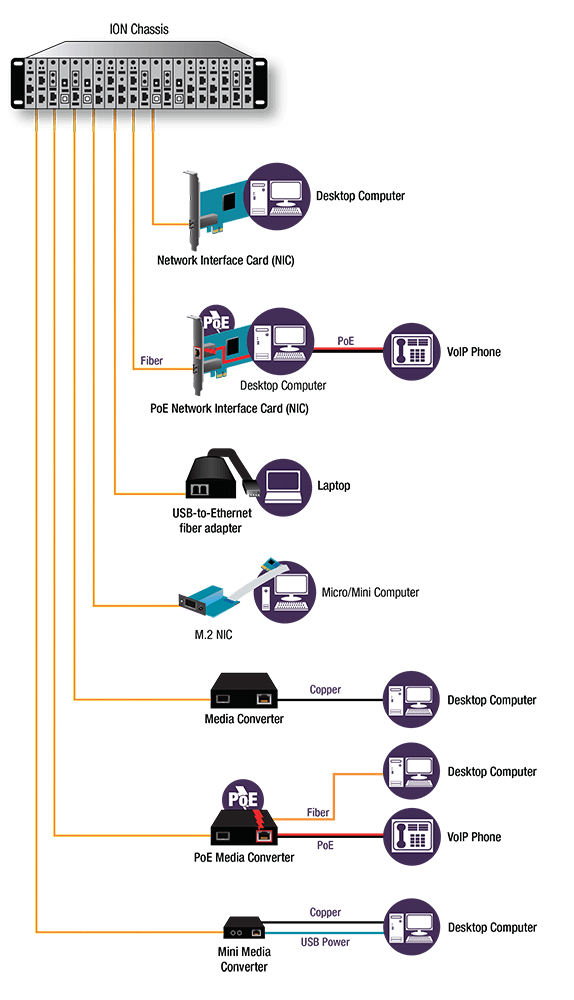
We know that RI45 Ethernet cable can also be used as transmission media. What makes optical cable superior to RJ45 Ethernet cable? This part will show you the advantages of using optical cable for FTTD project.
Optical cable is immune to electromagnetic interference (EMI) and radio-frequency interference (RFI), so it is more difficult for hackers to tap on optical cable. Besides, optical cable uses light that is completely shielded, so hackers would have to physically splice into the line, which is difficult to do and easily detected. While RJ45 Ethernet cable emits electromagnetic signals which allows hackers to read data from nearby without physically touching the lines. In contrast, optical cable is a more secure option for applications concerned with data security.
Optical cable is able to support higher data rates than any other cable type, with capacity to transmit up to 100 Gbit/s. As demand for higher bandwidth is ever-growing, optical cable has the absolute advantage. What’s more, connected with appropriate optics, the transmission distance of optical cable can reach dozen kilometers. Although higher grades of RJ45 Ethernet cables can transmit 10G data signals, they will only be able to do so over very short distances. Therefore, optical cable is the best choice for transporting higher speed and higher bandwidth signals over longer distances.
Optical cable used to be more expensive than RJ45 Ethernet cable. As demand has increased, manufacturing costs have dropped. Also, if properly designed, the FTTD project could be affordable. Apart from this, optical cable can ensure your network cabling can keep up with the growth in network traffic over time and upgrade your network to higher bandwidth in the future without recabling. Considering the cost of cabling, this can be a huge advantage. Though the initial cost of fiber equipment may be slightly higher than copper, the benefits realized can save organizations significant cost in the long term.
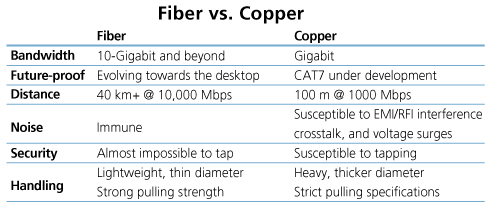
Optical cable Vs. RJ45 Ethernet cable
FTTD is a high-bandwidth solution that expands the traditional fiber backbone system by running fiber directly to desktops. FTTD is a horizontal wiring option that pushes the available bandwidth beyond 10G. It is an intriguing, underestimated and overlooked way to create a beneficial system that is expandable and performance-driven.
Originally published at: http://www.fiber-optical-networking.com/application-fiber-desk-fttd.html
Oznake: FTTD, optical cable, rj45 ethernet cable, PoE media converter
komentiraj (0) * ispiši * #
Copper-Based or Fiber-Based Home Network?
srijeda , 13.09.2017.In an age of network technology developing rapidly, we enjoy the convenience brought by Internet all the time. We can know what is happening around us by surfing the Internet. Also, we can chat with friends far away from us on the computer. Still, higher bandwidth is needed. We know that fiber optic cable can provide higher bandwidth and longer transmission distance than Ethernet cable. Therefore, many broadband service providers utilize fiber optic cable to serve customers. That’s what we call FTTH (Fiber To the Home) project. According to FTTH project, there are two kinds of home network deployment—copper-based hone network and fiber-based home network. This article will introduce them to you.

In order to achieve quick installation, the broadband service provider will set a distribution point near or inside a building. Fiber optic cables are deployed in this building to connect every required house to this fiber distribution point, thus providing broadband services to end users. Usually, we will connect modem to Internet service port through RJ-11 cable or coax cable. Then we connect the modem to the router via Ethernet cable. The router can be connected with multiple Ethernet-ready devices. Finally, the copper-based home network is finished. However, in FTTH project, there is some differences. The fiber distribution cable from the broadband service provider is connected to an ONU (Optical Network Unit) which can convert the optical signals into electrical signals. Then we use Ethernet cable to connect ONU with router as well as router with Ethernet-ready device. At last, copper-based home network in FTTH project is completed. We can easily find that both of them utilize router to connect with Ethernet-ready device via Ethernet cable. However, the differences are that the previous one uses modem to connect with router, while the latter one uses ONU to connect with router.
It is not difficult to understand that in fiber-based home network, fiber optic cable is only used. To complete the deployment, we need some preparations. For connecting a computer directly to a fiber network, we can install a fiber optic PCI Ethernet adapter card which allows you to add a fiber port to your system through an available standard or low-profile PCI slot. And there are different interfaces for the card, such as LC, SC, FC, ST. Therefore, you can install corresponding fiber optic wall plates and use corresponding fiber optic cable. Once the fiber distribution cable is connected with the fiber optic wall plates, you can enjoy Internet with high bandwidth.
In fact, many people choose copper-based home network for the lower cost. And they often choose cat5e network cable or cat6 network cable for future-proof. But if you have higher requirement for bandwidth and do not worry about the budget, you can choose fiber-based home network. In addition, you do not have to think about future-proof. Besides, there is another thing that you have to think about carefully—the installation. From the perspective of installation, fiber optic cable is light in weight which makes it easier to handle than Ethernet cable. And it is thin, so it takes up much less space in cabling ducts. However, fiber optic cable is fragile which may be damaged during the installation. What we have discussed are just main differences between copper-based and fiber-based home network. Which one to choose depends on your actual requirement. I hope this article can help you make the right decision.
Oznake: fiber optic cable, cat6 network cable, cat5e network cable, FTTH
komentiraj (0) * ispiši * #
Have You Upgraded to Cisco Nexus 9000 Series Switches?
petak , 08.09.2017.As the nerve of the whole network deployment, data switch can provide high performance and density to ensure the normal operation of all connections. The smart switch of Cisco has gained great popularity among engineers. in February, 2017, Cisco has announced the significant advancements and enhancements to the Cisco Nexus 9000 portfolio. Have you upgraded to Cisco Nexus 9000 Series switches? This article will guide you to have a close look at Cisco Nexus 9000.
Cisco Nexus 9000 Series delivers proven high performance and density, low latency, and exceptional power efficiency in a range of form factors. The switches operate in Cisco NX-OS Software or Application Centric Infrastructure (ACI) modes with ground-breaking Cloud Scale ASIC technology. They are ideal for traditional or fully automated data center deployments. Here is figure of Cisco Nexus 9000 Series switches.

Many experts said that the Cisco Nexus 9000 Series is the right choice as the foundation for today’s hybrid enterprise data centers. Why? This part will show you the shining points of Cisco Nexus 9000.
- To address rapidly changing and increasingly complex hybrid data centers, customers are recommended to choose the Cisco Cloud Scale ASIC that powers the Cisco Nexus 9000 Series. Compared to other products, Cloud Scale ASIC gives customers at least a two-year advantage in the functions, such as providing greater scalability, deeper analytics and visibility, and greater performance. In addition, Cloud Scale ASIC offers significantly greater scale and more features at an optimized price with capabilities that include segment routing, group-based security policy, network service headers, and fullfeatured Virtual Extensible LAN (VXLAN) overlays.
- Open Cisco NX-OS Software is the industry’s most extensible, open, and programmable network operating system. It enables customers to programmatically provision and configure Cisco Nexus 9000 Series switches through well-documented, comprehensive APIs offered by both Cisco and third parties. Customers can provision their switches using familiar tool integrations (such as Puppet, Chef, and Ansible) and have access to a robust API and community support.
- Cisco ACI is the industry’s number one Software Defined Networking (SDN) solution, delivering the most comprehensive automation capability. It enhances business agility, reduces total cost of ownership (TCO), automates IT tasks, and accelerates application deployment. It allows customers to accelerate their application deployment cycles from weeks to minutes by using centralized, policy-defined automation management.
- The Cisco Nexus 9000 Series with the Cloud Scale ASIC come configured with support for the Cisco Tetration Analytics and Cisco Nexus Data Broker solutions, providing customers with real-time visibility into application performance as well as enhanced security. IT can better understand the current system, helping prepare IT for whatever the future may bring.
- The Cisco Nexus 9000 Series offers tools such as Cisco Data Center Network Manager (DCNM) that enable customers to deploy switches efficiently and optimize the fabric through automatable capabilities. It automatically provisions Cisco Nexus switches and configures switch fabric virtual machine management (VMM) tools for the network manager.
The Cisco Nexus 9000 Series provides multiyear, sustained differentiation between Cisco and point-product network providers and providers of proprietary, single-vendor public clouds, supporting greater performance and enhanced operations through features including intelligent services, programmability, automation, analytics, and manageability. If you want to get higher performance of your network deployment, it is time to upgrade to Cisco Nexus 9000. FS.COM provides Gigabit PoE switch, 10G/40G/100G layer 2/layer 3 switch. Also, they have cost-effective Cisco compatible fiber optic transceiver, such as Cisco gigabit SFP, Cisco 10gb SFP+, Cisco 10GBASE-T transceiver and so on.
Oznake: Cisco Nexus 9000, data switch, smart switch, poe switch, layer 3 switch
komentiraj (0) * ispiši * #
Cisco 10G SFP+ Datasheet
petak , 01.09.2017.Cisco, as one of the leading fiber optics manufactures around the world, is professional in networking hardware, telecommunications equipment and other high-technology services and products. As Cisco 10G SFP+ modules are popular among data center managers, this article will focus on Cisco 10G SFP+ datasheet.
Cisco 10G SFP+ modules provide various 10G Ethernet connectivity options for data center, enterprise wiring closet and service provider transport applications. They are designed with industry’s smallest 10G form factor. As hot-swappable input/output device, they can be plugged into an Ethernet SFP+ port of a Cisco switch and it is no need to power down when installing or replacing them. They also have the digital optical monitoring capability for strong diagnostic capabilities. In addition, according to different applications, Cisco 10G SFP+ modules can be divided into different types, such as Cisco SFP-10G-SR module, Cisco SFP-10G-LR module, Cisco SFP-10G-ER module, Cisco SFP-10G-ZR module, Cisco SFP+ 10GBASE-T module and so on.

The Cisco SFP-10G-SR module supports a link length of 26m on standard Fiber Distributed Data Interface (FDDI)-grade Multimode Fiber (MMF). when using 2000MHz*km MMF (OM3), it can reach up to 300m link lengths; when using 4700MHz*km MMF (OM4), it cab support up to 400m link lengths. The Cisco SFP-10G-SR datasheet is shown as below:

The Cisco SFP-10G-LR module utilizes 1310nm wavelength for 10G data transmission. It transfers data signals over singlemode fiber. The optical link lengths can be up to 10km. The interface of Cisco SFP-10G-LR module is LC duplex connector. The Cisco SFP-10G-LR datasheet is shown as below:

The Cisco SFP-10G-ER module is designed for long distance data transmission which need link length up to 40km. It transfers data signals at 1550nm wavelength over LC duplex singlemode fiber. The Cisco SFP-10G-ER datasheet is shown as below:

The Cisco SFP-10G-ZR module is a multirate 10GBASE-ZR, 10GBASE-ZW, and OTU2/OTU2e module. It supports link lengths of up to about 80 kilometers on standard singlemode Fiber (SMF, G.652). The Cisco SFP-10G-ZR datasheet is shown as below:

The Cisco SFP+ 10GBASE-T module is designed with the same fit and form as the other uplink modules. It is hot-swappable and can operate at either 10GE or GE speed (with manual configuration). The Cisco SFP+ 10GBASE-T datasheet is shown as below:

In 10G network application, 10G SFP+ module plays an important role. FS.COM provides various Cisco compatible modules, such as Cisco SFP modules, Cisco 10G SFP+ modules, Cisco 10GBASE-T SFP+ modules and so on.
Oznake: Cisco 10G SFP+ modules, Cisco 10G SFP datasheet, cisco SFP+ 10GBASE T, cisco 10GBASE T SFP+
komentiraj (0) * ispiši * #
