20
četvrtak
studeni
2025
Android SBC Applications in Modern Embedded Systems
Android-powered Single Board Computers (SBCs) are no longer just hobby platforms or prototypes for consumer gadgets.
They have become a serious option in industrial, medical, commercial, and home automation projects where a rich user interface,
network connectivity, and fast time-to-market are critical. By combining ARM-based SoCs, integrated graphics, and the mature
Android software ecosystem, Android SBCs bridge the gap between traditional embedded systems and modern smart devices.
This article explores how Android SBCs are used in modern embedded applications, why system designers choose Android over
traditional Linux-only platforms, and what technical aspects need to be considered when building real products.
1. Why Android SBCs Are Gaining Popularity
An Android SBC integrates an ARM-based processor, GPU, memory, storage, and common interfaces such as HDMI, MIPI-DSI, LVDS,
USB, Ethernet, Wi-Fi, and GPIO onto a compact board. What makes it stand out from a Linux board is the software stack:
a familiar Android user interface, a strong app framework, and rich multimedia capabilities.
1.1 User Experience and UI Framework
Traditional embedded systems often rely on custom UI frameworks (Qt, GTK, or proprietary solutions). While they are powerful,
developing a responsive and visually attractive interface can be time-consuming. Android provides:
- A mature UI framework with layout managers, animations, and widgets.
- Touch-first design and built-in support for gestures.
- Extensive libraries for graphics, fonts, and localization.
This allows UX teams to prototype and refine interfaces faster, and reuse design patterns that users already understand from smartphones and tablets.
1.2 Connectivity and Ecosystem
Android includes ready-to-use stacks for Wi-Fi, Bluetooth, Ethernet, cellular modems, and USB accessories. For many embedded
products, this removes the need to build networking from scratch. The application framework also provides APIs for:
- HTTP and WebSocket communication.
- MQTT or cloud-based IoT services via libraries.
- Secure storage, permissions, and user management.
Together, these features shorten development time and make it easier to integrate with cloud dashboards, mobile apps, and remote monitoring systems.
1.3 Hardware Acceleration and Multimedia
Modern Android SBCs built around SoCs such as Rockchip, NXP, or Allwinner provide hardware-accelerated video decoding, OpenGL ES graphics, and GPU-accelerated compositing. This enables:
- Smooth 2D/3D animations for HMI screens.
- Video playback for digital signage and infotainment.
- Camera integration for vision-based applications.
For many product categories, a responsive and fluid interface is now a baseline expectation. Android SBCs help meet that expectation without building a multimedia stack from zero.
2. Android SBCs in Industrial and Commercial HMIs
One of the most common application areas for Android SBCs is Human–Machine Interfaces (HMIs) in industrial and commercial equipment.
Instead of simple text-based displays or segmented LCDs, manufacturers can deploy full graphical dashboards.
2.1 Machine Control Panels
In factory automation, Android SBCs drive touch panels that display:
- Machine status, alarms, and workflows.
- Production metrics, cycle times, and quality statistics.
- Diagnostic pages for maintenance engineers.
In these systems, Android interacts with PLCs or microcontrollers via Modbus, CAN, Ethernet/IP, or serial protocols. The SBC provides
the user interface and communication gateway, while the real-time control remains on dedicated controllers.
2.2 Building Automation and Smart Facility Management
In building management, Android SBCs power wall-mounted HMIs and room controllers. Typical functions include:
- HVAC setpoint adjustment and scheduling.
- Lighting and shading control.
- Energy consumption dashboards.
- Access control and presence indication.
Because Android handles graphics and networking easily, integrators can build panels that combine local KNX, BACnet, or Modbus control with cloud-based monitoring on the same device.
3. Kiosks, Digital Signage, and Retail
Kiosk systems and digital signage are natural fits for Android SBCs. They need a robust platform that can:
- Render web-based or native layouts.
- Play high-resolution video content.
- Support touch interaction and peripherals.
- Be remotely updated and managed.
3.1 Interactive Kiosks
In retail stores, museums, and public spaces, interactive kiosks can be built using Android SBCs connected to a TFT or IPS display. Typical use cases:
- Product browsers and self-service terminals.
- Ticket vending machines and check-in stations.
- Information points in transportation hubs.
Developers often lock the system into kiosk mode, using Android’s fullscreen capabilities or custom home screen to prevent users from exiting the app. Remote management tools can push new content or software updates without on-site visits.
3.2 Digital Signage Players
Android SBCs can act as media players for digital signage networks:
- Schedule-based playback of videos, images, and HTML5 content.
- Dynamic layouts showing promotions, news, and live data.
- Content synchronized across multiple displays over the network.
Compared to traditional PC-based players, an Android SBC is smaller, more power-efficient, and easier to maintain in the field.
4. Smart Home and Residential Applications
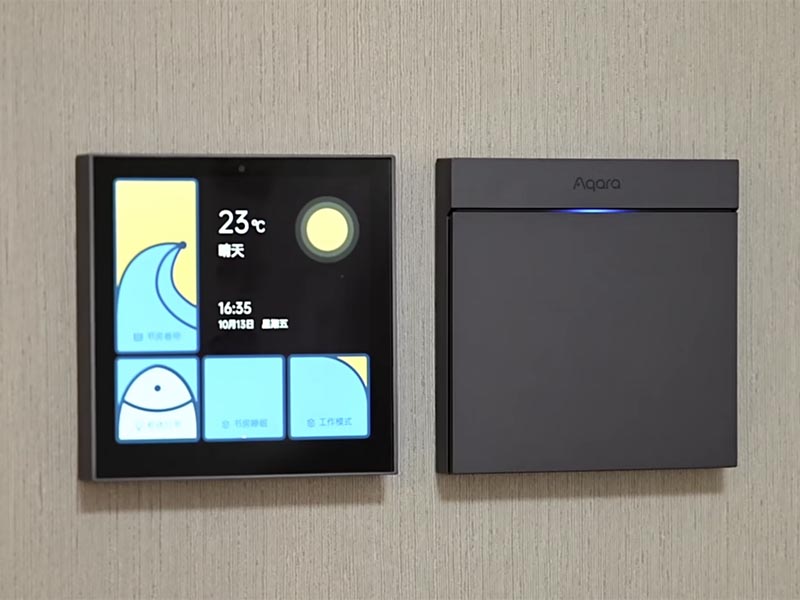
In smart homes, Android SBCs are often used as central control panels or smart hubs. Instead of a closed, minimal UI, homeowners get a tablet-like experience mounted on the wall or integrated into furniture.
4.1 Smart Control Panels
Android-based control panels can integrate:
- Lighting scenes and dimming groups.
- Climate control, floor heating, and air quality monitoring.
- Door camera feeds and intercom functions.
- Integration with voice assistants or smartphone apps.
Because Android supports multiple languages, themes, and user accounts, the same hardware platform can serve different regions and brands with customized interfaces.
4.2 Multimedia and Entertainment Integration
Smart TVs and multi-room audio systems sometimes use Android SBCs or similar SoCs for:
- Streaming media from the cloud or local NAS.
- Displaying home status dashboards on large screens.
- Acting as a central node for casting or screen mirroring.
For product designers, this reduces the need to develop proprietary multimedia frameworks and allows them to leverage existing Android media APIs.
5. Medical, Fitness, and Specialized Devices
The medical and fitness sectors increasingly demand devices with intuitive interfaces and connectivity, while still requiring stable platforms and long-term availability.
5.1 Medical Displays and Diagnostic Terminals
Android SBCs can be found in:
- Patient monitoring stations.
- Medical imaging viewers (non-diagnostic or companion displays).
- Portable diagnostic equipment with touch interfaces.
Developers can implement secure user authentication, audit logging, and network encryption using standard Android APIs, and connect to hospital systems via RESTful APIs or specialized protocols through native libraries.
5.2 Fitness and Rehabilitation Equipment
Treadmills, exercise bikes, and rehabilitation devices increasingly ship with Android-based consoles. Features include:
- Guided workout programs with video coaching.
- Integration with wearables and heart-rate sensors.
- Cloud synchronization of training data.
The Android environment makes it easier to update UI content over time, add new workout modes, or integrate with third-party fitness platforms.
6. Edge AI and Vision Applications
Modern Android SBCs often include NPUs (Neural Processing Units) or GPUs capable of accelerating machine learning workloads at the edge. This opens up new application classes:
- Smart cameras and people counting in retail.
- Object detection in logistics and warehousing.
- Quality inspection in light industrial environments.
Developers can deploy TensorFlow Lite or other inference engines on Android, combining camera input, on-device processing, and interactive visualization on the same SBC.
7. Integration Considerations for Real Products
While Android SBCs offer many advantages, there are important engineering aspects to consider when moving from prototype to production.
7.1 Long-Term Support and Supply
For industrial and commercial products, it is essential to choose SBC vendors that commit to:
- Multi-year availability of the hardware platform.
- Security patches and Android version maintenance.
- Clear lifecycle and replacement plans.
Without this, firmware maintenance and spare part availability can become problematic long after the product launch.
7.2 Customization of the Android Image
Most production systems need a customized firmware image, including:
- Lockdown of the user interface and settings.
- Pre-installed apps and services only.
- Boot animations, branding, and regional settings.
- Device drivers for specific peripherals (touch, displays, sensors).
Engineering teams usually work with Board Support Packages (BSPs) from the SoC vendor or module manufacturer, then adapt them to their own hardware and UI requirements.
7.3 Security and Remote Management
For connected devices, security cannot be an afterthought. Android SBC products often implement:
- Secure boot and signed firmware images.
- Encrypted storage for sensitive data.
- Remote update mechanisms (OTA) with rollback options.
- Network hardening, firewalls, and restricted services.
These features make it possible to deploy Android SBCs in professional environments while meeting IT and compliance requirements.
8. Conclusion
Android SBCs have become a powerful building block in modern embedded systems. They combine a rich graphical user interface, strong connectivity options,
hardware-accelerated multimedia, and a mature development ecosystem. From industrial HMIs and building automation to kiosks, smart home panels, medical equipment, and edge AI devices,
Android SBCs enable manufacturers to deliver feature-rich products with shorter development cycles.
The key to successful use of Android SBCs lies in careful hardware selection, long-term software maintenance, and disciplined system integration.
When those aspects are properly managed, Android SBC platforms offer an attractive path for creating modern embedded devices that feel as responsive and user-friendly as consumer electronics,
while still meeting the robustness and reliability requirements of industrial and commercial markets.
