03
petak
listopad
2025
Embedded Android Board: The Future of Smart Devices
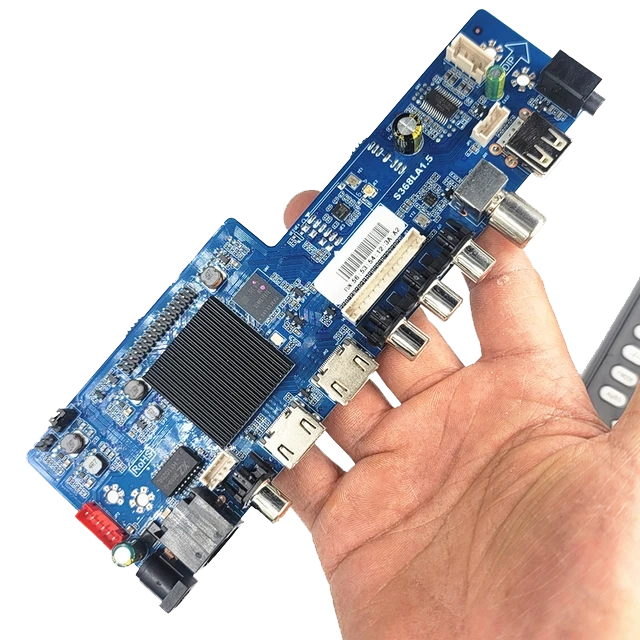
Embedded Android Board: The Future of Smart Devices
In recent years, embedded systems have moved from simple control units to powerful computing platforms capable of running advanced applications. At the heart of this evolution lies the Android Based Embedded Board(SBCs) —a compact single-board computer (SBC) that runs the Android operating system.
Unlike traditional microcontrollers that focus on specific tasks, Android SBCs integrate processing, multimedia, connectivity, and peripheral control in a single platform. This makes them an ideal choice for industrial, consumer, and IoT products that demand both performance and flexibility.
1) What Is an Embedded Android Board?
An embedded Android board is essentially a complete computer system built on a single circuit board. Typical components include:
- CPU / GPU: ARM-based processors with efficient cores for multitasking and graphics acceleration.
- Memory: LPDDR4/DDR4 RAM sized for the UI and app workload.
- Storage: eMMC, microSD, or NVMe/SSD for the OS, apps, and logs.
- Display Interfaces: HDMI, LVDS, MIPI-DSI, or eDP for high-resolution panels and touch.
- Connectivity: Wi-Fi, Bluetooth, Ethernet; sometimes LTE/5G via modules.
- I/O: GPIO, UART, I2C, SPI, CAN, USB—used to control sensors, motors, and peripherals.
In other words, it is a ready-to-use platform that developers can adapt to many embedded applications without building a motherboard from scratch.
2) Why Use Android in Embedded Systems?
- Rich User Interface – Android provides advanced UI frameworks, touch support, animation, localization, and accessibility—ideal for HMIs, kiosks, and infotainment.
- Vast Developer Ecosystem – Millions of Android developers and a huge library ecosystem reduce time-to-market compared with proprietary stacks.
- Multimedia Capability – Hardware-accelerated video, audio, camera, and GPU pipelines come baked in.
- Connectivity & Cloud – Built-in APIs make it simple to connect to services, MQTT/HTTP endpoints, and secure backends.
- Scalability & Customization – From low-cost quad-core boards to octa-core AI platforms, Android scales with workload and BOM targets.
3) Typical Applications
Industrial Automation & HMI
Factories deploy Android SBCs for touch-first human–machine interfaces, line visualization, and on-device analytics. The UI toolkit and multimedia stack help operators understand machine state quickly.
Smart Home Panels
Wall-mounted control panels consolidate lighting, HVAC, and security under a responsive Android UI with over-the-air updates and voice integration.
Automotive Infotainment
Android provides navigation, media, Bluetooth telephony, and app ecosystems. OEMs customize the launcher and restrict features for driver safety.
Medical & Lab Devices
High-resolution displays and intuitive touch workflows suit patient monitors, diagnostic instruments, and imaging consoles—often paired with secure boot and data encryption.
Retail, Kiosks & Digital Signage
From POS to vending and signage, Android SBCs deliver smooth video, remote fleet management, and app-based extensibility.
4) Hardware Considerations
- Processor: core count, big.LITTLE mix (A55/A76), GPU class (Mali/Adreno), and available NPUs.
- Display: resolution, brightness (nits), color accuracy, and touch type (capacitive vs. resistive).
- Networking: dual-band Wi-Fi, BT 5.x, GbE; optional 4G/5G modules with certified antennas.
- Expansion: camera MIPI CSI, USB host/device, GPIO headers, CAN or RS-485 for industry.
- Thermal Envelope: heat-spreader or heatsink needs; consider sealed enclosures and ambient range.
- Longevity: industrial lifecycles (5–10+ years) and vendor BSP maintenance commitments.
5) Android SBC vs. Linux SBC
6) Mini Case Study: Smart Home Panel
Imagine replacing a wall of mechanical switches with a 4-inch Android panel:
- Hardware: quad-core Cortex-A55, 2 GB RAM, 16 GB eMMC
- Display: 4-inch IPS TFT with capacitive multi-touch
- Connectivity: Wi-Fi + Zigbee + BLE for home devices
- Software: Android launcher customized for scenes, timers, and voice control
The result is a modern, maintainable user experience with OTA updates and cloud monitoring.
7) Development & Integration Tips
- BSP quality matters: choose boards with stable kernels, documented device trees, and maintained vendor branches.
- Security: enable verified boot, key storage, and encrypted credentials; restrict adb in production.
- Thermals: profile workloads; consider heat-spreader plates and airflow in sealed kiosks.
- Power design: budget peaks from radios, display backlight, and camera; size the PMIC accordingly.
- EMC/EMI: plan early for cable shielding, grounding, and filter networks—especially with high-brightness LCDs.
- Lifecycle: verify supply commitments, change-notification processes, and end-of-life migrations.
8) Challenges to Expect
While powerful, Android SBCs come with trade-offs:
- Power draw higher than MCU-based designs.
- System complexity across kernel modules, HALs, and app/driver boundaries.
- Security updates often depend on board vendors—clarify SLA up front.
- Unit cost can be higher vs. lightweight Linux or RTOS platforms for simple tasks.
9) Future Trends
- AI at the Edge – NPUs bring on-device inference for vision, anomaly detection, and voice.
- 5G + Cloud – low-latency backends enable predictive maintenance and real-time dashboards.
- Security by Default – secure boot, TPM/TEE, and remote attestation become standard.
- Standardized SDKs – more consistent BSPs shorten certification and time-to-market.
10) How to Choose the Right Board
- Map UI complexity and media needs to CPU/GPU class; don’t over-spec beyond thermal limits.
- Confirm display interface (MIPI-DSI/LVDS/eDP) and touch controller support in the BSP.
- Check radio certifications and regional compliance early (FCC/CE/TELEC, etc.).
- Validate vendor longevity and security-patch cadence.
- Prototype quickly, then harden: secure boot, kiosk-mode, watchdogs, and logging.
Conclusion
The embedded Android board is more than a small computer—it is a gateway to the next generation of smart devices, industrial HMIs, medical instruments, and retail systems. By combining capable hardware, a flexible OS, and a massive developer ecosystem, Android SBCs enable rapid innovation while keeping user experience front and center.
Related posts
- Android SBC in Smart Home Applications
- What ls IPs Display: Technology, Advantages, and Industrial Applications
