18
nedjelja
siječanj
2026
ARM-Based SBCs Explained: How SoC Integration Shapes Real Embedded Products
ARM-based single-board computers (SBCs) show up everywhere in embedded work: industrial controllers, smart panels, gateways, medical equipment, and a long list of “connected box” products that need compute plus I/O in a compact form. People often talk about these boards like they are interchangeable modules. In reality, an ARM SBC is the visible surface of a deeper design approach that starts inside the system-on-chip (SoC) and carries through hardware layout, software bring-up, and lifecycle planning.
This article looks at ARM SBCs from a practical engineering angle. The goal is not to sell a platform or compare benchmark charts. The goal is to explain why ARM SoC architecture leads to a particular kind of board design, how those boards fit into embedded systems, and what trade-offs show up during integration and long-term deployment.

The SoC Is the Product’s “Backplane”
On a traditional PC-style platform, the CPU is only part of the story. A separate chipset provides I/O, and graphics and media functions may live on additional silicon. ARM SBCs usually follow a different model: most of the system is consolidated into one SoC. That SoC typically contains CPU cores, memory controller, GPU, video engines, display pipelines, and a large set of peripheral controllers. From an embedded designer’s perspective, the SoC becomes the product’s backplane. The board is largely a way of exposing the SoC’s interfaces in a manufacturable package.
A typical SoC used in ARM SBCs includes Cortex-A class cores (for example A35/A53/A55/A72 class), a GPU for 2D/3D acceleration, hardware blocks for video decode/encode, display controllers, and integrated interfaces such as USB, SD/eMMC, Ethernet MAC, I˛C, SPI, UART, PWM, and sometimes CAN or PCIe. Putting these blocks on the same die is a major reason ARM SBCs can be compact and power-efficient while still supporting “modern” workloads like a graphical UI, multiple network services, or camera capture.
Because these components are designed as one system, the SoC can manage clocks, power domains, and bandwidth in a coordinated way. That matters for embedded products that need to run fanless, stay stable under temperature drift, and survive long uptimes without the “mystery freezes” that appear when power and thermal margins are tight.
Why ARM Platforms Fit Embedded Constraints
ARM processors were built around efficiency and scaling. In embedded design, the workload is usually known: a specific UI, a set of control tasks, a defined networking model, and an expected duty cycle. ARM SoCs match that reality well because they offer a wide range of performance levels with relatively predictable power behavior.
Scalability shows up in a practical way for product lines. You can often move from a lower-cost SoC to a higher-performance one within the same ecosystem while keeping many software assumptions: Linux or Android as the base OS, similar graphics stacks, similar middleware, and similar peripheral programming models. That helps teams reuse bring-up experience and reduce rework when requirements evolve.
Ecosystem maturity is another advantage. ARM SoCs dominate smartphones, tablets, and consumer devices, which means toolchains and software stacks are constantly exercised at massive scale. Embedded teams benefit from that downstream: stable compilers, mature kernel support, established graphics APIs, and readily available libraries. Even when you are building an industrial device, you are often standing on software work that was proven in high-volume consumer deployments.
What an ARM SBC Actually Adds Around the SoC
If the SoC is the core, the SBC is the supporting structure that makes it usable. Most ARM SBCs are straightforward in concept: power regulation, memory and storage, clocks, connectors, and routing. But the details are what determine whether a board is “developer friendly” or “production friendly.”
Power design is the first differentiator. Many SoCs have multiple rails with strict sequencing requirements. A board that handles sequencing cleanly, provides stable regulators, and leaves thermal margin will behave more predictably in the field. A board that barely meets the requirement may pass lab testing and still fail after months of heat cycling or brownouts.
Memory and storage decisions are also central. Many SBCs use soldered DDR or LPDDR to improve signal integrity and reduce assembly complexity. Storage is typically eMMC for production stability, with an SD slot used mainly for development, recovery, or limited field updates. These choices affect boot time consistency, write endurance, and how you manage updates across a fleet.
On the connector side, an SBC “exposes” the SoC’s abilities in a way that aligns with target products: USB for common expansion, Ethernet for networking, and headers or dedicated connectors for low-level interfaces. The more your application depends on custom sensors or industrial buses, the more these details matter.
Display and Multimedia: Why ARM SBCs Are Common in HMIs
One reason ARM SBCs have become common in embedded HMIs is that many SoCs include a complete display subsystem. Instead of adding a separate graphics chip, the board can connect directly to a TFT panel using interfaces like RGB, LVDS, eDP, HDMI, or MIPI DSI. For a product team, this reduces component count and simplifies mechanical integration. For an engineer, it also means fewer points of failure and fewer vendors to coordinate during debugging.
The advantage becomes clearer when the UI is more than static text. Hardware composition, scaling, overlay layers, and video decode engines can offload significant work from the CPU. That can be the difference between a UI that stays responsive under load and a UI that drops frames when background tasks are active.
In practice, display integration on embedded boards still requires careful work. Panel timing, power sequencing, backlight control, and touch integration are not . But ARM SoCs at least provide the hardware blocks required to do the job without extra silicon, which is why they are a natural fit for control panels, kiosks, smart appliances, and similar products.
Real-World I/O: What Embedded Products Actually Need
Most embedded systems are not “computers with a screen.” They are systems connected to sensors, actuators, external modules, and industrial networks. ARM SBCs typically expose a mix of low-speed buses (I˛C, SPI), serial links (UART), general-purpose signals (GPIO, PWM), and higher-speed interfaces (USB, Ethernet, sometimes PCIe). This is not a cosmetic feature list. It defines how cleanly the board can integrate into a real machine.
I˛C and SPI are commonly used for touch controllers, sensor hubs, RTCs, and small peripheral devices. UART links frequently connect to modems, GNSS, barcode engines, or secondary microcontrollers. USB covers both production expansion and service use cases. Ethernet remains essential in industrial deployments because it is robust and easy to integrate into existing networks.
When these interfaces are integrated into the SoC, you often avoid external bridges. That reduces BOM, reduces PCB complexity, and can simplify compliance work. It also reduces the number of “mystery parts” that can break during a long product lifecycle.
Software Stack Reality: Linux and Android Are Both Normal Choices
ARM SBCs typically support embedded Linux, Android, or both. The OS choice is usually driven by the product’s interaction model rather than by the hardware itself. Linux is often selected when you need transparent system control, flexible networking, or a service-oriented architecture. Android is frequently selected when the display is the center of interaction and you want a mature UI framework with strong multimedia behavior.
From a system standpoint, this flexibility can be useful. One hardware design can sometimes support multiple SKUs: a Linux-based controller variant and an Android-based UI variant, or a single platform that changes software roles across deployments. That said, the board support package (BSP) quality matters. A board that ships with an old kernel and a brittle vendor tree may be “supported” in name only, and long-term maintenance becomes expensive.
For production work, a reliable workflow often looks like this: validate peripherals at the kernel level, confirm stability under load and temperature drift, then integrate Android services or higher-level applications. Treating low-level bring-up as a first-class activity prevents weeks of debugging symptoms that are really caused by a misconfigured pinmux, wrong regulator parameters, or a marginal clock configuration.
Constraints and Trade-Offs You Will Encounter
ARM SBCs are strong general foundations, but they are not perfect for every embedded requirement. Two common constraints show up quickly.
First, real-time behavior. Cortex-A class processors can be tuned for “soft real-time” work, and Linux can be improved with scheduling changes or PREEMPT_RT. Still, many products that require strict timing pair the SBC with a microcontroller. In that architecture, the SBC handles UI, networking, and system integration. The MCU handles motor control, safety interlocks, sensor sampling, or power sequencing that cannot tolerate OS jitter. This split is common because it matches each device’s strengths.
Second, lifecycle planning. Embedded products often ship for years and remain installed long after that. SoC availability, RAM and eMMC sourcing, display panel continuity, and BSP support all matter as much as headline performance. The “right” SBC for an embedded product is often the one with a predictable roadmap and a vendor willing to support stable software baselines, not the one with the fastest CPU.
From SBC to Product: What Changes During Integration
Turning an SBC into a shippable product involves more than picking a board and writing an app. You still have to align the compute module with mechanical, power, and environmental realities. Cable routing and connector choice affect EMI and serviceability. Thermal design affects long-term stability. Storage decisions affect update strategy. And display integration affects user perception immediately.
In many successful designs, the SBC becomes a stable “compute core,” and the rest of the product is built around predictable interfaces: a defined power model, a known display stack, a clear communication boundary to any real-time controller, and a software update path that can be maintained for years.
Conclusion
ARM-based SBCs are not just small computers. They are system platforms shaped by SoC-level integration and embedded-first trade-offs. Their value comes from combining compute, graphics, media, and real-world I/O into a package that can be deployed fanless, connected to custom hardware, and maintained across long product lifecycles.
If you treat ARM SBCs as modules and only compare specs, you miss the factors that decide field outcomes: power design margins, BSP quality, interface exposure, and how well the board aligns with the product’s real operating environment. If you treat them as configurable platforms—chosen with architecture and lifecycle in mind—they can reduce development risk and provide a stable foundation for embedded systems across industrial, medical, and commercial use cases.
04
četvrtak
prosinac
2025
TFT vs OLED in Budget Tablets: A 2025 Technical Overview
As tablet adoption continues to rise across both mature and developing markets, the quality of display technology has become one of the most noticeable factors influencing user satisfaction. In the budget segment—typically tablets priced below $300—the choice between TFT LCD and OLED panels plays a major role in balancing cost, reliability, power consumption, and overall visual performance.
This article reviews how these two display technologies are used in budget tablets in 2025, examining their technical characteristics, market trends, engineering considerations, and suitability for different user scenarios.
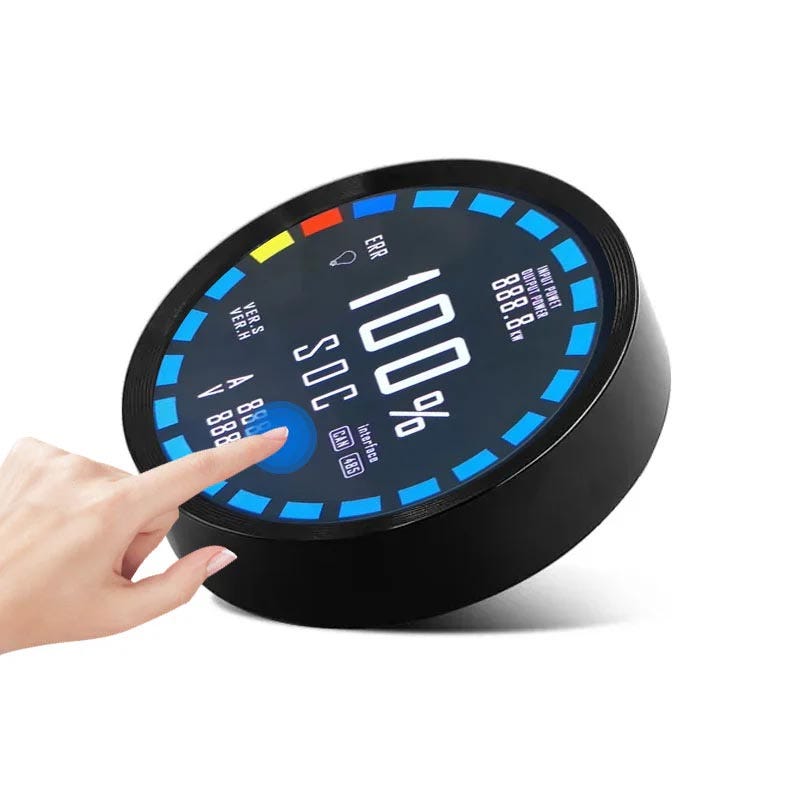
1. Why Displays Matter in Budget Tablets
In low-cost devices, internal components such as mid-range processors, RAM, and storage have become relatively standardized. As a result, the display often becomes the feature that defines the quality of the tablet experience. Brightness, viewing angle stability, color accuracy, and power efficiency all shape how a device feels during day-to-day use.
Budget tablets must strike a balance between affordability and usability, and the selected display technology is one of the few components that directly influences both.
2. Technical Overview of TFT LCD
TFT LCD displays rely on an LED backlight that shines through liquid crystal cells. These cells act as shutters, controlling light flow through red, green, and blue color filters. The structure is relatively simple and has been refined over decades.
Strengths of TFT LCD
- Lower production cost due to mature manufacturing processes
- Consistent brightness and better readability outdoors
- Minimal risk of burn-in, even with static UI elements
- Wide availability across multiple suppliers
Weaknesses of TFT LCD
- Reduced contrast ratio compared with OLED
- Limited color depth on lower-end panels
- Viewing angles that vary depending on panel type (TN, IPS, VA)
- Thicker structures due to the backlight layer
In today’s budget tablets, IPS-type TFT panels are common because they offer acceptable color reproduction and significantly improved viewing angles compared with older TN panels.
3. Technical Overview of OLED
OLED panels work very differently. Each pixel emits its own light, removing the need for a backlight. This gives OLED its well-known deep blacks and high contrast ratios. Recent improvements have made OLED more available in mid-range tablets, and the cost gap has narrowed compared with previous years.
Strengths of OLED
- True blacks and excellent contrast
- Highly vibrant colors and superior viewing angles
- Thinner and lighter construction
- Flexible and curved designs possible
Weaknesses of OLED
- Susceptibility to burn-in when static elements remain on screen
- Higher cost than mainstream TFT options
- Lower peak brightness in lower-cost OLED panels
- Performance degradation over long operating lifetimes
Despite these limitations, OLED has become increasingly common in tablets positioned as “premium budget” devices.
4. Market Trends in 2025
Growing Use of OLED in Mid-Range Tablets
Since 2022, large-scale manufacturing has reduced the cost of OLED modules by an estimated 20–25%. This allows manufacturers to offer OLED-equipped tablets around the $200–$300 range without significantly compromising other specifications.
Brands including Xiaomi, Realme, and Honor now offer budget tablets with OLED displays, mainly targeting consumers who prioritize media consumption.
Continued Dominance of TFT in Lower Price Brackets
Under $200, TFT LCD remains the default choice. Manufacturers such as Lenovo, Samsung, and Amazon continue to rely on high-quality IPS TFT panels because they provide:
- Reliable performance in classrooms and industrial environments
- Higher outdoor visibility
- Longer operational lifespan
- Stable supply chains
5. Visual Performance Comparison
Color and Contrast
OLED delivers unmatched contrast because pixels turn off completely to represent black. TFT panels, even IPS variants, still show some glow in dark scenes due to the active backlight.
Brightness and Outdoor Use
Budget-oriented OLED panels often cannot reach the peak brightness levels of TFT LCDs. As a result, TFT tends to perform better in sunlight or brightly lit spaces.
Viewing Angles
OLED maintains accurate colors across almost all viewing angles.
IPS TFT is acceptable, while cheaper VA and TN panels introduce noticeable shifts.
Battery Consumption
OLED power usage varies widely. It is efficient with dark interfaces but becomes less efficient with bright or white backgrounds. TFT power consumption is more predictable, making it easier to manage battery life in general-use tablets.
6. Durability and Longevity
Durability is where TFT still holds a clear advantage. OLED burn-in remains a concern for devices that display static UI layouts or icons for long periods. Educational tablets, kiosk-style commercial tablets, and business devices typically avoid OLED for this reason.
TFT panels do not suffer from permanent image retention and typically maintain stable performance over long operating lifetimes.
7. Engineering and Manufacturing Considerations
Thermal Behavior
OLED lacks a backlight, reducing overall heat generation. However, bright content can lead to localized heat spots.
TFT distributes heat more evenly due to the backlight structure.
Form Factor Flexibility
OLED enables thinner and curved designs. While not yet mainstream in sub-$300 tablets, early models with flexible OLED panels are beginning to appear.
Supply Chain Reliability
TFT LCD manufacturing capacity is widespread and diversified across many suppliers.
OLED production remains concentrated among a smaller number of panel manufacturers, leading to occasional supply constraints.
8. Practical Use Cases
| Use Case | Preferred Technology | Reason |
|---|---|---|
| Children's learning tablets | TFT LCD | Durability, long lifespan, outdoor usability |
| Media-focused tablets | OLED | High contrast and rich colors |
| Industrial or kiosk devices | TFT LCD | No burn-in, stable brightness |
| Entry-level drawing / creative tablets | OLED | Better color reproduction |
| Business tablets with static UIs | TFT LCD | Lower risk of image retention |
9. Strategic Outlook
Looking ahead, the budget tablet market will likely continue following a dual-track approach:
- TFT LCD for durable, cost-oriented, and educational devices
- OLED for visually immersive and media-centric devices
Meanwhile, emerging technologies such as mini-LED backlit TFT panels are beginning to bridge the gap between traditional LCD and OLED, offering improved contrast while maintaining durability.
10. Conclusion
In 2025, both TFT LCD and OLED play important roles in budget tablets. OLED continues to push visual quality forward, while TFT remains the dependable option for long-term use, outdoor visibility, and lower price points.
For manufacturers, the challenge lies in matching display technology to user expectations. For consumers, understanding the strengths and trade-offs of each panel type makes it easier to choose a tablet that fits real-world needs.
As display innovation accelerates, the distinction between budget and premium tablets is becoming less about raw performance and more about the kind of experience users want—and the role the display plays in delivering it.
28
petak
studeni
2025
Android SBC vs Linux SBC: Choosing the Right Platform for Embedded Projects
Single Board Computers (SBCs) have become a standard building block for modern embedded systems. Instead of designing a
processor, memory, and I/O subsystem from scratch, engineers can start with an SBC and focus on application logic, UI,
and system integration.
When selecting an SBC, one of the first architectural decisions is the software platform. In many projects that need a
graphical user interface or connected features, the choice often narrows down to two options:
- Android SBC – an SBC that ships with Android as the primary operating system
- Linux SBC – an SBC that runs a more traditional GNU/Linux distribution

Both options can run on similar ARM or x86 processors, and both support rich applications, networking, and hardware
acceleration. However, their design philosophy, development workflow, and best-fit applications are different.
This article compares Android SBCs and Linux SBCs from a practical engineering perspective to help you decide which
platform is the better match for your next embedded project.
1. What Is an Android SBC?
An Android SBC is a single board computer whose primary operating system is Android, usually based on
AOSP (Android Open Source Project) plus vendor-specific modifications. These boards are often derived from mobile or TV
box platforms and reuse SoCs originally designed for smartphones, tablets, or media players.
Android SBCs typically provide:
- A touch-friendly, app-centric user interface
- Support for Android applications written in Java/Kotlin (and sometimes Flutter, React Native, etc.)
- Access to common Android APIs: multimedia, sensors, notifications, permissions, and more
- Hardware acceleration for graphics and video playback
- Optional access to Google Mobile Services (GMS) depending on licensing and certification
From the user’s perspective, an Android SBC can feel like a large-screen Android tablet without a battery. From the
developer’s point of view, it behaves like an embedded Android device that can be customized, branded, and integrated
into a product.
2. What Is a Linux SBC?
A Linux SBC runs a more traditional Linux distribution such as Debian, Ubuntu, Yocto-based custom
images, or other embedded Linux variants. The board may still use the same family of ARM or x86 processors, but the
software stack resembles a desktop or server Linux environment.
Linux SBCs usually provide:
- Standard GNU/Linux user space (shell, systemd or other init system, common utilities)
- Wide language support: C/C++, Python, Go, Rust, Node.js, and more
- Access to package managers (apt, opkg, rpm, etc.), enabling the installation of existing software
- Multiple graphical frameworks: Qt, GTK, LVGL, Chromium-based front-ends, or fully custom UIs
- Flexible networking and security tools comparable to server Linux systems
Developers can treat a Linux SBC like a small server, a desktop replacement, or a headless controller, depending on the
application. It is especially strong where openness, customization, and long-term maintainability are priorities.
3. User Interface and HMI Capabilities
3.1 Android SBCs
Android was designed from the ground up for touch-first devices, so UI development is one of its strongest advantages:
- Rich, mature UI toolkit with animations, transitions, and standardized widgets
- Well-defined design language (Material Design) that helps maintain a consistent look and feel
- Built-in support for virtual keyboards, text input, notifications, and multi-touch gestures
- Good ecosystem of high-level frameworks and libraries for charts, media, and connectivity
For devices that resemble a smartphone or tablet in behavior—for example, interactive kiosks, digital signage,
consumer touch panels, or infotainment terminals—Android can significantly reduce HMI development time.
3.2 Linux SBCs
Linux SBCs offer more freedom but also demand more architectural decisions on the UI side:
- Choice between Qt, GTK, LVGL, web-based UIs (Electron, Chromium, WebView), or custom OpenGL solutions
- Greater flexibility for non-touch or mixed input (mouse, keyboard, industrial keypads, barcode scanners)
- Better suited to multi-window desktop-style applications or combined GUI + headless services
For industrial HMIs, configuration tools, or engineering interfaces that require precise control and integration with
existing Linux software, a Linux SBC can be a better match.
4. Headless Operation and Background Services
Many embedded systems do not need a graphical UI at all, or only require a simple status page while most work runs in the
background.
Android SBC: Optimized for app-centric workflows with Activity and Service lifecycles.
Headless or daemon-style services are possible but less natural, and the platform assumes a foreground UI most of the time.
Linux SBC: Naturally suited for headless operation. System services can run under systemd or other
init systems, just like on a server or router. Ideal for gateways, data loggers, or control units that rarely show a UI.
If your project is primarily about data acquisition, control, or networking with minimal direct interaction,
a Linux SBC is usually the simpler and cleaner option.
5. Development Workflow and Tooling
5.1 Android SBC Development
Android development typically uses:
- Android Studio as the main IDE
- Java or Kotlin as primary languages
- Android SDK and NDK (for native C/C++ code)
- Emulators and ADB for debugging and deployment
Engineers with mobile app experience can quickly adapt to building applications for Android SBCs. However, modifying
system components, device drivers, or low-level behavior may require working with the Android build system and BSP
(Board Support Package), which is more complex than standard Linux distributions.
5.2 Linux SBC Development
Linux SBC development looks more like server or desktop development:
- Compilers like GCC/Clang and cross-compilation toolchains
- Shell access (SSH), standard build systems (CMake, Meson, Make)
- Popular languages such as C/C++, Python, Go, Rust
- Standard debugging tools: gdb, strace, perf, Valgrind
For teams already familiar with Linux development, moving to a Linux SBC is straightforward. Kernel modification,
driver integration, and custom filesystems are also easier to manage in a typical embedded Linux workflow (Yocto, Buildroot,
Debian-based images, and so on).
6. Connectivity, Networking, and Security
Both Android and Linux provide mature networking stacks, but their emphasis differs.
Android SBC: Offers convenient APIs for Wi-Fi, Bluetooth, mobile networks, and cloud connectivity
from the application layer. Good for devices that are mostly client-like, such as consumer IoT products, kiosks, and
connected displays.
Linux SBC: Provides a full range of networking tools more typical for servers and routers:
iptables/nftables, VPNs, SSH, advanced routing, industrial protocols, and more. Better suited to gateways, edge
nodes, or devices that must integrate deeply into existing IT/OT networks.
In terms of security, both platforms can be hardened, but Linux gives more granular control at the system level
(SELinux, AppArmor, custom firewalls, containerization, etc.), while Android emphasizes sandboxing at the application
level and a permissions-based model.
7. Real-Time Behavior and Determinism
Most Android and Linux SBCs are not hard real-time systems out of the box. However, embedded Linux has a more established
path toward real-time enhancements:
- PREEMPT_RT patches for the Linux kernel
- Combining Linux with a separate real-time MCU for critical control loops
- Use of real-time frameworks such as Xenomai in some projects
Android can be tuned, but it is generally not the first choice for applications that require deterministic response times
(such as motor control or safety-critical functions). In such cases, Linux SBCs paired with dedicated MCUs or real-time
modules are more common.
8. Software Ecosystem and Package Availability
The available software ecosystem is another major difference.
Android: Access to Android libraries, mobile frameworks, and app-centric tooling. Many cloud SDKs and
third-party services offer Android clients. However, traditional Linux command-line tools, daemons, and packages are
either absent or must be ported specifically.
Linux: Access to huge repositories of open-source software (servers, databases, message brokers,
monitoring tools, scientific libraries, etc.). Ideal when the device must run existing Linux components or integrate
with standard tooling.
If your product is primarily a touch device that behaves like a dedicated app, Android has the edge. If the device needs
to behave more like a small server or gateway, Linux offers far more ready-made building blocks.
9. Updates, Maintenance, and Lifecycle
Embedded products often remain in the field for many years, so long-term maintenance is critical.
Android SBC: Android versions are tightly coupled to SoC vendors and BSP releases.
Upgrading from one major Android version to another can be complex and may depend on vendor support.
OTA (over-the-air) updates are well supported at the application level, but long-term OS support varies.
Linux SBC: Many distributions provide long-term support (LTS) kernels and security updates.
Yocto or Buildroot-based systems allow complete control over the software stack, enabling long-term maintenance
even after a SoC is considered mature or end-of-life, as long as kernel support remains.
If your product has a long lifecycle and needs predictable maintenance strategies, Linux often offers more control and
transparency, whereas Android support depends more heavily on the BSP vendor.
10. Typical Use Cases for Android SBCs
Android SBCs tend to work best when:
- The device is highly UI-centric and touch-focused
- The user experience is similar to a consumer app
- Media playback, animations, or app-like workflows are important
- Developers have strong Android/Java/Kotlin expertise
Examples include:
- Interactive kiosks and self-service terminals
- Smart home control panels and wall-mounted touch screens
- Digital signage players with animated content
- Point-of-sale terminals or check-in systems
11. Typical Use Cases for Linux SBCs
Linux SBCs are usually preferred when:
- The system must run multiple services or daemons alongside the UI
- Industrial protocols, gateways, or edge computing workloads are involved
- Headless or semi-headless operation is required
- Long-term maintenance, root-level access, and customizations are critical
Examples include:
- Industrial HMIs with complex back-end logic
- Data acquisition units and edge gateways
- Factory automation controllers that interact with PLCs and fieldbuses
- Robotics platforms and autonomous machines
12. Decision Checklist: Android SBC vs Linux SBC
When choosing between an Android SBC and a Linux SBC, consider the following questions:
- Is the device primarily a touch-based, app-like interface or a control/gateway node?
- Does the team have more experience with Android development or Linux development?
- Will the device run mostly one foreground application or multiple background services?
- Are long-term OS updates and deep system customization required?
- How important are real-time behavior and deterministic response?
- Does the project depend heavily on existing Linux tools and packages?
There is no universally “better” platform—only a more suitable one for a specific problem. In some projects, a
hybrid approach is also possible: using a Linux SBC as the core controller and an Android device as a secondary display, or
combining a Linux SBC with a separate microcontroller for real-time tasks.
Conclusion
Android SBCs and Linux SBCs share much of the same hardware DNA, yet they target different design philosophies.
Android focuses on delivering polished, touch-first user experiences with a strong app ecosystem, while Linux emphasizes
flexibility, openness, and long-term maintainability.
If your device is essentially a dedicated interactive application with rich graphics and animations, an Android SBC may
offer a faster path to market. If your project resembles a small server, gateway, or industrial controller with multiple
services and heavy integration requirements, a Linux SBC is likely the better choice.
By aligning the choice of SBC platform with the actual role of the device—UI terminal, gateway, controller, or
mixed system—you can reduce development effort, improve reliability, and extend the useful life of your embedded
product.
25
utorak
studeni
2025
Display Interfaces: LVDS vs MIPI DSI vs eDP vs HDMI
Choosing the right display interface is a critical decision in embedded and industrial system design.
The interface you select affects image quality, refresh rate, power consumption, cable length, EMI performance,
and the overall BOM cost of your product. This article provides a clear comparison of the four most commonly
used display interfaces—LVDS, MIPI DSI, eDP, and HDMI—based on real engineering considerations.
For readers who want a broader overview of different TFT interface standards, you can also explore
this detailed collection of TFT display interface guides.
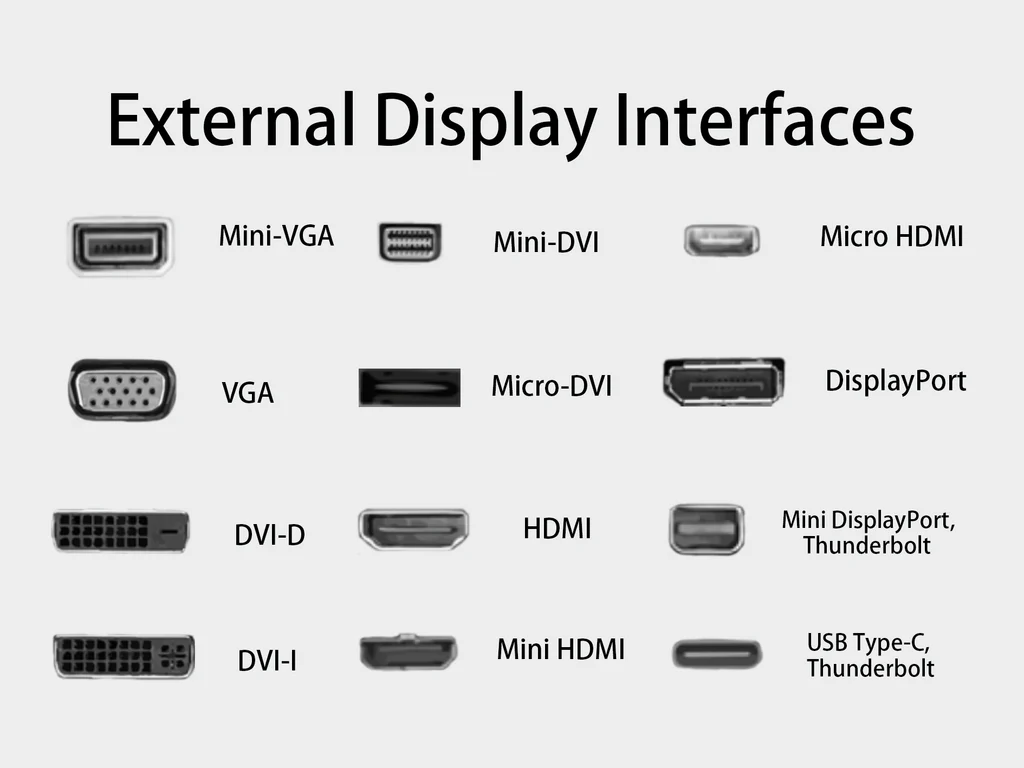
1. LVDS (Low-Voltage Differential Signaling)
Overview
LVDS is one of the longest-standing display interfaces in industrial applications. It transfers data using
differential signaling, which greatly reduces EMI and supports long cable distances compared with more
modern serialized display protocols.
Strengths
- Mature, stable, and widely supported in industrial SBCs and HMI devices.
- Excellent reliability over long cable lengths (up to 10 meters with proper cabling).
- Well suited for electrically noisy environments.
Limitations
- Fixed mapping makes it less flexible for evolving display resolutions.
- Requires more pins compared with serial interfaces like MIPI.
- Dual- or quad-channel LVDS is required for resolutions above 1080p.
Best For: Factory automation panels, medical displays, outdoor kiosks.
2. MIPI DSI (Mobile Industry Processor Interface – Display Serial Interface)
Overview
MIPI DSI was originally developed for smartphones and tablets, but it is now widely adopted in compact
embedded systems. It uses high-speed serial lanes with a low pin count.
Strengths
- Extremely low power consumption.
- High bandwidth supporting resolutions up to 4K with four lanes.
- Allows slim, flexible cable designs commonly used in handheld devices.
Limitations
- Short cable length limitations (typically less than 30 cm).
- Sensitive to EMI; requires proper shielding in industrial environments.
- Driver support varies across industrial SBC platforms.
Best For: Portable devices, compact HMIs, low-power IoT products.
3. eDP (Embedded DisplayPort)
Overview
eDP is a version of DisplayPort designed for internal display connections. It supports high-resolution
and high-refresh-rate displays, making it a strong choice for performance-oriented systems.
Strengths
- Supports extremely high resolutions, including 4K and 8K.
- Lower EMI and improved efficiency compared with HDMI.
- Can transmit audio and auxiliary data.
Limitations
- Cable length is shorter than LVDS (typically under 3 meters).
- Less common in older industrial embedded platforms.
Best For: AI vision systems, high-performance industrial PCs, medical workstations.
4. HDMI (High-Definition Multimedia Interface)
Overview
HDMI is the world’s most widely used consumer display interface. It supports both video and audio through
a single cable and is compatible with virtually all TVs and monitors.
Strengths
- Universal compatibility with retail displays.
- Supports hot-plugging and modern content protection (HDCP).
- Capable of resolutions up to 8K with HDMI 2.1.
Limitations
- Higher power consumption than LVDS or MIPI.
- Not optimized for internal displays due to connector size.
- Requires strong EMI shielding for industrial applications.
Best For: Digital signage, prototyping, external monitors.
5. Comparison Table
Before comparing the interfaces directly, understanding resolution and aspect ratio is helpful because
different interface technologies scale differently with pixel density.
For a deeper explanation, you can explore this guide on resolution and aspect ratio in TFT displays.
| Feature | LVDS | MIPI DSI | eDP | HDMI |
|---|---|---|---|---|
| Max Cable Length | 10m+ | <0.3m | <3m | 10m+ |
| Resolution Support | Up to 1080p (dual) | Up to 4K | Up to 8K | Up to 8K |
| Power Consumption | Medium | Low | Medium | High |
| EMI Resistance | High | Low | Medium-High | Medium |
| Cost | Low | Low–Medium | Medium | Low–Medium |
| Industrial Use | Excellent | Limited | Good | Limited |
6. Application Recommendations
Use LVDS when:
- You need long cable runs.
- The environment has high EMI.
- You require long-term stable industrial supply.
Use MIPI DSI when:
- Low power and compact cabling are priorities.
- Cable length can be kept short.
- Your device is battery powered.
Use eDP when:
- You need very high resolutions or fast refresh rates.
- The system design allows short internal cables.
- Your platform supports DisplayPort signaling.
Use HDMI when:
- The display is external or user-replaceable.
- You need compatibility with consumer monitors.
- You are prototyping or developing concept designs.
Additional Resource
For readers who want a broader overview of how these interfaces are used in embedded systems,
you can also check this Google page on display interfaces.
Final Thoughts
There is no single display interface that fits every embedded project. LVDS remains the preferred choice
for long-distance industrial applications, while MIPI DSI excels in portable and ultra-compact devices.
eDP is ideal for performance-oriented systems with high resolution requirements, and HDMI continues to
dominate applications involving external screens and general consumer displays.
Selecting the right interface early in your design process can prevent costly redesigns later and ensures that
the overall system performs efficiently throughout its lifecycle.
20
četvrtak
studeni
2025
Introduction to ARM Architecture: A Modern Computing Foundation
ARM architecture has become one of the most influential computing platforms in the modern era.
From smartphones and tablets to automotive systems, industrial controllers, routers, smart home devices,
and even cloud servers, ARM-based processors are everywhere. Unlike traditional x86 processors,
ARM follows a reduced instruction set computing (RISC) philosophy, focusing on efficiency,
scalability, and flexibility — qualities that make it ideal for embedded and power-sensitive applications.

1. The Origins and Evolution of ARM
ARM traces its roots back to the 1980s at Acorn Computers in the United Kingdom.
Originally designed to power personal computers, ARM quickly evolved into a licensing-based business model.
Instead of manufacturing chips, ARM develops processor architectures and CPU IP cores, which semiconductor
companies can license and integrate into their own system-on-chips (SoCs).
- ARM designs the ISA and CPU cores.
- Chip vendors (Qualcomm, Apple, Rockchip, NXP, MediaTek, Samsung, etc.) integrate these cores with GPUs, NPUs, memory controllers, and I/O blocks.
- Final products appear in mobile devices, SBCs, automotive ECUs, wearables, and cloud servers.
This licensing ecosystem allows ARM technology to scale from microwatt IoT sensors all the way
to multi-core server processors.
2. RISC Philosophy: The Foundation of ARM
ARM belongs to the RISC (Reduced Instruction Set Computer) family. Compared to CISC architectures like x86,
RISC focuses on simplicity and efficiency. Key principles include:
- Simple, fixed-length instructions for predictable execution and easier pipeline design.
- A large general-purpose register set to minimize memory access.
- Load/store architecture, where only specific instructions access memory.
- High efficiency per watt, making ARM ideal for mobile and embedded devices.
Over time, ARM has added advanced features — such as NEON SIMD, TrustZone security, and vector extensions —
while preserving its RISC fundamentals.
3. Major ARM ISA Generations: ARMv7, ARMv8, and ARMv9
3.1 ARMv7: The 32-bit Era
ARMv7 powered early smartphones and embedded Linux systems. Features include:
- ARM Thumb/Thumb-2 instruction sets for better code density.
- NEON acceleration for multimedia processing.
- TrustZone secure execution mode.
Popular cores such as Cortex-A8 and Cortex-A9 belong to this generation.
3.2 ARMv8: The 64-bit Transition
ARMv8-A introduced the 64-bit AArch64 architecture while retaining backward compatibility with 32-bit AArch32.
Its improvements include:
- 64-bit registers and larger virtual address space.
- A modernized exception and privilege model.
- Improved floating-point and SIMD performance.
ARMv8 enabled ARM’s shift from mobile devices to servers and high-performance computing.
3.3 ARMv9: Security and Vector Computing
Launched as the next major evolution, ARMv9 strengthens security and accelerates AI workloads.
It includes:
- ARM CCA (Confidential Compute Architecture) for secure execution environments.
- SVE2 (Scalable Vector Extension 2) for AI, DSP, and HPC tasks.
- Enhanced debugging and memory safety improvements.
4. ARM Processor Families
ARM divides its CPU IP into specialized series, each targeting different market needs.
4.1 Cortex-A: Application Processors
Designed for rich operating systems such as Android, Linux, and Windows on ARM. Features include:
- MMU and virtual memory support.
- Multi-level caches, out-of-order execution, and advanced pipelines.
- Used in smartphones, SBCs, automotive IVI, and industrial HMI systems.
4.2 Cortex-R: Real-Time Processors
Targeting mission-critical applications requiring deterministic responses:
- Low-latency interrupt handling.
- Lockstep and ECC features for safety.
- Used in automotive control units, HDD controllers, and communication modems.
4.3 Cortex-M: Microcontrollers
Cortex-M processors dominate the MCU market:
- Low power consumption.
- Integrated peripherals such as NVIC, timers, and GPIO.
- Common in IoT nodes, appliances, and small industrial devices.
4.4 Neoverse: Data Center and Network Infrastructure
Neoverse cores power cloud servers and networking equipment:
- High core counts and server-class performance.
- Excellent virtualization support.
- Used in ARM-based cloud instances from AWS, Google, Azure, and Alibaba Cloud.
5. Advantages of ARM Architecture
5.1 Exceptional Energy Efficiency
ARM processors deliver excellent performance per watt, making them ideal for:
- Battery-powered consumer devices.
- Industrial systems requiring 24/7 uptime.
- Edge computing and micro-servers with thermal constraints.
5.2 Highly Customizable SoCs
Because ARM provides IP rather than complete chips, vendors can tailor SoCs for their exact needs.
This allows integration of:
- GPUs, NPUs, VPU modules.
- Custom I/O interfaces (MIPI, LVDS, PCIe, Ethernet, CAN, etc.).
- Automotive-grade safety mechanisms and industrial-grade reliability.
5.3 Mature Software Ecosystem
ARM enjoys broad software support:
- Mobile systems: Android and iOS.
- Embedded Linux: Buildroot, Yocto, Debian, Ubuntu.
- Cloud computing: full support for ARM64 in major distributions, container platforms, and databases.
This ecosystem lowers development cost and accelerates time-to-market.
6. Challenges and Design Considerations
- Fragmented BSP quality across different SoC vendors.
- Long-term supply concerns for industrial and automotive projects.
- Debug and tooling differences compared to x86 environments.
- Performance evaluation must be workload-specific, especially for memory- and vector-heavy tasks.
7. ARM’s Role in Modern Computing
Today’s computing landscape demands both high performance and high efficiency.
ARM fits naturally into this trend:
- Dominant in mobile and embedded markets.
- Rapidly expanding in cloud and HPC workloads.
- Providing end-to-end silicon solutions for IoT, industrial systems, and automotive platforms.
As the industry continues shifting toward heterogeneous computing and energy-optimized architectures,
ARM’s combination of performance, efficiency, and ecosystem maturity ensures it will remain
one of the most important processor architectures for years to come.
19
srijeda
studeni
2025
Deploying YOLOv8 on Rockchip NPU Using RKNN
Rockchip’s NPU platform introduces a complete toolchain built around the RKNN model format.
RKNN files, typically ending in .rknn, are optimized models designed specifically for
Rockchip NPU hardware. To support developers, Rockchip provides a full suite of model conversion
tools, including Python APIs for RKNN-Toolkit2 along with C/C++ and Python runtime interfaces on
device. Together, these components streamline the deployment of deep-learning algorithms from desktop
development environments to embedded edge devices powered by Rockchip SoCs.

Overview of the Rockchip NPU Software Stack
The Rockchip NPU SDK is divided into two major parts: the desktop-side tools and the device-side runtime.
On a PC, developers use RKNN-Toolkit2 to convert mainstream deep-learning models—
including Caffe, TensorFlow, TensorFlow Lite, ONNX, DarkNet, and PyTorch—into the RKNN format.
The toolkit also enables simulation-based inference, performance analysis, and memory usage evaluation
directly on the desktop, making it easy to estimate deployment results before transferring models to hardware.
On the target board, Rockchip provides a runtime environment consisting of a set of C APIs, Python
bindings, communication drivers, and essential executables. This runtime environment ensures that RKNN
models generated by RKNN-Toolkit2 can execute efficiently on the NPU. The entire RKNN software stack
is designed to help developers rapidly deploy AI workloads onto Rockchip-based systems.
The following components form the core of the ecosystem:
- RKNN-Toolkit2: A software development kit for converting, simulating, and evaluating AI models on PC or Rockchip NPU platforms.
- RKNN-Toolkit-Lite2: A lightweight Python deployment interface intended for direct use on Rockchip NPU devices, simplifying inference workflows.
- RKNN Runtime: A C/C++ runtime for executing RKNN models directly on Rockchip NPU hardware.
- RKNPU Kernel Driver: The low-level driver responsible for interacting with the NPU hardware. It is open-source and available within Rockchip’s kernel repositories.
Capabilities of RKNN-Toolkit2
RKNN-Toolkit2 provides a convenient Python interface for model conversion and inference on a PC.
With this toolkit, developers can:
- Convert Deep-Learning Models: Convert Caffe, TensorFlow, TensorFlow Lite, ONNX, DarkNet, and PyTorch models into RKNN format. The converted RKNN files can be exported, imported, and deployed on Rockchip NPU devices.
- Quantize Models: Convert floating-point models into fixed-point models using asymmetric quantization (asymmetric_quantized-8). Hybrid quantization is also supported.
- Simulate Inference: Run inference using the RKNN model on a PC to simulate NPU execution, enabling developers to validate outputs before deployment.
- Evaluate Performance: Send the model to an NPU-equipped device to measure execution speed and memory consumption.
- Analyze Quantization Accuracy: Compare layer-by-layer outputs between floating-point and quantized models using cosine similarity, helping identify quantization-sensitive operations.
- Encrypt Models: Encrypt RKNN models using specified security levels. Encryption occurs within the driver, meaning encrypted models load and run identically to normal models.
RKNN SDK supports mainstream Rockchip chips such as RK3566, RK3568, RK3576, and RK3588.
A typical development environment requires Ubuntu 20.04 (64-bit), Python 3.8, and at least 16GB RAM.
YOLOv8: A SOTA Vision Model Meets Edge Deployment
In January 2023, Ultralytics released YOLOv8, the newest generation of the popular YOLO model
family. Presented as a state-of-the-art, cutting-edge vision framework, YOLOv8 is designed to support
an extensive range of visual AI tasks—including image classification, object detection, instance segmentation,
pose estimation, and even multi-object tracking.
One of YOLOv8’s strengths lies in its diversified model lineup. Ultralytics provides five pretrained
variants: YOLOv8n, YOLOv8s, YOLOv8m, YOLOv8l, and YOLOv8x. These range from lightweight models suitable
for edge devices to high-accuracy variants ideal for demanding applications. Compared with YOLOv5 of
similar size, YOLOv8 achieves significantly higher accuracy on the COCO dataset, thanks to improvements
in architecture, training methods, loss functions, and anchor-free designs.
Where YOLOv8 Shines
- It offers strong accuracy improvements while still running efficiently on lightweight platforms.
- The command-line interface allows easy training, inference, and model export.
- Its built-in integration with tracking algorithms such as BoT-SORT and ByteTrack enables robust tracking applications.
- The FastSAM segmentation approach uses YOLOv8’s backbone for generalizable mask-generation tasks.
Because of these advantages, YOLOv8 has become a strong candidate for edge-based vision systems such as
robots, surveillance devices, autonomous machines, and embedded smart cameras.
Understanding the Model Deployment Process
Deploying a machine-learning model means placing it in a real operating environment where it can perform
tasks for an actual product or service. During deployment, models often undergo optimization steps such as
operator fusion, graph restructuring, post-training quantization, and knowledge distillation. This ensures
that the model runs efficiently on specialized hardware while meeting power and latency constraints.
From Training Framework to Inference Engine
Most models are initially developed using flexible frameworks like PyTorch or TensorFlow. However,
deployment platforms frequently rely on specialized inference engines such as TensorRT, ONNX Runtime,
or Rockchip’s RKNN Runtime to achieve real-time performance.
To bridge these environments, Facebook and Microsoft introduced ONNX in 2017—a universal model
representation format that allows conversion between training and inference frameworks. As a result,
the deployment process typically follows the workflow:
Training Framework ’ ONNX Representation ’ Hardware-Specific Inference Engine
Instead of manually rewriting models layer by layer, today’s conversion tools rely on graph tracing.
Given a sample input, the tool traces intermediate operations and reconstructs the computational graph,
which becomes the converted model. In RKNN conversion, sample inputs also help determine quantization
parameters.
Deploying Models on Rockchip NPU Using RKNN
RKNN is the official inference framework for Rockchip NPUs. It enables optimized execution of
deep-learning models on NPU hardware, ensuring high throughput and low power consumption.
The rknn-toolkit ecosystem provides Python APIs for:
- model conversion
- post-training quantization
- simulation inference
- validity checking and debugging
A typical RKNN deployment pipeline consists of:
- RKNN Model Configuration
Specify preprocessing parameters, mean values, quantization type, platform, and other settings. - Model Loading
Import the source model (ONNX, PyTorch, TensorFlow, Caffe, etc.). Developers can also designate output nodes, which affects how the model is sliced during conversion. - RKNN Model Building
Perform quantization if needed and supply calibration datasets. - Model Export
Save the final .rknn file for deployment on Rockchip hardware.
Rockchip RK3576/RK3588 NPU Highlights
Rockchip’s high-performance AIoT platforms—particularly RK3576 and RK3588—feature powerful NPUs
built on advanced 8nm processes. Delivering up to 6 TOPS, these NPUs handle compute-intensive
tasks such as:
- image classification
- object detection and recognition
- face recognition
- speech processing
- natural language understanding
Rockchip NPUs support mainstream deep-learning frameworks including TensorFlow, PyTorch, Caffe, and MXNet,
allowing developers to train models in familiar environments while benefiting from accelerated inference
on embedded devices. Their strong ecosystem makes them well suited for large-scale computer vision
applications such as surveillance, autonomous driving, industrial robotics, and medical imaging.
Conclusion
By combining the flexibility of YOLOv8 with the high-performance capabilities of Rockchip’s NPU ecosystem,
developers can build powerful edge-AI applications that operate efficiently even under strict resource
constraints. The RKNN toolchain—spanning RKNN-Toolkit2, RKNN-Toolkit-Lite2, and RKNN Runtime—provides a
comprehensive workflow from model conversion to deployment. As edge AI continues to evolve, Rockchip’s
platform offers a scalable and practical solution for embedding advanced vision algorithms directly
into next-generation devices.
18
utorak
studeni
2025
Small Moments, Everyday Screens, and a Little Journey Into Round TFT LCDs
Life recently has been moving a little faster than usual. I’ve been splitting my time between work,
walking around the city, exploring cafés, and reading random articles that somehow pull me into
deep technical rabbit holes. I don’t know whether it’s the colder weather or simply the rhythm of
this part of the year, but I’ve been paying more attention to small details around me — especially
the screens that quietly exist everywhere.
Screens are in places we barely notice: the ticket machine I use for the bus, a tiny display on a coffee
grinder in a local shop, the circular interface on a portable speaker, the smart thermostat on my wall,
and even the interface at the laundromat. It feels almost funny that we all interact with displays
hundreds of times per day, yet most people never think about what type of display technology they are using.
A few days ago, while waiting for my coffee, I noticed the café had installed a new grinder with a
small round display. It was stylish and clean, and somehow it made the entire device feel more
modern. That little display pulled me into reading more about why round TFT LCDs have become so
common in 2024–2025. It reminded me of the projects I worked on not long ago, where industrial
designers strongly preferred “non-rectangle displays” because modern products need a distinctive,
friendly look.

This small moment made me revisit an article I saved earlier, which explains the topic much better
than I can summarize here. It helped me organize my thoughts about how these displays are used in
different devices, especially in industrial and consumer applications. Here is the article I found
useful:
Round TFT LCD Displays: Technology, Use Cases, and Practical Guide 2025
What I found interesting while re-reading it is how many real-world devices now rely on round or
custom-shaped TFT displays. Smart home devices, vending interfaces, medical instruments, wearables,
and even modern car dashboard meters use them. They are no longer just “cute design choices.”
They have become functional components that enable simpler UI layouts, clearer interaction design,
and better use of limited surface area.
I also started thinking about all the little design decisions that product teams make. For example,
a circular UI forces the developer to rethink information hierarchy. You can’t simply copy a rectangular UI
and paste it into a circle. It requires clarity and simplicity. Maybe that is why these screens feel
more modern — they push designers to remove clutter.
Beyond aesthetics, the technology behind them has improved dramatically. Contrast, viewing angles,
brightness, and touch responsiveness are so much better compared to older modules. The price gap
between rectangular TFT modules and round versions has also become much smaller, which is probably
why cafés, gyms, beauty salons, and smart-home brands started adopting them rapidly.
On my way home that day, I looked around more intentionally. I saw a round interface on a public
bicycle rental station, a circular display on a smart lock, and another one on an interactive signboard.
It felt like I was discovering a pattern hidden in plain sight — everyday screens becoming better and
more diverse as display technology evolves.
Maybe this is why I enjoy writing these casual notes. They help me connect everyday life with the
technology behind the scenes. And sometimes, a small circular screen on a coffee machine is all it
takes to open an unexpectedly deep technical curiosity.
If you are also curious about this trend, I recommend checking the article linked earlier. It explains
the engineering side clearly without being overly technical. As someone who enjoys both technology
and small everyday observations, it was surprisingly enjoyable to read.
17
ponedjeljak
studeni
2025
A Slow Afternoon Walk Through the Old Town

It’s funny how certain afternoons unfold without any plan, yet end up being the most memorable ones.
Yesterday, after finishing my usual daily tasks, I felt an urge to leave the apartment for no particular reason.
There was nothing I needed to buy and nowhere specific I wanted to go — I simply wanted to step outside and let my feet decide the direction.
I walked toward the old part of the town, a place I don’t visit often even though it’s only a short bus ride away.
The moment I arrived, I remembered why I used to enjoy it so much.
The narrow streets, uneven old stones, small balconies full of plants, and the smell of bakeries hidden in alleys all mixed together into a strangely comforting atmosphere.
One small detail caught my attention: an elderly man repairing an antique wooden chair right outside his workshop.
His hands moved slowly but confidently, as if he had done this thousands of times.
I stood there for a moment longer than I expected, just watching the rhythm of the sandpaper brushing against the wood.
He looked up, smiled politely, and continued working without saying anything — a tiny interaction, yet it felt sincere and warm.
Farther down the street, I passed a café that I hadn’t noticed before.
It had only three tables outside, each with mismatched chairs and slightly crooked umbrellas.
But the place had character — the kind you can’t design intentionally.
I sat there for a while with a simple cup of coffee, listening to a group of students discussing something enthusiastically, switching between laughter and serious debate.
Their energy somehow lifted my mood, even though I couldn’t hear every word clearly.
As the sun started to set, the town changed its tone.
Shadows stretched across the walls, the warm yellow lights flickered on, and more people appeared on the streets — couples holding hands, parents carrying children, and tourists trying to capture everything with their phones.
It felt like the town was waking up for its evening shift.
When I finally decided to head back home, I felt strangely refreshed.
Nothing extraordinary happened, yet the combination of small observations created a sense of calm I hadn’t felt in a while.
Maybe the real purpose of wandering without a plan is simply to be reminded that the world is alive even when we’re too busy to notice.
Next time, I might explore another part of the town — or maybe I’ll return here again. Some places deserve more than just one visit.
