4G Mobile broadband & 5G Gadgets https://blog.dnevnik.hr/ltemodem
ponedjeljak, 29.10.2018.
ZTE MF286 4G LTE Router Test
Since LTE networks are becoming more and more popular, there are many stationary or mobile LTE routers from various brands on sale, and one of the most interesting routers is ZTE MF286 4G router. It combines the features of stationary router and the mobile router.
Not as well-known as Huawei B593 router, ZTE MF286 is quite a new router, it was introduced to some network providers in Europe at the end of last year. It supports the latest network standards, primarily LTE Advanced (aggregation of two bands, downloading at speeds up to 300 Mb/s), and within the Wi-Fi network, it supports the 802.11ac standard (2x2 MIMO, or up to 867 Mb/s).
Of course, there are no miracles in practice, the LTE speeds drop down in real use. Wi-Fi bandwidth is also a fraction of the theoretical value: between computers in the LAN and WLAN during testing it did not exceed 288 Mbit/s. Like other desktop routers, the ZTE MF286 has four Gigabit Ethernet ports, a USB 2.0 port for connecting a USB drive and file sharing, as well as an analog telephone line connector. Of course, there is also a built-in modem and a slot for mini SIM cards, under the plugs, two SMA connectors for the external LTE antenna.
An unusual feature is a removable battery with a capacity of 3000 mAh. It is a bit similar to the equipment for mobile 4G routers because you can take it anywhere and use it for at least 3 hours. It is a pity that instead of the USB charger, it has a 12-volt AC power adapter - you cannot power it with a power bank.
The function set is similar to other stationary LTE routers. The main screen of the configuration interface shows a network diagram where you can go to LTE settings, Wi-Fi or a list of connected devices. An interesting thing is the ability to choose the bandwidth that can be used by the modem built into the router. However, the Wi-Fi capability is much larger, above all the advantage is simultaneous operation in the 2.4 GHz and 5 GHz band. The router has a Wi-Fi optimization function - it scans the radio band, detects existing networks and automatically selects the best channel. You can enable an additional guest network (Multi SSID) on both frequencies, limit the number of clients in each SSID network, and set a time limit for guests (in hours).
Hardware and software provide the possibility of using WPS to quickly establish connections, as well as completely disable Wi-Fi. When it comes to managing devices on the network, there is actually only one function: blocking with one click (this is an easy-to-use MAC filter implementation):
In the lower part of the interface, there are additional functions, among them SMS and address book supported, but there is no USSD code support. There is an important function of setting the mobile data transfer limit (or time of using the network). After exceeding a certain threshold (eg 80% of the limit), a notification appears in the interface and in the form of a red color of the 4G indicator. It is not clear how (manually or automatically, on a certain day of the month), to reset information about the use of the data packet.
There is also parental control consisting of three elements: a list of "children's" computers, a network access schedule (division into days of the week and hours), and a whitelist of pages. The feature affects the operation of security.
In the advanced settings, you can find a lot of additional functions, characteristic for the ZTE LTE router. This includes passing VPN connections, static MAC-IP binding (MAC address must be "patched" manually or copy device lists), packet filtering, manual port forwarding, UPnP, DMZ zone. The firewall is enabled by default and it is not possible to disable it. The advanced feature is the ability to adjust the power of the Wi-Fi signal (although it should probably be in the section on Wi-Fi), as well as the URL filter (should be in the parental control).
Other advanced features include DDNS, date and time configuration, SIM card PIN configuration, saving/loading configuration to/from the file, periodic updates software and ping diagnostics. The WatchDog function is interesting, which pings a specific IP address with a specified interval. After a few failed pings (their number can also be determined) resets the router to re-establish a connection.
There is also a file server function, there must be files on the USB memory stick in the network. So the router has a lot of functions, some very useful. It is a pity that some of them do not work as you would expect. Compared to other fixed routers, there is a lack of options, such as bandwidth management, any event log, e-mail notifications, or VPN connection (as in business equipment). The ZTE MF286 4G Router does not have a mobile application, but for smartphone management, you can use a good-looking mobile page with the most important settings.
Summary
ZTE MF286 can work like as a stationary router and as a mobile WiFi router. The web interfaces provider rich options for internet settings and WiFi features. It provides enough functions for daily use. If you are looking for a stationary router, you may consider ZTE MF286 Router.
Oznake: ZTE MF286
Huawei B612 VS Huawei E5186
We had introduced the Huawei E5186 VS Huawei B525 Cat6 router a few months ago and now Huawei presents a new 4G Cat6 router B612 to Europe market. We had compared the Huawei B612 with Huawei B525 router and today we will check what the difference is between Huawei B612 and Huawei E5186 router.
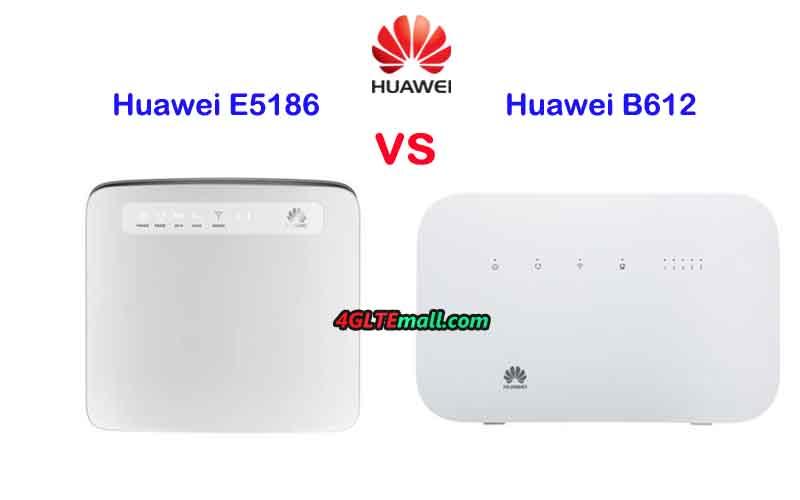
Huawei B612 VS Huawei E5186 Appearance and Interfaces
The front of the two routers are similar, they both have a few indicators for power, mode, WiFi and signal with Huawei Logo on the front. The Huawei E5186 has one more indicator for Voice. One the back, Huawei E5186 router has 3 LAN ports and one LAN/WAN port. It also has two telephone ports and one USB port, but Huawei B612 has only one telephone port and no USB port available. The Huawei B612 router has an angled backrest which makes it stand more stable.
The SIM card slot of Huawei E5186 modem is at the edge side of the device while the Huawei B612 SIM card slot is at the bottom. The Huawei E5186 has the WiFi button and WPS button with the reset hole at the below side of the SIM card slot. The Huawei B612 power button is at the top side with WPS button. They both have two connectors for external antennas. The connector type is SMA and covered by a cap.
Huawei E5186 VS Huawei B612 Specs and Features
The two routers Huawei B612 and E5186 are both in the typical design of Huawei 4G wireless router. Then let’s compare the specifications of Huawei B612 and Huawei E5186 to see more difference:
Model: Huawei B612
Product type: Huawei WiFi Router with Ethernet port
Category: LTE Cat.6
Chipset: HiSilicon LTE Cat6 Chipset
Data rates: DL 300Mbps / UL 50Mbps
Supported 4G LTE frequency bands:
Huawei B612s-25d: B1/B3/B7/B8/B20/B38/B40/B41/B42/B43Huawei B612s-51d: B2/B4/B5/B7/B41
WLAN: 802.11 b/g/n/ac, single-band 2.4GHz
Max support users: 32 users
MIMO: 4 x 4 MIMO
Connector for external antenna: Two, SMA-female jacks
Buy Antenna: Huawei B612 external antenna
App management: Huawei Hilink APP
SIM type: Micro SIM
Battery: NO
Dimensions: 240 × 155 × 78 mm
Interfaces
* 3 x LAN port(RJ45)* 1 x LAN/WAN port (RJ45)* 1 x telephone port(RJ11)* Two external LTE antenna ports (SMA-female)* One micro-SIM card slot* 1 x USB 2.0 port
Datasheet: Huawei B612 Datasheet(PDF)
User Manual: Huawei B612 User Manual(PDF)
Other features: Firewall, CS Voice, VoIP, VoLTE, IPv6/IPv4 dual stack, NAT, DHCP, VPN, DMZ, UPnP, ALG
Reviews: Huawei B612 Review
Price / USD: 199.00USD
--------------------------------------------------------------
Model: Huawei E5186
Product type: LTE WiFi Router
Category: LTE Cat.6
Chipset: HiSilicon LTE Cat6 Chipset
Data rates: DL 300Mbps/UL 50Mbps
Supported 4G LTE frequency bands:
Huawei E5186s-22a: Band 1/3/7/8/20/38
Huawei E5186s-61a: Band 3/7/28/40
WLAN: 802.11a/b/g/n/ac, dual-band 2.4GHz & 5GHz
Max supported users: 64 users
MIMO: 2 x 2 MIMO
Connector for external antenna: Two, SMA-female jacks
Buy Antenna: Huawei E5186 external antenna
App management: Huawei Hilink APP
SIM Size: Micro SIM
Battery: NO
Dimensions: 190 mm × 200 mm × 32 mm
Interfaces:
* 3 x LAN port(45)
* 1 x LAN/WAN port (45)
* 2 x telephone port(RJ11)
* Two external LTE antenna ports (SMA-J1.5)
* One micro-SIM card slot
* 1 x USB 2.0 port
Datasheet: Huawei E5186 Datasheet(PDF)
User Manual: Huawei E5186 User Manual
Other features: Firewall, CS Voice, VoIP, TR069 Remote Management, HTTP Online Upgrade, QoS, USB Share, UPnP, IPV6, DLNA, Fax, Print, VPN
Firmware download: Huawei E5186 firmware
Driver: Huawei E5186 driver
Reviews: Huawei E5186 Review
Price/USD: 169.00USD
Summary
From the specs table, we can see the two Huawei Cat6 routers both could achieve peak download speed up to 300Mbps. They both have two variant models now. The Huawei E5186 supports dual-band WiFi while Huawei B612 supports only a single band on 2.4GHz. Huawei E5186 router could support up to 64 wireless users while Huawei B612 supports up to 32 WiFi users. However, the Huawei B612 supports 4 x 4 MIMO technology while Huawei E5186 supports 2 x 2 MIMO. Except for the interface difference, the MIMO technology should be the key difference.
One more thing we have to mention is that perhaps the Huawei B612 is a latest new model, the price is more expensive, but we suppose the Huawei B612 price would become cheaper soon. If you want to buy a 4G LTE modem router, we think the Huawei E5186 is very good to recommend based on the price/performance ratio.
Oznake: huawei b612

| listopad, 2018 | > | |||||
| P | U | S | Č | P | S | N |
| 1 | 2 | 3 | 4 | 5 | 6 | 7 |
| 8 | 9 | 10 | 11 | 12 | 13 | 14 |
| 15 | 16 | 17 | 18 | 19 | 20 | 21 |
| 22 | 23 | 24 | 25 | 26 | 27 | 28 |
| 29 | 30 | 31 | ||||
Siječanj 2019 (1)
Studeni 2018 (4)
Listopad 2018 (2)
Dnevnik.hr
Gol.hr
Zadovoljna.hr
Novaplus.hr
NovaTV.hr
DomaTV.hr
Mojamini.tv